Migrate from Cloudflare to Azion
A platform migration usually begins long before the first configuration file is changed. It starts when a team notices that its current environment no longer gives the same level of clarity, speed, or control it once did.
Maybe deployments still work, but the process requires too much manual coordination. Maybe the application has grown beyond the original architecture. Maybe the team needs stronger compliance alignment, more predictable runtime behavior, or a more unified way to manage compute, storage, databases, delivery, and security.
For teams currently using Cloudflare Pages, Workers, Workers KV, R2, D1, redirects, custom headers, DNS, WAF, logs, or analytics, Azion provides equivalent capabilities through Applications, Functions, KV Store, Object Storage, SQL Database, Rules Engine, Edge DNS, Web Application Firewall, Real-Time Events, and Real-Time Metrics.
The strongest reason to migrate is not simply to replace one vendor with another. It is to modernize your application platform without restarting your architecture from zero.
How Cloudflare to Azion Migration Works
Traditional platform migrations often require rewriting application logic, reconfiguring infrastructure from scratch, and managing multiple disconnected services. This approach creates operational risk, extends timelines, and fragments team knowledge across different configuration patterns.
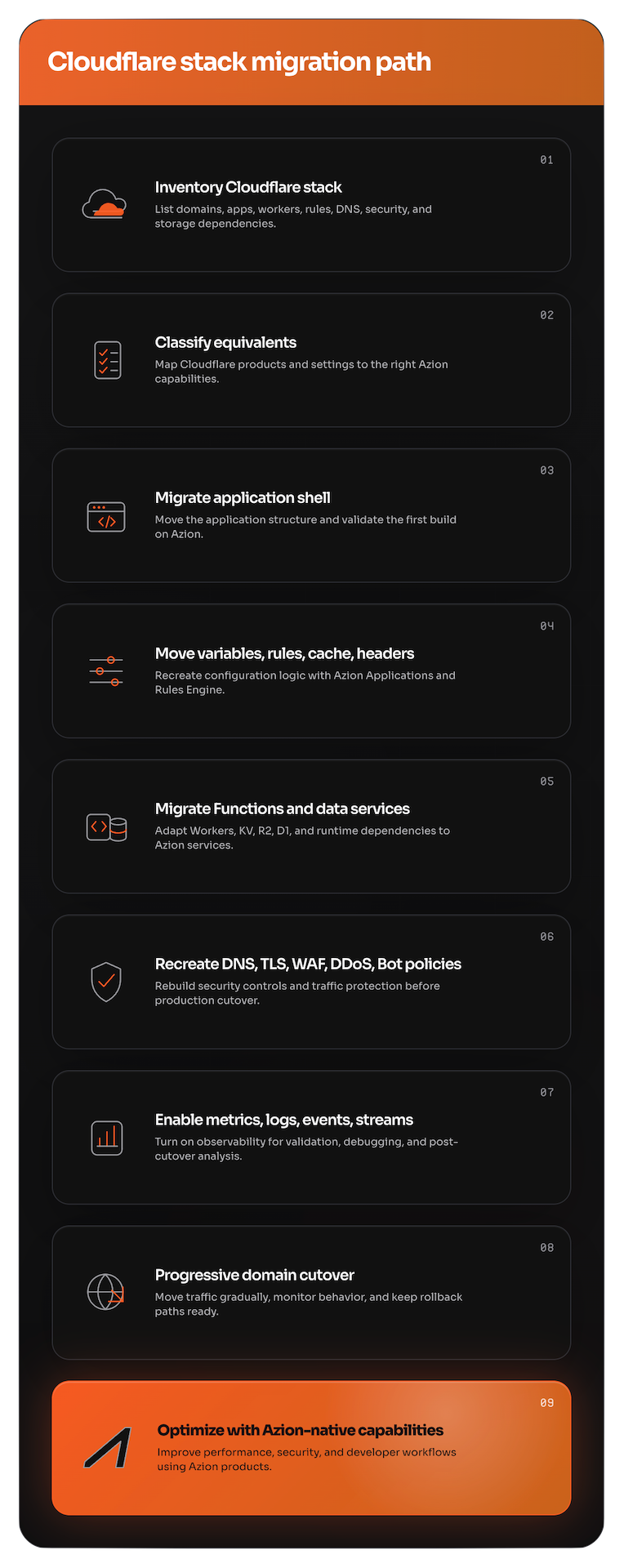
The Azion migration approach preserves your application logic while transitioning to a unified platform:
-
Incremental migration path. Start with a single project, validate each layer independently, and expand with confidence. No need to migrate everything at once.
-
Preserved application logic. Functions, redirects, headers, and data services map directly to Azion equivalents with minimal code changes—primarily syntax updates for environment access and service imports.
-
Unified platform model. Instead of managing compute, storage, databases, security, and observability as disconnected layers, Azion brings these capabilities together with consistent APIs and configuration patterns.
Feature Mapping
The following table provides a comprehensive mapping of Cloudflare products to their Azion equivalents. A dash (-) indicates that Azion does not currently offer a direct equivalent.
| Cloudflare Product | Description | Azion Equivalent Product(s) |
|---|---|---|
| Agents | Build AI-powered agents on Cloudflare’s developer platform. | AI Inference + Functions |
| AI Crawl Control | Analyze and control AI crawler access to your site. | Firewall + Network Shield + Functions |
| AI Gateway | Observe, cache, rate limit, and control AI application traffic. | Functions + Cache + Real-Time Events + Data Stream |
| AI Search | Managed retrieval and search pipelines for AI applications. | SQL Database + AI Inference |
| Analytics | Analytics products and observability across Cloudflare services. | Real-Time Metrics + Real-Time Events + Data Stream + Edge Pulse |
| API Shield | Protect APIs with discovery, schema validation, mTLS, and controls. | Firewall + Web Application Firewall + Network Shield + Certificate Manager |
| Bots | Detect, manage, and mitigate automated/bot traffic. | Bot Manager + Bot Manager Lite |
| Cache | Configure Cloudflare CDN caching behavior. | Cache + Tiered Cache |
| Cloudflare for Platforms | Build platforms on top of Cloudflare services. | Console Kit + Azion API + Marketplace |
| Cloudflare Images | Store, resize, optimize, and deliver images. | Image Processor |
| Cloudflare Network Firewall | Firewall-as-a-service for network traffic. | Firewall + Network Shield |
| D1 | Serverless SQL database built on SQLite. | SQL Database |
| DDoS Protection | Protect applications and networks from DDoS attacks. | DDoS Protection + DDoS Mitigation |
| Digital Experience Monitoring | Monitor user, device, network, and application experience. | Edge Pulse + Real-Time Metrics |
| DNS | Authoritative DNS management and DNS security. | Edge DNS |
| Dynamic Workers | Spin up isolated Workers on demand for code execution. | Functions |
| KV | Global, low-latency key-value storage. | KV Store |
| Load Balancing | Distribute traffic across origins with health checks and steering. | Load Balancer + Edge DNS |
| Logs | Export, query, and manage Cloudflare logs. | Real-Time Events + Data Stream |
| Origin Rules | Rewrite origin settings and route requests to origins. | Applications + Load Balancer |
| Pages | Deploy frontend and full-stack applications. | Applications + Azion CLI |
| R2 | S3-compatible object storage with no egress fees. | Object Storage |
| Rate limiting | Protect applications by limiting request rates. | Firewall + Functions |
| Rules | Ruleset engine for request, routing, cache, transform, and security logic. | Applications + Firewall + Functions |
| Secrets Store | Manage secrets for Cloudflare developer workloads. | Variables |
| Smart Shield | Shield and optimize origin access patterns. | Cache + Tiered Cache + Application Accelerator |
| SSL/TLS | Manage certificates, encryption modes, and TLS settings. | Certificate Manager + Edge DNS |
| Terraform | Manage Cloudflare resources with Terraform. | Terraform Provider |
| Transform Rules | Modify requests and responses at Cloudflare’s edge. | Applications + Rules Engine + Functions |
| Vectorize | Vector database for embeddings and semantic search. | SQL Database |
| WAF | Web Application Firewall rules and protections. | Web Application Firewall |
| Workers | Serverless compute on Cloudflare’s global network. | Functions |
| Workers AI | Run AI inference on Cloudflare’s GPU-backed infrastructure. | AI Inference |
¹ Orchestrator includes Edge Services and Edge Node as integrated modules for orchestrating containerized workloads on private edge infrastructure.
² Functions can be instantiated within Firewall to transform requests and responses at the edge.
Migration Strategy
The migration is organized around Azion’s four product categories, allowing teams to plan and execute each layer independently:
- Build: deploy applications, configure builds and environment variables, migrate Functions, routing, headers, load balancing, cache, image optimization, and AI workloads.
- Secure: migrate custom domains, DNS, SSL/TLS certificates, WAF, DDoS protection, bot management, and rate limiting.
- Store: migrate key-value data, object storage, and SQL databases.
- Observe: migrate analytics, metrics, and logs to Azion’s real-time observability stack.
Build
The Build category covers application deployment, compute, routing, and configuration. Start here to bring your application onto Azion and establish the foundation for the rest of the migration.
1. Project Setup on Azion
The first step brings your application into Azion in a way that feels familiar to teams that deploy modern web projects. If you have used Cloudflare Pages, you already understand the pattern: connect a repository, define framework settings, run a build, deploy the output, and validate the generated URL.
Azion follows a similar workflow but with a broader platform context. Your project becomes part of an environment where application delivery, Functions, rules, security, and observability can be managed together.
Key Differences
| Aspect | Cloudflare | Azion |
|---|---|---|
| Config file | wrangler.toml (TOML) | azion.config.js (JavaScript) |
| Framework detection | 15+ frameworks | 20+ frameworks with auto-detection |
| Cold starts | Possible | Minimized |
| Compliance | SOC 2, ISO 27001 | PCI DSS 4.0.1 Level 1, SOC 2 Type II |
Connect Your Repository
- Open Azion Console.
- Click + Create > Import from GitHub.
- Authorize the Azion GitHub App.
- Select the repository you want to migrate.
Configure Your Build
Azion auto-detects your framework and configures build settings. Override the detected preset in azion.config.js:
import { defineConfig } from 'azion'
export default defineConfig({name: 'my-project',preset: 'nextjs', // Override auto-detection if needed})
Deploy and Verify
Deploy from the Azion Console or CLI. Your temporary Azion URL follows this pattern:
https://xxxxxxxxxx.map.azionedge.net/Validate the deployment:
curl https://xxxxxxxxxx.map.azionedge.net/Reference documentation
2. Converting Build Configuration
A migration can appear successful when the build passes but fail later when runtime behavior differs. Review build and deployment configuration carefully instead of treating it as a mechanical command replacement.
CLI Quick Reference
| Task | Cloudflare | Azion |
|---|---|---|
| Install | npm i -D wrangler@latest | curl -fsSL https://cli.azion.app/install.sh | bash |
| Login | npx wrangler login | azion login |
| Local dev | npx wrangler pages dev ./dist | azion dev |
| Deploy | npx wrangler pages deploy ./dist | azion deploy |
Reference documentation
3. Migrating Environment Variables
Environment variables contain API keys, database credentials, authentication secrets, service endpoints, feature flags, and environment-specific configuration. Migrating them incorrectly causes runtime failures even when deployment succeeds.
Key Differences
| Aspect | Cloudflare | Azion |
|---|---|---|
| Access | env.VARIABLE | Azion.env.get('VARIABLE') |
| Parameters | fetch(request, env, ctx) | fetch(request) |
Evaluate Your Variables
Before changing code, identify every variable in:
- Cloudflare Pages: Dashboard > Settings > Environment variables
- Cloudflare Workers:
wrangler.toml - CLI-managed secrets
- CI/CD environment settings
- Runtime configuration in source code
Create Variables in Azion
- Access Azion Console.
- Navigate to Build > Variables.
- Click Add Variable.
- Enter the variable name and value.
- Click Save.
curl -X POST 'https://api.azionapi.net/variables' --header 'Accept: application/json; version=3' --header 'Authorization: Token [TOKEN VALUE]' --header 'Content-Type: application/json' --data '{"key": "key-test","value": "value-test"}'Update Your Code
// Before: Cloudflareconst apiKey = env.API_KEY;
// After: Azionconst apiKey = Azion.env.get('API_KEY');Reference documentation
4. Migrating Rewrite and Redirect URLs
Redirects protect years of SEO value, campaign links, backlinks, bookmarks, and user expectations. When redirects break, the impact shows up as lost traffic, lower rankings, and poor user experience.
Key Differences
| Aspect | Cloudflare | Azion |
|---|---|---|
| Configuration | _redirects file | Rules Engine (Console or API) |
| Pattern matching | Glob patterns (/*) | Regex (^/.*$) |
| Capture groups | :splat, :placeholder | %{capture[1]}, %{capture[2]} |
Pattern Conversion
| Cloudflare Pattern | Azion Regex |
|---|---|
/old-page | ^/old-page$ |
/blog/* | ^/blog/(.*)$ |
:splat | %{capture[1]} |
Create Redirect Rules
Navigate to Rules Engine and configure:
Criteria:
${uri} matches ^/old-blog/(.*)$Behavior:
Redirect To (301): /blog/%{capture[1]}Verify Redirects
curl -I https://yourdomain.com/old-blog/postReference documentation
5. Migrating Custom Headers
HTTP headers control caching, security, and browser behavior. Azion gives teams a more flexible model through azion.config.js and Rules Engine, allowing rules that respond to request characteristics.
Key Differences
| Aspect | Cloudflare | Azion |
|---|---|---|
| Config file | _headers (text) | azion.config.js (JavaScript) |
| Phases | Response only | Request and response |
| Dynamic values | Not supported | ${uri}, ${host}, ${geoip_city_country_code} |
Example: Security Headers
import type { AzionConfig } from 'azion/config';
const config: AzionConfig = {applications: [{  name: 'my-app',  rules: {    response: [{      name: 'Security Headers',      active: true,      criteria: [{        variable: 'uri',        conditional: 'if',        operator: 'starts_with',        argument: '/'      }],      behavior: {        addResponseHeader: [          'X-Frame-Options: SAMEORIGIN',          'X-Content-Type-Options: nosniff'        ]      }    }]  }}]};
export default config;
Reference documentation
6. Migrating Workers to Functions
Functions are the computational engine of modern distributed applications. They often contain the most business-critical logic: authentication, personalization, API orchestration, and integrations with third-party systems.
Key Differences
| Aspect | Cloudflare Workers | Azion Functions |
|---|---|---|
| Function signature | fetch(request, env, ctx) | fetch(request, env, ctx) |
| Environment access | env.VARIABLE | Azion.env.get('VARIABLE') |
| Memory | 128 MB (all plans) | 512 MB (all plans) |
| Cold starts | Possible | Possible (minimized with node distribution) |
Update Function Signature
// Before: Cloudflareexport default {async fetch(request, env, ctx) {  const apiKey = env.API_KEY;  return fetch(apiUrl, { headers: { 'Authorization': `Bearer ${apiKey}` }});}};
// After: Azionexport default {async fetch(request, env, ctx) {  const apiKey = Azion.env.get('API_KEY');  return fetch(apiUrl, { headers: { 'Authorization': `Bearer ${apiKey}` }});}};
Update Geo Metadata
// Before: Cloudflareconst country = request.cf.country;
// After: Azionconst country = request.metadata['geoip_country_code'];
Update Service Imports
Azion provides two SQL interfaces:
- Runtime API (
azion:sql) — for querying databases from Functions - Azion Lib SDK (
azion/sql) — for managing databases via API (build tools, scripts)
import { Database } from 'azion:sql';
// Open connection (async)const db = await Database.open('my-database');
// Query and iterate resultsconst rows = await db.query('SELECT * FROM users');let row = await rows.next();while (row) {const name = row.getString(0); // access column by indexconsole.log(name);row = await rows.next();}
Reference documentation
- Functions
- Functions Instances
- Runtime APIs
- JavaScript Runtime APIs reference
- SQL Database API (Runtime)
- Azion Lib SQL (SDK)
7. Migrating Load Balancing
Load balancing distributes traffic across multiple origins for high availability and performance. Azion Load Balancer provides health checks, steering policies, and origin failover.
Key Differences
| Aspect | Cloudflare Load Balancing | Azion Load Balancer |
|---|---|---|
| Health checks | HTTP, HTTPS, TCP | HTTP, HTTPS, TCP |
| Steering policies | Round-robin, Least connections, Random, Geo | Round-robin, Least connections, Geo |
| Failover | Active-passive, Active-active | Active-passive, Active-active |
| Session affinity | Cookie, IP hash | Cookie, IP hash |
| Origins per pool | Multiple origins | Multiple origins |
Configuration Steps
- Access Azion Console.
- Go to Products menu > Load Balancer.
- Create an Connector for each origin server.
- Configure health checks for each origin.
- Create a Load Balancer instance.
- Add origins to the load balancer pool.
- Configure steering policy (round-robin, geo, etc.).
- Set origin weights if using weighted distribution.
- Enable session affinity if needed.
# Create a Connector (origin) with load balancing configured at the address levelcurl -X POST 'https://api.azionapi.net/v4/workspace/connectors' --header 'Authorization: Token YOUR_TOKEN' --header 'Content-Type: application/json' --data '{ "name": "Origin-US-East", "type": "http", "attributes": { "addresses": [ { "address": "origin1.example.com", "active": true, "modules": { "load_balancer": { "weight": 3 } } }, { "address": "origin2.example.com", "active": true, "modules": { "load_balancer": { "weight": 1 } } } ] }}'Load Balancer Module Configuration
// Load balancer settings within address modules{"weight": 3, // Relative weight for weighted distribution"method": "round_robin", // Options: "round_robin", "least_conn", "ip_hash""max_retries": 3, // Maximum retry attempts"connection_timeout": 10, // Connection timeout in seconds"read_write_timeout": 30 // Read/write timeout in seconds}Reference documentation
8. Migrating Cache Configuration
Caching configuration determines how content is stored and served from distributed locations. Azion Cache provides fine-grained control over cache behavior with Tiered Cache support.
Key Differences
| Aspect | Cloudflare Cache | Azion Cache |
|---|---|---|
| Cache levels | Regional Tiered Cache + Smart Tiered Cache + Edge + Browser | Cache + Tiered Cache + Browser |
| Cache key | Customizable | Customizable via Rules Engine |
| Purge | URL, Tag, Host, Prefix | URL, Cache Key, Wildcard |
| Stale content | Stale-while-revalidate | Stale-while-revalidate |
| TTL limits | Per-page rules | Per-rule configuration |
Cache Settings Migration
- Access Azion Console.
- Edit your Application.
- Navigate to Cache Settings.
- Configure default cache TTL.
- Enable Tiered Cache for improved hit ratio.
- Add custom cache rules via Rules Engine.
# Update cache settings for a specific cache setting within an applicationcurl -X PATCH 'https://api.azion.com/v4/workspace/applications/{application_id}/cache_settings/{cache_setting_id}' --header 'Authorization: Token YOUR_TOKEN' --header 'Content-Type: application/json' --data '{ "name": "my-cache-setting", "browser_cache": { "ttl": 3600 }, "modules": { "cache": { "ttl": 86400 }, "tiered_cache": { "enabled": true } }}'Tiered Cache
Enable Tiered Cache to improve cache hit ratio:
// Tiered cache is configured within cache settings modules{"name": "my-cache-setting","modules": { "tiered_cache": { "enabled": true }}}Cache Key Customization
Cache key customization uses Advanced Cache Key in Cache Settings combined with Adaptive Delivery for device-based variations:
Example: Vary cache by device group
- In Cache Settings, enable Adaptive Delivery
- Select “Content varies by some Device Groups (Whitelist)“
- Choose device groups (e.g., Mobile, Desktop)
- Apply via Rules Engine:
Criteria: ${uri} starts with /images/Behavior: Set Cache Policy → [cache-setting-name]Cache Purge
# Purge by URLcurl -X POST 'https://api.azion.com/v4/workspace/purge/url' --header 'Authorization: Token YOUR_TOKEN' --header 'Content-Type: application/json' --data '{  "items": [    "https://example.com/image.jpg",    "https://example.com/styles.css"  ],  "layer": "cache"}'
# Purge by wildcardcurl -X POST 'https://api.azion.com/v4/workspace/purge/wildcard' --header 'Authorization: Token YOUR_TOKEN' --header 'Content-Type: application/json' --data '{ "items": ["https://example.com/images/*"], "layer": "cache"}'Reference documentation
9. Migrating Image Optimization
Image optimization reduces image file sizes while maintaining visual quality. Azion Image Processor transforms, optimizes, and delivers images from distributed node locations.
Key Differences
| Aspect | Cloudflare Images | Azion Image Processor |
|---|---|---|
| Storage | Built-in storage | Object Storage integration |
| Transformations | Resize, format, quality | Resize, format, quality, crop, rotate |
| URL format | /cdn-cgi/image/<OPTIONS>/<SOURCE-IMAGE> | /image.png?ims=<OPTIONS> |
| Format support | WebP, AVIF | WebP, AVIF, JPEG, PNG |
| Signed URLs | Supported | Supported via Secure Token |
Configuration Steps
- Access Azion Console.
- Edit your Application.
- Navigate to Image Processor settings.
- Enable Image Processor.
- Configure default quality and format settings.
- Set up Object Storage as image source (optional).
# Enable Image Processor within application modulescurl -X PATCH 'https://api.azionapi.net/v4/workspace/applications/{application_id}' --header 'Authorization: Token YOUR_TOKEN' --header 'Content-Type: application/json' --data '{ "modules": { "image_processor": { "enabled": true } }}'URL Format
Transform images via query string parameters:
# Cloudflare formathttps://example.com/cdn-cgi/image/width=400,quality=85/image.jpg
# Azion formathttps://example.com/image.jpg?ims=400x400
Transformation Parameters
Azion Image Processor uses the ims query parameter for transformations:
| Syntax | Description | Example |
|---|---|---|
?ims=WxH | Resize to width x height | ?ims=400x300 |
?ims=Wx | Resize to width (auto height) | ?ims=400x |
?ims=xH | Resize to height (auto width) | ?ims=x300 |
?ims=WxH:fill | Crop to exact dimensions | ?ims=400x300:fill |
?ims=WxH:fit | Fit within dimensions | ?ims=400x300:fit |
Reference documentation
10. Migrating AI Workloads (Workers AI to AI Inference)
AI inference enables low-latency AI-powered features in applications. Azion AI Inference provides GPU-backed inference for text and visual models, allowing you to run AI workloads close to your users.
Key Differences
| Aspect | Cloudflare Workers AI | Azion AI Inference |
|---|---|---|
| Model hosting | Cloudflare-hosted models | Custom model deployment |
| Inference API | REST API | REST API + Functions |
| Model types | Text generation, image, speech | Custom models, LLMs |
| GPU support | Shared GPU | Dedicated GPU instances |
Using AI Inference
- Access Azion Console.
- Go to AI Inference (via Marketplace or Functions).
- Deploy a model or use pre-built templates.
- Configure inference endpoint.
- Integrate with your application via Functions.
// AI inference in Functionsexport default {async fetch(request) { const response = await fetch('https://ai-inference.example.com/v1/predict', { method: 'POST', headers: { 'Content-Type': 'application/json', 'Authorization': `Bearer ${Azion.env.get('AI_API_KEY')}` }, body: JSON.stringify({ model: 'text-generation', prompt: await request.text() }) }); return response;}};AI Starter Kit
Use the AI Inference Starter Kit template:
# Deploy via CLIazion deploy --template ai-inference-starter-kitReference documentation
Secure
The Secure category covers domains, DNS, certificates, firewall rules, and protection against malicious traffic. Plan these migrations as controlled cutovers, since they affect how users reach your application and how it is protected in production.
1. Migrating Custom Domains
Custom domain migration is one of the most sensitive parts of any platform transition. It affects users, SEO, brand trust, and production availability. Plan domain migration as a controlled cutover, not a last-minute DNS change.
Migration Strategies
| Strategy | Best For | DNS Control |
|---|---|---|
| CNAME | Quick subdomain migration | Keep your DNS provider |
| Nameserver | Full DNS control and apex domains | Transfer DNS to Azion |
Create the Certificate
Create your SSL/TLS certificate before pointing your domain to Azion. This ensures users can access the application securely over HTTPS when the domain starts resolving to the new infrastructure.
Azion provides free Let’s Encrypt certificates with automatic renewal.
Configure the Domain
Create a workload in Azion Console and associate your custom domain. See Workloads Documentation.
Point the Domain to Azion
Point the subdomain to the Azion-generated domain:
www CNAME xxxxxxxxxx.map.azionedge.netThis keeps your current DNS provider while routing traffic through Azion.
Configure your domain to use Azion DNS nameservers:
ns1.aziondns.netns2.aziondns.comns3.aziondns.orgThis gives Azion full DNS control, required for apex domains.
Verify Propagation
dig www.yourdomain.com CNAME +shortReference documentation
2. Migrating DNS to Edge DNS
DNS configuration is foundational to application delivery. Migrating DNS requires careful planning to avoid downtime during the nameserver switch.
Key Differences
| Aspect | Cloudflare DNS | Azion Edge DNS |
|---|---|---|
| Nameservers | Assigned per zone | ns1.aziondns.net, ns2.aziondns.com, ns3.aziondns.org |
| Record types | A, AAAA, CNAME, MX, TXT, SRV, NS, etc. | A, AAAA, CNAME, MX, TXT, SRV, NS, CAA, PTR |
| DNSSEC | Supported | Supported |
| API | REST API | REST API v4 |
| Anycast | Global Anycast | Global Anycast |
Migration Steps
- Access Azion Console.
- Go to Products menu > Edge DNS.
- Click + Zone to create a new DNS zone.
- Enter your domain name.
- Add DNS records matching your Cloudflare configuration.
- Note the Azion nameservers assigned to your zone.
- Update nameservers at your domain registrar.
# Create a DNS zonecurl -X POST 'https://api.azionapi.net/v4/workspace/dns/zones' --header 'Authorization: Token YOUR_TOKEN' --header 'Content-Type: application/json' --data '{  "name": "my-zone",  "domain": "example.com",  "active": true}'
# Add DNS recordscurl -X POST 'https://api.azionapi.net/v4/workspace/dns/zones/{zone_id}/records' --header 'Authorization: Token YOUR_TOKEN' --header 'Content-Type: application/json' --data '{ "record_type": "A", "entry": "www", "ttl": 3600, "rdata": ["192.168.1.1"]}'Record Type Mapping
| Cloudflare Record | Azion Edge DNS | Notes |
|---|---|---|
| A | A | Direct IP mapping |
| AAAA | AAAA | IPv6 address |
| CNAME | CNAME | Alias to another domain |
| MX | MX | Mail exchange (include priority) |
| TXT | TXT | Text records (SPF, DKIM) |
| SRV | SRV | Service records |
| CAA | CAA | Certificate Authority Authorization |
| NS | NS | Nameserver delegation |
DNSSEC Configuration
To enable DNSSEC:
- Navigate to your zone in Edge DNS.
- Go to DNSSEC tab.
- Enable DNSSEC.
- Copy the DS record to your registrar.
# Verify DNSSECdig example.com DNSSEC +dnssecVerify Propagation
# Check nameserver propagationdig example.com NS +short
# Check specific recorddig www.example.com A +short
# Check from specific DNS serverdig @ns1.aziondns.net example.com A
Reference documentation
3. Migrating SSL/TLS to Certificate Manager
SSL/TLS certificates ensure secure communication between clients and your application. Azion provides automatic certificate provisioning and supports custom certificates.
Key Differences
| Area | Cloudflare SSL/TLS | Azion Certificate Manager |
|---|---|---|
| Product scope | Broader SSL/TLS suite covering edge certificates, origin certificates, encryption modes, mTLS, custom TLS settings, and related controls. | Focused on managing TLS certificates and associating them with Azion Domains or Workloads. |
| Main certificate options | Universal SSL, Advanced certificates, and Custom certificates. | Azion SAN, Custom certificate, Let’s Encrypt certificate, and Trusted CA for mTLS. |
| Default managed certificate | Universal SSL automatically covers the apex domain and first-level subdomains. | Let’s Encrypt is the main managed option for customer-owned custom domains. Azion SAN applies to Azion-provided azionedge.net addresses. |
| Advanced managed certificates | Advanced certificates allow more control, such as CA, hostnames, and validity period. | Azion does not position an equivalent “Advanced Certificate Manager” layer in the same way; use Let’s Encrypt for managed DV or Custom certificate for full control. |
| Custom certificates | Supported for customers who want their own certificate, CA control, OV, or EV. Customer handles issuance and renewal. | Supported by uploading a TLS certificate and private key. Azion accepts single-domain or SAN certificates. |
| Validation | Cloudflare uses Domain Control Validation; with Cloudflare DNS it can happen automatically, while external DNS may require manual DCV. | Let’s Encrypt validation supports DNS-01 and HTTP-01 challenges. |
| Renewal | Universal SSL and Advanced certificates are managed by Cloudflare; uploaded Custom certificates are not renewed by Cloudflare. | Let’s Encrypt certificates are automatically renewed by Azion before expiration; custom certificates depend on the customer lifecycle. |
| Origin encryption model | Cloudflare explicitly manages the visitor-to-Cloudflare and Cloudflare-to-origin model through SSL/TLS encryption modes such as Full and Full Strict. | Azion Certificate Manager focuses on certificates for HTTPS traffic on Azion; origin/TLS behavior is configured through the broader application/workload setup, not as a Cloudflare-style SSL mode model. |
| Origin CA | Cloudflare has Origin CA certificates for encrypting traffic between Cloudflare and the origin when traffic is proxied through Cloudflare. | No direct equivalent should be described as “Origin CA”; use custom certificates or origin/application configuration depending on the architecture. |
| mTLS | Cloudflare supports client certificates and BYOCA for mTLS, plus Authenticated Origin Pulls for Cloudflare-to-origin authentication. | Azion supports mTLS through Trusted CA certificates; Azion SAN certificates do not support mTLS. |
Automatic Certificate Provisioning
Azion automatically provisions Let’s Encrypt certificates for custom domains:
- Access Azion Console.
- Create or edit a Workload.
- Add your custom domain.
- Azion automatically provisions a Let’s Encrypt certificate.
- Verify domain ownership (if required).
- Wait for certificate activation (typically 5-15 minutes).
# Create a workload with TLS configuration# First, create a certificate via Certificate Manager, then reference it by IDcurl -X POST 'https://api.azionapi.net/v4/workspace/workloads' --header 'Authorization: Token YOUR_TOKEN' --header 'Content-Type: application/json' --data '{ "name": "my-workload", "domains": ["www.example.com"], "tls": { "certificate": 12345, "minimum_version": "tls12", "ciphers": 1 }, "active": true, "infrastructure": 1}'Custom Certificate Upload
For organizations with existing certificates:
- Go to Products menu > Certificate Manager.
- Click + Certificate.
- Select Custom Certificate.
- Upload your certificate (PEM format).
- Upload your private key.
- Upload intermediate CA chain (if applicable).
- Associate the certificate with your workload.
# Upload custom certificatecurl -X POST 'https://api.azionapi.net/v4/workspace/tls/certificates' --header 'Authorization: Token YOUR_TOKEN' --header 'Content-Type: application/json' --data '{ "name": "my-custom-cert", "certificate": "-----BEGIN CERTIFICATE-----...-----END CERTIFICATE-----", "private_key": "-----BEGIN PRIVATE KEY-----...-----END PRIVATE KEY-----"}'mTLS Configuration
For mutual TLS authentication:
- Navigate to Certificate Manager.
- Upload your CA certificate as a Trusted CA.
- Configure your workload to require client certificates.
- See the mTLS configuration guide for detailed steps.
Reference documentation
4. Migrating WAF to Web Application Firewall
Web Application Firewall protects applications from malicious traffic, SQL injection, cross-site scripting (XSS), and other application-layer attacks. Migrating WAF rules requires careful mapping of rule logic and understanding differences in rule construction.
Key Differences
| Aspect | Cloudflare WAF | Azion WAF |
|---|---|---|
| Rule language | Expression language | Rules Engine criteria |
| Managed rulesets | Cloudflare-managed rules | Azion-managed rulesets |
| Custom rules | Firewall Rules | Rules Engine for Firewall |
| OWASP coverage | OWASP Core Rule Set | OWASP Top 10 coverage |
| Mode options | Block, Challenge, Log | Learning, Blocking |
Migration Steps
- Access Azion Console.
- Go to Products menu > Firewall.
- Select or create a Firewall instance.
- Navigate to WAF tab.
- Enable desired managed rulesets (SQL Injection, XSS, etc.).
- Configure sensitivity level per ruleset.
- Create custom rules in Rules Engine tab.
- Associate the Firewall with your application.
# Create a WAF instancecurl -X POST 'https://api.azion.com/v4/workspace/wafs' --header 'Accept: application/json' --header 'Authorization: Token [TOKEN]' --header 'Content-Type: application/json' --data '{ "active": true, "name": "My WAF", "product_version": "1.0", "engine_settings": { "engine_version": "2021-Q3", "type": "score", "attributes": { "rulesets": [1], "thresholds": [ { "threat": "sql_injection", "sensitivity": "medium" } ] } }}'Rule Migration Example
Convert Cloudflare firewall rule to Azion Rules Engine:
Cloudflare expression:
(http.request.uri.path contains "/admin" and not ip.src in {10.0.0.0/8})Azion criteria:
Variable: ${uri}Operator: matchesArgument: /admin
AND
Variable: ${remote_addr}Operator: does not matchArgument: 10.0.0.0/8Reference documentation
5. Migrating DDoS Protection
DDoS protection guards against volumetric attacks, protocol attacks, and application layer attacks. Azion provides automatic DDoS mitigation with no configuration required for most attack types.
Key Differences
| Aspect | Cloudflare DDoS | Azion DDoS Protection |
|---|---|---|
| Activation | Automatic | Automatic |
| Layer coverage | L3, L4, L7 | L3, L4, L7 |
| Billing | Unmetered (standard) | Unmetered |
| Customization | Managed rules + custom | Managed rules + Rules Engine |
Automatic Protection
Azion DDoS Protection activates automatically for all applications. No manual configuration is required for standard protection against:
- Volumetric attacks (UDP floods, ICMP floods)
- Protocol attacks (SYN floods, packet fragmentation)
- Application layer attacks (HTTP floods, slowloris)
Advanced Configuration
For applications requiring specific DDoS policies:
- Access Azion Console.
- Go to Products menu > Firewall.
- Select your Firewall instance.
- Navigate to DDoS Protection tab.
- Configure threshold settings.
- Enable/disable specific mitigation rules.
- Set up alert notifications.
# DDoS protection is configured as a module within Firewall# Update the Firewall with DDoS module settingscurl -X PATCH 'https://api.azion.com/v4/workspace/firewalls/{firewall_id}' --header 'Authorization: Token YOUR_TOKEN' --header 'Content-Type: application/json' --data '{ "modules": { "ddos_protection": { "enabled": true, "sensitivity": "high" } }}'Network Shield
For network-layer protection, use Azion Network Shield:
- Provides L3/L4 DDoS protection
- Works with Edge DNS for traffic filtering
- Integrates with Firewall for unified security
Reference documentation
6. Migrating Bot Management
Bot management protects applications from automated threats while allowing legitimate bots. Azion Bot Manager provides detection, challenge, and mitigation capabilities.
Key Differences
| Aspect | Cloudflare Bots | Azion Bot Manager |
|---|---|---|
| Detection | Machine learning, heuristics, fingerprinting, JavaScript Detections | Machine learning, behavioral analysis, fingerprinting, Reputation Intelligence |
| Challenge | JavaScript Detections, Managed Challenge, Turnstile | JavaScript injection (fingerprinting), ALTCHA (via redirect) |
| Actions | Allow, Managed Challenge, Block | Allow, Deny, Drop, Redirect, Custom HTML, Random Delay, Hold Connection |
| Lite version | Bot Fight Mode | Bot Manager Lite (Marketplace) |
Bot Manager Lite (Marketplace)
For basic bot protection, install Bot Manager Lite from Azion Marketplace:
- Access Azion Console.
- Go to Marketplace.
- Search for Bot Manager Lite.
- Click Install.
- Configure detection sensitivity.
- Set up response actions (challenge, block).
- Associate with your Firewall instance.
Bot Manager Lite provides:
- Score-based bot detection with configurable threshold
- Multiple response actions (deny, drop, redirect, custom HTML)
- IP reputation validation via network lists
- Adjustable tolerance levels (soft, medium, hard)
Custom Bot Rules
Create custom rules to handle specific bots:
Criteria: ${user_agent} contains "BadBot"Behavior: Deny (403)
Criteria: ${user_agent} contains "Googlebot"Behavior: Allow
Verification
# Test bot detectioncurl -A "BadBot/1.0" https://yourdomain.com/# Expected: 403 Forbidden or challenge page
curl -A "Mozilla/5.0" https://yourdomain.com/# Expected: Normal response
Reference documentation
7. Migrating Rate Limiting
Rate limiting protects applications from abuse by limiting request rates per client. Azion provides rate limiting through Firewall rules and Functions.
Key Differences
| Aspect | Cloudflare Rate Limiting | Azion Rate Limiting |
|---|---|---|
| Configuration | Dedicated rate limiting rules | Firewall rules + Functions |
| Granularity | Path, method, country | Path, method, IP, custom |
| Actions | Block, Challenge, Log | Block, Log |
| Window | 10 seconds to 1 hour | Customizable |
Firewall-Based Rate Limiting
Configure rate limiting in Firewall Rules Engine:
- Access Azion Console.
- Go to Firewall > Rules Engine.
- Create a new rule.
- Set criteria (path, method, etc.).
- Add Rate Limit behavior.
- Configure requests per second/minute.
- Set action (Block, Log).
# Create rate limiting rulecurl -X POST 'https://api.azionapi.net/v4/workspace/firewalls/{firewall_id}/request_rules' --header 'Authorization: Token YOUR_TOKEN' --header 'Content-Type: application/json' --data '{ "name": "Rate Limit API", "criteria": [[{"variable": "${uri}", "operator": "starts_with", "argument": "/api/"}]], "behaviors": [ {"type": "rate_limit", "attributes": {"rps": 100, "window": 60, "action": "block"}} ]}'Reference documentation
Store
The Store category covers data services. Migrate key-value, object, and SQL data with attention to consistency, access patterns, and application compatibility.
1. Migrating Workers KV with KV Store
Key-value storage is used for fast access to configuration, user preferences, session metadata, feature flags, and personalization data. The migration should preserve data consistency and application compatibility.
API Comparison
// Before: Cloudflareawait env.MY_KV_NAMESPACE.put('key1', 'value1');const value = await env.MY_KV_NAMESPACE.get('key1');
// After: Azionimport { KVStore } from 'azion:kv';
const kv = new KVStore('my-store');await kv.put('key1', 'value1');const value = await kv.get('key1');
Export and Import
Export existing KV data through Cloudflare’s API. Before importing, review:
- Key naming conventions and prefixes
- Expiration logic
- Value formats and serialized object structure
- Missing-key and default value behavior
Reference documentation
2. Migrating R2 with Object Storage
Object storage powers files that matter to users and business operations: images, documents, static assets, media files, uploads, and generated content.
Key Differences
| Aspect | Cloudflare R2 | Azion Object Storage |
|---|---|---|
| Endpoint | <ACCOUNT_ID>.r2.cloudflarestorage.com | s3.us-east-005.azionstorage.net |
| Region | auto | us-east-005 |
| Data transfer out | Free | Zero cost |
Update Configuration
import { S3Client } from '@aws-sdk/client-s3';
const client = new S3Client({region: 'us-east-005',endpoint: 'https://s3.us-east-005.azionstorage.net',credentials: {  accessKeyId: Azion.env.get('AZION_ACCESS_KEY'),  secretAccessKey: Azion.env.get('AZION_SECRET_KEY')}});
Migrate Data with s3cmd
s3cmd is a command-line tool for managing S3-compatible storage services. It’s an effective option for migrating data from Cloudflare R2 to Azion Object Storage.
- Install
s3cmdand runs3cmd --configureto set up your Azion credentials:
- Access Key / Secret Key: Enter the keys generated for Azion Object Storage.
- Default Region:
us-east-005(s3cmd also acceptsus-eastfor interactive configuration). - S3 Endpoint:
s3.us-east-005.azionstorage.net. - DNS template:
%(bucket).s3.us-east-005.azionstorage.net. - Use HTTPS protocol:
true.
- Use the following commands to migrate your data:
| Command | Description |
|---|---|
s3cmd ls | Lists all buckets. |
s3cmd put file.png s3://my-bucket/ | Uploads an object. |
s3cmd get s3://my-bucket/file.png | Downloads an object. |
s3cmd sync s3://source-bucket/ s3://dest-bucket/ | Syncs between buckets. |
Reference documentation
- Object Storage
- How to access Object Storage using the S3 protocol
- Create and modify a bucket
- Upload and download objects
- Use a bucket as origin
- Storage library reference
3. Migrating D1 with SQL Database
Database migration touches the core of application state. Azion SQL Database is SQLite-compatible, ACID-compliant, and uses a distributed Main/Replicas architecture.
Key Differences
| Aspect | Cloudflare D1 | Azion SQL Database |
|---|---|---|
| Connection | env.DB binding | new Database('name') |
| SQL dialect | SQLite | SQLite |
| Vector search | Supported | Supported |
Update Your Code
// Before: Cloudflareconst result = await env.DB.prepare('SELECT * FROM users WHERE id = ?').bind(1).first();
// After: Azionimport { Database } from 'azion:sql';
const db = new Database('my-database');const result = await db.prepare('SELECT * FROM users WHERE id = ?').bind(1).first();
Export and Import
# Export from D1wrangler d1 export my-db --output=dump.sql
# Import to Azion (via SQL Shell CLI or migration workflow)
Reference documentation
- SQL Database
- Vector Search
- Create a database
- Install SQL Shell
- SQL Database Shell commands
- Import data into SQL Database
Observe
The Observe category covers analytics, metrics, and logs. Migrating observability ensures you keep production visibility, troubleshooting capabilities, and compliance reporting after the cutover.
1. Migrating Analytics to Real-Time Metrics
Analytics provide visibility into application performance, traffic patterns, and user behavior. Azion offers comprehensive observability through Real-Time Metrics, Real-Time Events, and GraphQL API.
Key Differences
| Aspect | Cloudflare Analytics | Azion Real-Time Metrics |
|---|---|---|
| Data freshness | Near real-time | Near real-time (up to 10 minutes) |
| Retention | 30 days (free), 1 year (paid) | 2 years |
| Query method | Dashboard, API | Dashboard, GraphQL API |
| Metrics | Requests, bandwidth, errors | Requests, bandwidth, errors, latency, cache |
| Granularity | Per-minute aggregates | Adaptive intervals (minute/hour/day) |
Available Metrics
Azion Real-Time Metrics tracks:
- Request metrics: Total requests, requests by status code, requests by HTTP method
- Performance metrics: Response time, upstream header time (equivalent to TTFB), origin response time
- Bandwidth metrics: Data transferred, data saved by cache
- Cache metrics: Hit ratio, miss ratio, expired objects
- Error metrics: 4xx errors, 5xx errors, origin errors
- Access Azion Console.
- Go to Products menu > Real-Time Metrics.
- Select your application or workload.
- Configure time range and filters.
- Export data if needed.
query HttpMetricsQuery {httpMetrics( limit: 10, filter: { tsRange: {begin: "2024-01-01T00:00:00", end: "2024-01-02T00:00:00"} } aggregate: {sum: requests} groupBy: [ts]) { ts sum}}Reference documentation
- Real-Time Metrics
- Real-Time Metrics first steps
- Historical Real-Time Metrics
- Analyze metrics
- Grafana plugin custom dashboards
- Grafana plugin pre-built dashboards
- Edge Pulse
2. Migrating Logs to Real-Time Events
Log data is essential for debugging, security analysis, and compliance. Real-Time Events provides immediate log access through Console or GraphQL API for real-time troubleshooting and investigation.
Key Differences
| Aspect | Cloudflare Logs | Azion Real-Time Events |
|---|---|---|
| Access method | Pull API, Push to S3 | Real-time query via Console or GraphQL API |
| Latency | Minutes | Seconds |
| Retention | Configurable | Configurable |
| Format | JSON | JSON, customizable |
| Query interface | API | Console + GraphQL API |
Access Real-Time Events
- Access Azion Console.
- Go to Products menu > Real-Time Events.
- Select the dataset (HTTP Requests, WAF, etc.).
- Configure time range and filters.
- Click Search to query logs.
- Click any row to see detailed log information.
query HttpEvents {workloadEvents( limit: 100, filter: { tsRange: {begin: "2024-01-01T00:00:00", end: "2024-01-01T01:00:00"} }) { ts remoteAddress requestUri status upstreamResponseTime}}Reference documentation
- Real-Time Events
- Real-Time Events first steps
- Investigate requests with the GraphQL API
- Configure sampling
3. Migrating Logs to Data Stream
Data Stream exports logs continuously to external destinations for long-term storage, analysis, and integration with external monitoring and security systems.
Key Differences
| Aspect | Cloudflare Logs | Azion Data Stream |
|---|---|---|
| Access method | Pull API, Push to S3 | Push to 10+ destinations |
| Latency | Minutes | Seconds |
| Retention | Configurable | Configurable (via destination) |
| Format | JSON | JSON, customizable |
| Destinations | S3, Azure, GCS | S3, Azure Blob, Datadog, Splunk, Kafka, BigQuery, and more |
Configure Data Stream
- Access Azion Console.
- Go to Products menu > Data Stream.
- Click + Stream.
- Configure the source (Applications, WAF, etc.).
- Select or create a template for log format.
- Choose destination (S3, Datadog, Splunk, etc.).
- Configure destination credentials.
- Activate the stream.
# Create a Data Streamcurl -X POST 'https://api.azion.com/v4/workspace/stream/streams' --header 'Authorization: Token YOUR_TOKEN' --header 'Content-Type: application/json' --data '{ "name": "My Log Stream", "source": { "type": "applications" }, "template_id": 12345, "endpoint": { "type": "s3", "name": "my-s3-endpoint", "bucket": "my-logs-bucket", "region": "us-east-1", "access_key": "YOUR_ACCESS_KEY", "secret_key": "YOUR_SECRET_KEY" }, "active": true}'Supported Destinations
Data Stream supports 10+ destinations:
- Cloud Storage: Amazon S3, Azure Blob Storage, Azion Object Storage
- Monitoring: Datadog, Splunk, Elasticsearch, Azure Monitor
- Streaming: AWS Kinesis Data Firehose, Apache Kafka
- Analytics: Google BigQuery
- Security: IBM QRadar
- Custom: HTTP Webhook, Standard HTTP/HTTPS POST
Reference documentation
- Data Stream
- Data Stream first steps
- Use Data Stream
- Connectors: Amazon S3, Azion Object Storage, Datadog, Splunk, Elasticsearch, Kinesis, BigQuery
Troubleshooting
Common Issues
| Issue | Solution |
|---|---|
| Build fails on Azion | Check framework preset matches your project; verify build command in azion.config.js |
| Environment variables not found | Confirm variables created in Azion Console; check code uses Azion.env.get() syntax |
| Redirects not working | Verify regex patterns are correct; check Rules Engine criteria syntax |
| Functions return errors | Update function signature to fetch(request); verify Azion.env.get() for variables |
| KV data missing | Re-export from Cloudflare; verify import completed without errors |
| Object Storage access denied | Check S3 credentials are correct; verify endpoint is s3.azionstorage.net |
| Database queries fail | Confirm schema imported correctly; verify new Database('name') syntax |
| DNS not resolving | Check CNAME or nameserver configuration; allow time for propagation |
| Certificate not active | Verify domain ownership; check certificate provisioning status |
Key Advantages After Migration
Migrating from Cloudflare to Azion is straightforward for most modern applications, especially those using Workers, KV, R2, or D1. The immediate goal of migration is continuity—your application should keep working, users should keep accessing the same experiences, and critical business flows should remain stable.
But the larger value comes after the migration, when the team starts operating on a more unified platform.
| Area | Advantage after migration | What it means in practice |
|---|---|---|
| Migration strategy | Incremental migration path | Teams can migrate one layer at a time: application, domains, functions, storage, database, security, and observability. |
| Platform model | Unified application platform | Build, Secure, Store, and Observe capabilities are managed through a more connected platform model. |
| Build | Modern application deployment | Applications can be deployed from GitHub or CLI, with framework detection and Azion configuration. |
| Build | Serverless compute with zero cold starts | Functions are designed for consistent first-request performance on Azion’s distributed infrastructure. |
| Build | Rules-based application control | Rules Engine can manage redirects, rewrites, headers, cache behavior, routing, and request/response logic. |
| Build | Integrated cache and acceleration | Cache, Tiered Cache, and Application Accelerator can be configured as part of the application delivery layer. |
| Build | Image optimization at delivery time | Image Processor can transform and optimize images through URL parameters and application configuration. |
| Secure | Controlled domain and DNS cutover | Custom domains, Edge DNS, certificates, and workloads can be prepared before switching production traffic. |
| Secure | Managed HTTPS options | Certificate Manager supports Let’s Encrypt, custom certificates, Azion SAN, and Trusted CA for mTLS scenarios. |
| Secure | Unmetered DDoS protection | Azion DDoS Protection is automatically enabled and unmetered across accounts. |
| Secure | Integrated application security | WAF, Bot Manager, Network Shield, rate limiting patterns, and Firewall rules can be combined around the workload. |
| Store | KV for low-latency application data | Workers KV use cases can be migrated to KV Store for configuration, feature flags, preferences, and lightweight state. |
| Store | S3-compatible Object Storage | R2-style object storage workflows can be migrated using S3-compatible tools, SDKs, and credentials. |
| Store | Zero DTO cost for Object Storage delivery | Azion Object Storage does not charge Data Transfer Out over Azion’s infrastructure. |
| Store | SQLite-compatible SQL Database | D1-style use cases can be mapped to SQL Database with familiar SQL patterns. |
| Store | Vector search for AI use cases | SQL Database supports vector search for semantic search, recommendations, and RAG-style applications. |
| Observe | Real-time metrics for production visibility | Real-Time Metrics provides near real-time monitoring through dashboards and GraphQL API. |
| Observe | Real-time events for investigation | Real-Time Events provides detailed logs for requests, functions, WAF, DNS, image processing, and other data sources. |
| Observe | Data streaming to external tools | Logs can be exported to external destinations for SIEM, analytics, storage, and compliance workflows. |
| Compliance | Compliance-ready foundation | Azion provides a stronger foundation for teams that need security, compliance alignment, and operational control. |
With Azion, teams can build and run applications on globally distributed infrastructure while combining compute, delivery, storage, database, security, and observability capabilities in one environment. This reduces the fragmentation that often appears when modern applications depend on many separate services and configuration patterns.
Functions can interact with platform services such as KV Store and SQL Database. Applications can use Rules Engine for routing, redirects, and headers. Object Storage can support static assets, media, and user-generated files. Security capabilities can protect workloads. Real-Time Metrics and Events can give teams visibility into what is happening in production.
For engineering leaders, this means more operational clarity. For developers, it means a more cohesive workflow. For infrastructure and security teams, it means stronger control over how applications are delivered and protected. For the business, it means a platform foundation that can support growth without adding unnecessary complexity to every release cycle.
Next Steps
After your migration is complete:
- Review Real-Time Metrics to monitor application performance
- Set up Real-Time Events for production visibility
- Configure Web Application Firewall for production security
- Review the individual feature guides for advanced configuration
Get Started with a Small Project
The best way to begin is not with the most complex application in your portfolio. Start with a project that is meaningful enough to validate the migration path, but small enough to move quickly and safely.
Choose an application or workload that includes representative pieces of your architecture: a build process, a few redirects, environment variables, maybe one function, and a manageable amount of data. Use that project to validate the workflow, document the process, and identify internal patterns your team can reuse.
From there, expand gradually. Migrate more complex routes. Move additional functions. Bring over storage and database workloads. Add observability. Review security rules. Then prepare production cutovers with greater confidence.
Recommended Next Steps
- Create your free Azion account
- Read the Applications documentation
- Explore the Azion CLI
- Join the Azion community
Need Help?
Get help from the Azion Support team, or join our Discord community to see how others are using Azion.