SNI Check
SNI Check is a security enforcement mechanism built into the Azion Web Platform that validates the Server Name Indication (SNI) field of incoming HTTPS requests against the TLS certificate configured for the matching workload. When a mismatch is detected and the certificate cannot cover the requested hostname, the platform returns an HTTP 421 Misdirected Request response, preventing the request from being served under an incorrect security context.
What is SNI and why it matters
Server Name Indication (SNI) is a TLS extension that allows a client to specify the hostname it intends to reach during the TLS handshake, before the server sends its certificate. This enables a single server to host multiple TLS-enabled workloads on the same IP address, each with its own certificate.
On the Azion Web Platform, each workload is associated with a Certificate Manager entry. When a client establishes a TLS connection, the platform uses the SNI value to select the appropriate certificate. If the HTTP Host header used in the subsequent request does not match the certificate’s covered names (Common Name or Subject Alternative Names), the request is considered misdirected.
Request routing decision algorithm
For every incoming request, the platform applies the following decision logic to determine whether to serve the request normally or return a 421 response:
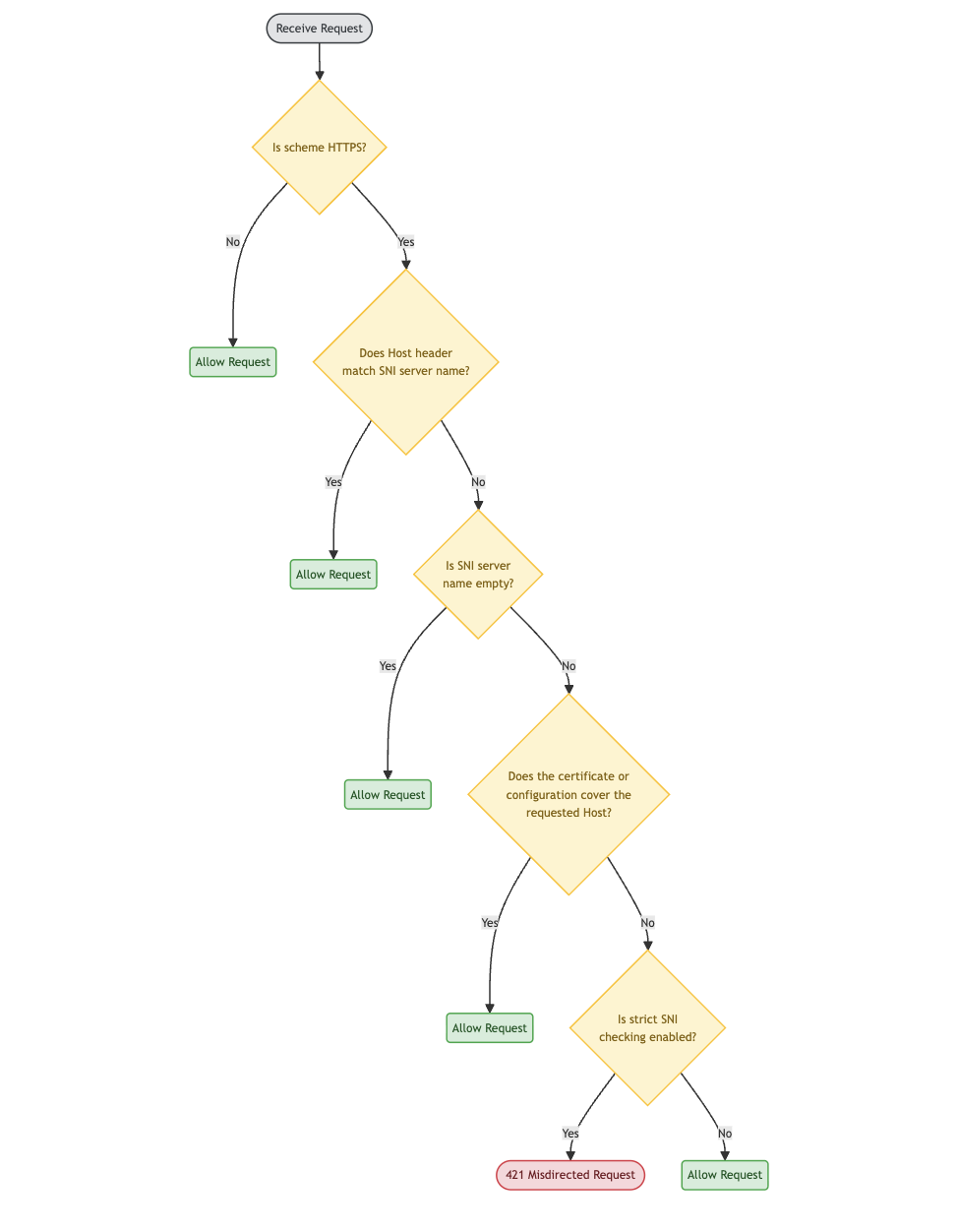
Decision steps explained
| Step | Condition | Outcome |
|---|---|---|
| 1 | Request is not HTTPS | Proceed normally — SNI check does not apply to plain HTTP |
| 2 | Host header matches ssl_server_name (case-insensitive) | Proceed normally — SNI and Host are consistent |
| 3 | ssl_server_name is empty | Proceed normally — no SNI was sent by the client |
| 4 | Workload is on the latest platform version and has a domain configured for the SNI value | Proceed normally — the SNI resolves to a known workload |
| 5 | Workload is on the latest platform version, no domain matches, and enforcement is enabled | Return 421 Misdirected Request |
| 6 | Workload is on the latest platform version, no domain matches, and enforcement is disabled | Proceed normally |
| 7 | TLS session data is unavailable | Proceed normally — the platform fails open to avoid disrupting legitimate traffic |
| 8 | Certificate is an Azion-managed certificate | Proceed normally — Azion certificates are trusted by the platform |
| 9 | X509_check_host confirms the Host is valid for the certificate | Proceed normally — the certificate covers the requested hostname |
| 10 | None of the above conditions are met and enforcement is enabled | Return 421 Misdirected Request |
| 11 | None of the above conditions are met and enforcement is disabled | Proceed normally |
The X509_check_host enforcement
The validation step uses OpenSSL’s X509_check_host function to verify whether the Host header value is covered by the certificate’s CN (Common Name) or SANs (Subject Alternative Names). This check is enforced for all workloads on the Azion Web Platform when SNI Check enforcement is enabled.
If the hostname is not within the certificate’s scope — for example, the certificate covers example.com but the request targets api.other-domain.com — the platform returns 421 Misdirected Request.
How to identify if your application is affected
Monitor your application logs for HTTP 421 Misdirected Request responses. This status code indicates that a request arrived over a TLS connection established for a different hostname than the one specified in the Host header, and the certificate in use does not cover that hostname.
Common scenarios that produce a 421 response:
- Web applications, APIs, or HTTP clients that reuse an existing TLS connection (connection pooling or HTTP/2 multiplexing) to send requests targeting a different hostname than the one used during the TLS handshake.
- Clients that send a
Hostheader pointing to a hostname not covered by the certificate associated with the TLS session.
How to investigate:
Use Real-Time Events to filter requests with status code 421. The event data will show the host and ssl_server_name fields, helping you identify which part of your application is sending requests with a hostname outside the scope of the certificate in use.
How to fix SNI mismatches
Ensure your certificates cover all required hostnames.
Each hostname your application serves over HTTPS must be covered by the certificate associated with the corresponding workload on the Azion Web Platform. A certificate covers a hostname if that hostname appears in the certificate’s CN or in its SAN list.
Recommended actions:
- Review the certificates configured in Certificate Manager for each of your workloads.
- If a workload serves multiple hostnames, use a wildcard certificate (e.g.,
*.example.com) or a multi-SAN certificate that explicitly lists all required hostnames. - Investigate any
421responses in Real-Time Events to identify which hostname is being requested outside the certificate’s scope, then update the certificate or the application’s connection logic accordingly.
Why this enforcement matters
Enforcing strict SNI validation significantly reduces the risk of SNI Spoofing attacks, in which a malicious actor manipulates the SNI field to route a TLS connection through a certificate that does not legitimately cover the target hostname. By returning 421 Misdirected Request in these cases, the Azion Web Platform ensures that each HTTPS request is served only under a valid and appropriate security context.
SNI Check enforcement is not configurable through the Azion Console or the API. To enable or disable it for your workloads, contact Azion Support.