This document presents a specific use case of file analysis as an example of Azion AI Inference application for autonomous security. There are several other scenarios where autonomous agents can strengthen application and API security.
Azion AI Inference applied to autonomous security acts as an intelligent security co-processor at the edge, analyzing content and context of file uploads in real-time, detecting malicious behaviors and automatically mitigating before the file reaches the origin application.
Architecture diagram of AI Inference Autonomous Security for PDF uploads
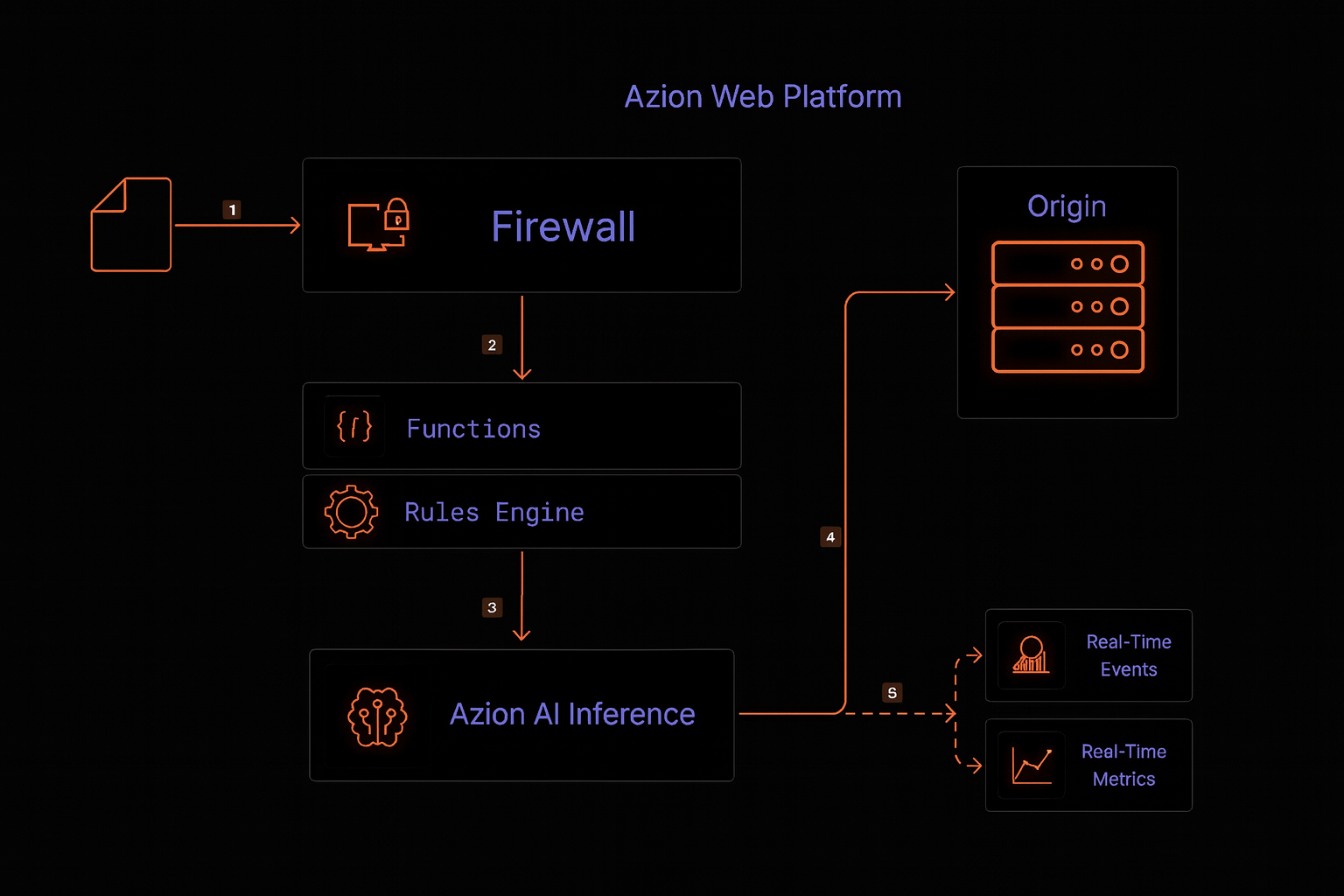
Data flow
- A user sends an HTTP(S) request to the web application containing a PDF file upload.
- The request reaches the Azion Web Platform and is routed to the nearest edge node.
- The Firewall processes the request, applying:
- DDoS Protection rules.
- WAAP/WAF and Network Shield Protection rules, if configured.
- Before forwarding the request to the origin, the Firewall Rules Engine triggers a security Function that implements autonomous security using Azion AI Inference for upload inspection:
- AI Inference checks file metadata (size, type, internal structure).
- Analyzes the PDF payload looking for:
- Suspicious objects and embedded code.
- PDF Injection patterns, scripts, macros, and malicious links.
- Inconsistencies in document structure that indicate exploitation attempts.
- Correlates with request context and defined policies.
- Based on AI Inference decision:
- Blocks the request and returns a secure response to the user (e.g., generic error, invalid file message).
- Allows the upload and forwards the request to the application and eventually to the origin.
- All activity is logged and can be monitored through Observe products (Real-Time Events, Real-Time Metrics, Data Stream, GraphQL API).
Components
-
Firewall
Protection layer that applies security policies at the network edge:- DDoS Protection to mitigate volumetric attacks.
- Web Application Firewall (WAAP) to protect against OWASP Top 10, including vectors related to upload and content manipulation.
- Network Shield to block suspicious sources by IP, ASN, or geolocation.
-
Functions
Executes the function that orchestrates Azion AI Inference Autonomous Security:- Receives the request and extracts the PDF file.
- Invokes the AI agent for payload analysis.
- Applies decisions (allow, block, quarantine, custom response).
-
AI Inference
Set of AI models and decision logic that:- Operates in real-time, at the edge.
- Analyzes PDF structure and content.
- Applies risk policies aligned with the organization’s GRC requirements.
- Learns from human feedback and historical events to reduce false positives.
-
Applications (Optional) Hosts the web application that consumes file uploads and exposes HTTP(S) endpoints for end users.
-
Object Storage (optional)
Used for:- Storing files in quarantine for later analysis.
- Maintaining training samples for continuous AI Inference improvement.
-
Observe
Azion observability products:- Real-Time Metrics and Real-Time Events to monitor blocks, anomalies, and upload volume.
- Data Stream to send detailed logs to SIEM, data lakes, and fraud platforms.
- GraphQL API for advanced queries and security event correlation.
Prerequisites
- Azion account.
- AI Inference endpoint (internal or managed) with API contract for malicious event analysis.
- Domain pointed to Azion Web Platform. (optional)
Implementation
1. Deploy the security function with AI Inference
Let’s create a Function that analyzes requests in Azion Firewall, using AI to identify and block malicious or unwanted content.
- Access the Azion console and navigate to the Functions service.
- Click the ”+ Function” button.
- Fill in the Function name with a unique and descriptive name.
- In the Execution Environment section, select “Firewall”.
- Go to the “Code” tab and paste the code below.
async function handleRequest(event) {  try {    const requestBody = await event.request.text();    const { model, action, prompt } = event.args; // Now we only need model, action, and prompt    const contentType = event.request.headers.get("content-type");
    // Allows images    if (contentType && contentType.startsWith("image/")) {      event.continue();      return;    }
    // Decodes the content if it's base64    const decodedBody = contentType && contentType.includes("base64")      ? atob(requestBody.split(",")[1])      : requestBody;
    // Calls the model via Azion.AI.run    const modelResponse = await Azion.AI.run(model, {      stream: false,      seed: 42,      temperature: 0,      max_tokens: 1024,      messages: [        {          role: "system",          content: `${prompt}`        },        {          role: "user",          content: decodedBody        }      ]    });
    // Extracts the model's response    const result = modelResponse?.choices?.[0]?.message?.content?.trim();
    if (result === "true") {      event.console.warn(`[AI] ${result}`);      event[action](); // Executes the action (e.g., deny)      return;    }  } catch (err) {    event.console.error("Error handling request:", err.message);    event.continue();    return;  }
  event.continue(); // If not malicious, let it pass}
// Keeps the event listeneraddEventListener("firewall", event => { event.waitUntil(handleRequest(event));});- Now in the “Arguments” tab and paste the code below.
{ "model": "casperhansen-mistral-small-24b-instruct-2501-awq", "prompt": "You are a security assistant specialized in detecting malicious PDF files. Analyze the provided content carefully and return 'true' only if you identify malicious content, such as embedded scripts, suspicious patterns, or known vulnerabilities. Do not classify a file as malicious based solely on its structure or the presence of a PDF header. If the content is safe or does not contain clear malicious indicators, return 'false'. Do not provide any additional explanation or output.", "action": "deny"}Note: Make sure the selected model is available and properly configured in the Azion environment. Check the available models.
2. Configure Firewall and basic policies
- Create a Firewall or edit an existing one.
- To ensure complete security, enable the modules: DDoS Protection, Functions, Network Shield, and Web Application Firewall (WAF).
- In the Functions Instances tab, instantiate the function in the Firewall.
- In the Rules Engine tab, create a rule that:
- Is triggered on specific upload routes (e.g.,
/upload,/documents/upload). - Executes the AI Inference function.
- Is triggered on specific upload routes (e.g.,
3. Observe, adjust, and evolve AI Inference
- Use Observe products to monitor:
- Rate of uploads blocked, allowed, and quarantined.
- Patterns by country, IP, ASN, route, and time.
- Events correlated with reported security incidents.
- Adjust:
- AI Inference sensitivity.
- Block vs. quarantine policies.
- WAF and Network Layer Protection rules based on collected insights.
- Incorporate feedback from security analysts, labeling false positives/negatives to continuously improve the model and reduce friction with legitimate users.
Related documentation
- Implement a Copilot assistant based on a ReAct AI agent
- Security automation with Edge Computing
- Accelerate security modernization with edge computing
- Protect web applications and APIs with WAAP
- Azion Observe products