Minimize downtime and achieve true scalability for your applications
Avoid service interruptions for optimal performance with traffic distribution that automatically routes around server failures in real time.









Eliminate single points of failure
Automated failover distributes traffic across multiple origins, detecting failures in real time and rerouting to healthy servers.
Deploy in minutes
Start immediately with preset algorithms. No hardware provisioning or complex setup required.
Scale automatically
Handle traffic spikes with distributed global architecture delivering low-latency responses in any region.
Maximize availability and performance
Intelligent Traffic distribution and origin monitoring
Manage requests between servers with configurable algorithms such as Round-Robin, Least Connections, and IP Hash. Adjust weights, monitor origin health in real time, and keep your infrastructure optimized and stable.
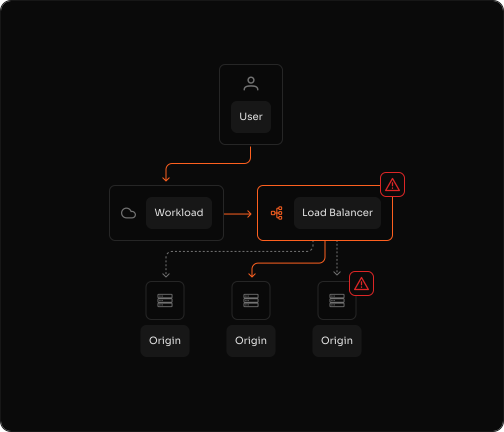
Failover and error handling
Detect origin failures in real time, respond to HTTP 5xx and 404 errors, timeouts, and connectivity loss, and reroute traffic to healthy servers without disrupting service. Set primary and backup roles to trigger only when necessary, and tune connection and byte-timeout settings to speed detection and recovery.
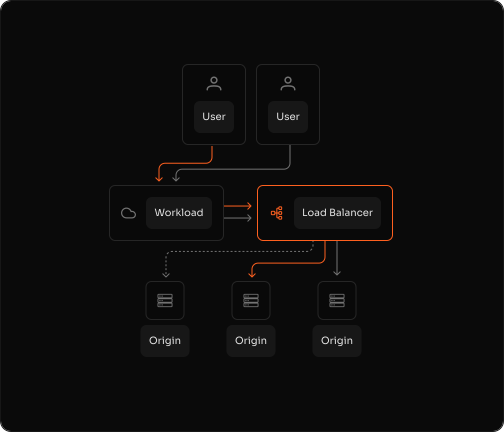
Multi-origin flexibility and vendor independence
Operate in hybrid environments with multiple data centers and clouds, avoid single points of failure, and scale by adding multiple origin addresses per configuration. Preserve freedom with a vendor-independent architecture and maintain consistent performance across environments.
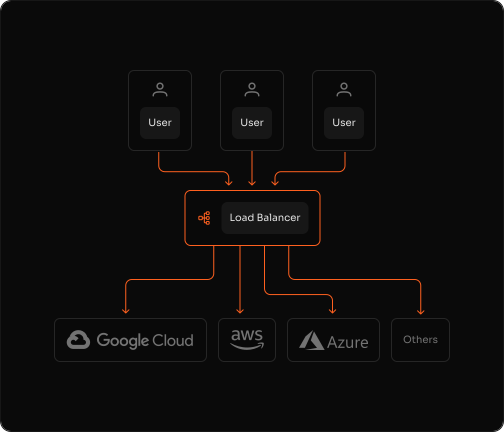
Optimize traffic distribution across industries





"Azion shielded us from sophisticated cyberattacks and empowered us to modernize our infrastructure, reduce costs, and deliver the best shopping experiences to millions of customers across Latin America."
Allan Monteiro
CISO & Head of Technology
A full-stack platform that scales instantly
Frequently Asked Questions
What is Load Balancer and how does it work?
Load Balancer distributes incoming traffic across multiple origin servers using configurable algorithms. It monitors server health in real time and automatically routes requests to healthy servers, ensuring high availability and optimal performance. You can choose from Round-Robin, Least Connections, or IP Hash algorithms to match your traffic patterns.
What load balancing algorithms are available?
Azion Load Balancer supports three algorithms: Round-Robin (distributes requests evenly across all servers), Least Connections (routes to the server with fewest active connections), and IP Hash (routes based on client IP for session persistence). You can configure weights for each origin to control traffic distribution.
How does automated failover work?
Load Balancer continuously monitors origin health through configurable health checks. When a server fails to respond or returns errors (5xx, 404, timeouts), traffic is automatically rerouted to healthy servers within seconds. You can set primary and backup roles, and configure connection and byte-timeout thresholds for detection sensitivity.
Can I use Load Balancer with multi-cloud or hybrid infrastructure?
Yes. Load Balancer works across any environment — multi-cloud, hybrid, or on-premises. You can add multiple origin addresses from different cloud providers or data centers within a single configuration. This provides vendor independence and eliminates single points of failure.
How long does it take to deploy Load Balancer?
Deployment takes minutes. Configure your origins, select a load balancing algorithm, and start distributing traffic immediately. No hardware provisioning, no complex setup, and no maintenance overhead required.
What happens if all origins fail?
If all configured origins become unavailable, Load Balancer will return an error response to the client. To prevent this, configure origins across multiple data centers or cloud providers, set appropriate health check intervals, and monitor origin status through Real-Time Metrics and Data Stream.
How do I monitor origin health and performance?
Monitor origin health through Real-Time Metrics for immediate status visibility and Data Stream for detailed analytics. Track connection timeouts, byte timeouts, error rates, and response times. Set up alerts to notify you when origins fail or performance degrades.
Does Load Balancer support session persistence?
Yes. Use the IP Hash algorithm to route requests from the same client IP to the same origin server, maintaining session persistence. This ensures users stay connected to the same backend server throughout their session, which is critical for stateful applications.
Build once.Run everywhere.
Get a faster path to launch, lower latency, and less infrastructure overhead.