A relational database is a storage system that organizes information into structured tables connected by logical relationships, using SQL as its universal query language. It guarantees data integrity through ACID properties, making it the foundation for systems where accuracy matters — financial transactions, user authentication, and inventory management.
TL;DR — A relational database organizes data into two-dimensional tables (rows and columns) linked by primary and foreign keys. The model was proposed by Edgar F. Codd at IBM in 1970. SQL, standardized by ANSI/ISO in 1986, is the language used to query and manage the data. ACID properties (Atomicity, Consistency, Isolation, Durability) guarantee transactions never leave data in a corrupted state. SQLite is a serverless, single-file implementation ideal for read-heavy and embedded workloads. Distributed SQL replicates data geographically to cut read latency while preserving ACID guarantees.
Every time a user logs into an application, checks a bank balance, or completes an online purchase, an invisible flow of data activates in fractions of a second to read or write information securely. Behind these everyday interactions stands the relational database — a system designed to organize, protect, and retrieve structured data with absolute consistency.
What is a relational database?
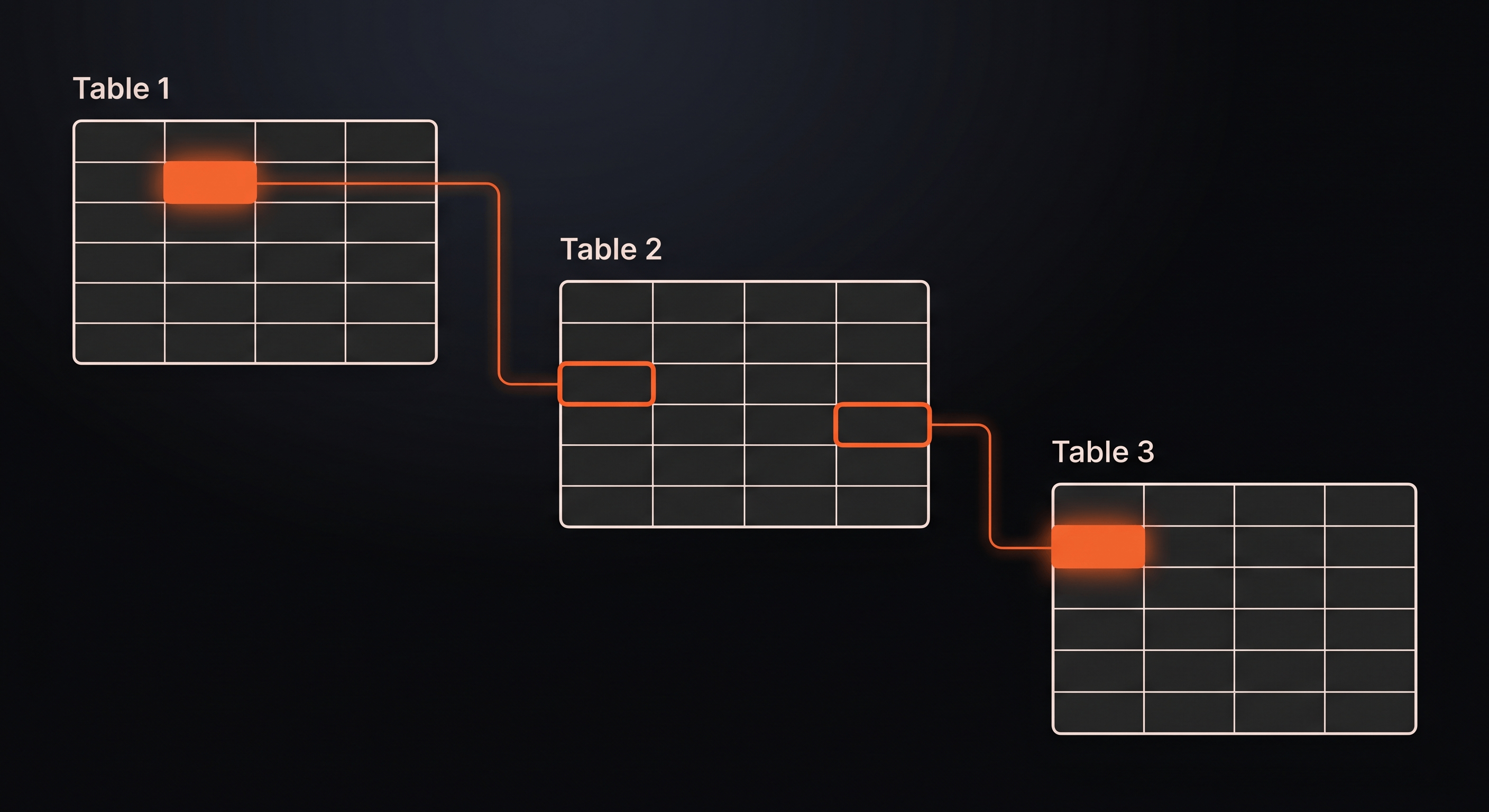
A relational database is a storage system that organizes information into two-dimensional structured tables (composed of rows and columns) that connect to each other through clear logical relationships, using the SQL language for queries.
This model emerged in 1970 when Edgar F. Codd, a computer scientist at IBM, proposed organizing data in mathematical relations — hence the name “relational.” The concept revolutionized data management by making it possible to express complex relationships between data elements without duplicating information.
Tables, rows, and columns
The basic unit of a relational database is the table (also called a relation). Tables contain:
- Columns — define the type of data that can be stored: text, numbers, dates, boolean values. Each column has a name and a data type constraint.
- Rows (or records) — represent individual entries of information. Each row contains one complete set of data matching the column structure.
Analogy: Imagine a physical file cabinet of student records. Each filled-out card is a row, and the printed fields on the card (Name, Age, ID Number) are the predefined columns of a table. The cabinet itself represents the table — a container organizing all records by the same structure.
-- A simple 'users' table structureCREATE TABLE users (    id INTEGER PRIMARY KEY,    name TEXT NOT NULL,    email TEXT UNIQUE,    created_at TIMESTAMP DEFAULT CURRENT_TIMESTAMP);
-- Inserting a row (record)INSERT INTO users (id, name, email)VALUES (1, 'Maria Silva', 'maria@example.com');
Primary keys and foreign keys: how tables connect
Relational databases derive their power from connections between tables. Two mechanisms make this possible:
Primary key — a unique identifier for each record in a table. Like a passport number for a person — no two individuals share the same number. A primary key guarantees that each row is distinct and findable.
Foreign key — a reference to a primary key stored in another table. This creates a link between related data. For example, a books table might contain an author_id column that references the id column in an authors table — connecting each book to its author without duplicating author information.
-- Authors table with primary keyCREATE TABLE authors (    author_id INTEGER PRIMARY KEY,    name TEXT NOT NULL,    country TEXT);
-- Books table with foreign key linking to authorsCREATE TABLE books (    book_id INTEGER PRIMARY KEY,    title TEXT NOT NULL,    author_id INTEGER,    publication_year INTEGER,    FOREIGN KEY (author_id) REFERENCES authors(author_id));
This structure eliminates redundancy. Instead of storing “Author: Gabriel García Márquez, Country: Colombia” for every book by that author, you store the author information once and reference it from each book record.
ACID properties: the integrity guarantee
Relational databases enforce ACID properties to ensure data remains accurate even when errors, crashes, or concurrent access occur:
| Property | Guarantee |
|---|---|
| Atomicity | Transactions complete entirely or not at all. If a bank transfer fails midway, the entire transaction rolls back automatically. |
| Consistency | Data remains valid according to defined rules. A constraint requiring age to be positive rejects any negative value. |
| Isolation | Concurrent transactions don’t interfere with each other. The database processes simultaneous updates sequentially, preventing corrupted data. |
| Durability | Once a transaction commits, it persists — even through power failures or system crashes — because changes are written to permanent storage before confirming success. |
Analogy: Think of a bank transfer. You want to move $500 from Account A to Account B. The database either completes both steps (debit A, credit B) successfully, or undoes everything if any step fails. Your balance never shows an incorrect intermediate state.
SQL: the universal language of data
What is SQL?
SQL (Structured Query Language) is the standardized programming language developers use to send instructions, retrieve records, update data, or delete information from a relational database.
SQL emerged in the 1970s at IBM and became an ANSI/ISO standard in 1986. Despite variations between database systems (MySQL, PostgreSQL, SQLite, Oracle), the core syntax remains consistent — making SQL knowledge transferable across platforms.
The language divides into four primary categories:
| Category | Purpose | Example commands |
|---|---|---|
| DDL (Data Definition Language) | Creates and modifies structure | CREATE TABLE, ALTER TABLE, DROP TABLE |
| DML (Data Manipulation Language) | Manipulates data | SELECT, INSERT, UPDATE, DELETE |
| DCL (Data Control Language) | Controls permissions | GRANT, REVOKE |
| TCL (Transaction Control Language) | Manages transactions | BEGIN, COMMIT, ROLLBACK |
-- Querying data with SQLSELECT name, emailFROM usersWHERE created_at > '2024-01-01'ORDER BY name ASC;
-- Joining tables to combine related dataSELECT books.title, authors.nameFROM booksJOIN authors ON books.author_id = authors.author_idWHERE authors.country = 'India';
What is a database schema?
A schema is the structural map or skeleton that defines the rules of the database — which tables exist, which columns they contain, what data types are allowed, and how tables connect.
Analogy: The schema functions as the blueprint of a building. It defines where each wall and door must be before construction begins. In a relational database, data only enters if it respects the schema’s limits — column types, constraints, and relationships.
Schemas provide several benefits:
- Data integrity — constraints prevent invalid data from entering the system
- Documentation — the schema itself documents the data model
- Query optimization — the database engine uses schema information to plan efficient queries
- Application stability — applications can rely on consistent data structure
-- A complete schema definitionCREATE TABLE orders (    order_id INTEGER PRIMARY KEY AUTOINCREMENT,    customer_id INTEGER NOT NULL,    order_date TIMESTAMP DEFAULT CURRENT_TIMESTAMP,    total_amount DECIMAL(10, 2) CHECK (total_amount >= 0),    status TEXT DEFAULT 'pending' CHECK (status IN ('pending', 'processing', 'shipped', 'delivered')),    FOREIGN KEY (customer_id) REFERENCES customers(customer_id));
-- Indexes speed up queries on frequently searched columnsCREATE INDEX idx_orders_customer ON orders(customer_id);CREATE INDEX idx_orders_date ON orders(order_date);
Note on indexes: Indexes are data structures that speed up SELECT queries on specific columns, similar to a book index helping you find a topic without reading every page. The tradeoff is slightly slower INSERT and UPDATE operations, since the database must update both the table and the index. Create indexes on columns you frequently search or join.
Note on syntax variation: The AUTOINCREMENT keyword shown above is SQLite syntax. PostgreSQL uses SERIAL or GENERATED ALWAYS AS IDENTITY, MySQL uses AUTO_INCREMENT, and the SQL standard uses GENERATED BY DEFAULT AS IDENTITY. The core concept remains the same — automatic generation of unique identifiers.
SQLite: the lightweight, portable, serverless database
What is SQLite?
SQLite is a software library that implements a complete SQL database engine, self-contained and portable, storing all information in a single disk file — eliminating the need to configure an active server process. This architecture makes serverless SQL deployments possible at the network edge.
Unlike traditional databases that run as separate server processes (MySQL, PostgreSQL), SQLite operates as a library embedded directly within applications. The entire database lives in one .sqlite file that you can copy, move, and version like any other file.
Why is SQLite so popular?
SQLite’s architecture delivers distinct advantages for specific use cases:
- Zero configuration — no server installation, no user management, no network configuration; add the library to your project and start using it
- Minimal memory footprint — SQLite runs in as little as 256KB of RAM, making it viable for embedded systems and resource-constrained environments (see SQLite memory requirements)
- Portability — the entire database is one file; copy it between servers, include it in version control, ship it with desktop applications, or bundle it in mobile apps
- Serverless operation — no separate process means no network latency between application and database; queries execute in-process
SQLite runs natively on smartphones, web browsers, serverless functions, and IoT devices at the network edge. According to the SQLite Consortium, it’s the most widely deployed database in the world — present in every Android device, every iOS device, every Chrome browser, and countless embedded systems.
// Using SQLite in a Node.js application (CommonJS syntax)const sqlite3 = require('sqlite3').verbose();const db = new sqlite3.Database('./data.sqlite');
db.serialize(() => {    db.run('CREATE TABLE IF NOT EXISTS cache (key TEXT PRIMARY KEY, value TEXT, expires INTEGER)');
    db.run('INSERT INTO cache (key, value, expires) VALUES (?, ?, ?)',        ['user_preferences_123', JSON.stringify({theme: 'dark'}), Date.now() + 3600000]);
    db.get('SELECT value FROM cache WHERE key = ?', ['user_preferences_123'], (err, row) => {        if (err) return console.error(err);        console.log(row.value);    });});
db.close();
The critical write limitation
SQLite’s single-file architecture creates a constraint: write operations require exclusive locks on the database file to prevent data corruption. Only one writer at a time.
This makes SQLite excellent for read-heavy workloads but unsuitable for high-volume concurrent write systems. Applications like content management systems, user preferences, configuration storage, and caching benefit from SQLite’s speed and simplicity. High-transaction financial systems or real-time collaborative applications need traditional server-based databases.
Practical guidance — use SQLite when:
- Your application has more reads than writes
- You need local data persistence in client applications
- You’re building serverless functions with memory constraints
- You want zero-configuration development environments
- You’re deploying to embedded systems or IoT devices
Distributed SQL: relationships without geographical borders
The challenge of scaling SQL
Traditional SQL databases run on a single centralized server. When your application grows to serve global users, requests from other continents suffer from network latency — the physical delay of data traveling across distances.
A user in São Paulo accessing a database in Virginia experiences hundreds of milliseconds of delay per query. A single page load might trigger dozens of queries. Each round-trip compounds the latency, degrading user experience.
How distributed SQL solves this
Distributed SQL replicates relational data geographically across a distributed network. The system directs read queries to local replicas positioned at the network edge, close to users, while intelligent mechanisms coordinate writes to maintain global consistency.
This architecture delivers:
- Local read latency — users query data from nearby replicas, not distant central servers
- Global consistency — write operations synchronize across nodes, preserving ACID guarantees
- High availability — if one node fails, others continue serving requests
- Regulatory compliance — data residency requirements can be met by controlling replica placement
The synchronization model typically follows a main-replica pattern:
- Main instance — handles all write operations: inserts, updates, deletes
- Read replicas — distribute globally, serving read queries locally
- Synchronization — changes propagate from main to replicas, maintaining data consistency
Some distributed SQL databases, such as CockroachDB and TiDB, use sophisticated consensus algorithms like Raft to ensure replicas agree on data state, even during network partitions or node failures. Other systems use asynchronous streaming replication (like PostgreSQL’s native replication) with eventual consistency between replicas.
-- Read query - routed to nearest replica by the database driverSELECT product_name, price FROM products WHERE category = 'electronics';
-- Write query - routed to main instance by the database driverINSERT INTO orders (customer_id, product_id, quantity)VALUES (12345, 67890, 2);
How routing works: The SQL syntax remains standard — the routing decision happens at the driver or proxy level, not in the query itself. Your application connects to a coordinator that directs read queries to the nearest replica and write queries to the main instance. Some systems require explicit read/write connection strings; others handle this automatically.
Database normalization: eliminating redundancy
Database normalization is the process of organizing tables to minimize data redundancy and dependency anomalies. Each “normal form” represents a level of refinement:
| Normal form | Rule | Example violation |
|---|---|---|
| First Normal Form (1NF) | Eliminates repeating groups — each column contains atomic (indivisible) values | Storing multiple phone numbers in one cell |
| Second Normal Form (2NF) | Removes partial dependencies — every non-key column must depend on the entire primary key | A composite key (order_id, product_id) with a product_name column that depends only on product_id |
| Third Normal Form (3NF) | Eliminates transitive dependencies — non-key columns cannot depend on other non-key columns | A table with customer_id, customer_name, and customer_address where name and address depend on customer_id, not the primary key |
Practical example: An orders table in 3NF separates customer information into its own table, eliminating the need to repeat customer names and addresses for every order. When customer information changes, you update one record instead of thousands.
Most transactional databases aim for 3NF as the practical balance between redundancy elimination and query complexity. Over-normalization can require excessive joins that degrade performance.
SQL vs. NoSQL: when to choose the relational path
Rigid schemas vs. flexible schemas
The fundamental difference between SQL and NoSQL lies in schema flexibility.
SQL databases require data to fit exactly into predefined table structures. You define columns, types, and constraints upfront. Changing the schema requires migration scripts. This rigidity guarantees data integrity and enables powerful query optimization.
NoSQL databases accept data without rigid schemas. Document stores like MongoDB accept JSON documents with varying structures. Key-value stores accept any value associated with a key. This flexibility enables rapid iteration and handles semi-structured data like logs, social media feeds, and IoT telemetry.
| Choose SQL when | Choose NoSQL when |
|---|---|
| Data relationships and integrity are critical | Your data schema evolves frequently |
| Your schema is stable and well-defined | You need horizontal scaling across many nodes |
| You need ACID transactions | Read/write velocity matters more than complex queries |
| Complex queries with joins are required | Your data is semi-structured (JSON, logs, documents) |
| Regulatory compliance demands audit trails | — |
For a deeper comparison, see What is NoSQL and Key-Value Store?
The CAP theorem: trade-offs in distributed systems
The CAP theorem, proposed by Eric Brewer in 2000, states that a distributed system can only guarantee two of three properties simultaneously:
- Consistency (C) — all nodes see the same data at the same time
- Availability (A) — every request receives a response (success or failure)
- Partition tolerance (P) — the system continues operating despite network failures
SQL databases designed for distributed architectures typically prioritize consistency — ensuring all replicas show identical data before confirming a transaction. This may introduce latency during writes as synchronization occurs.
NoSQL databases often prioritize availability — accepting writes locally and synchronizing asynchronously. Users can always read and write, but may see stale data temporarily (eventual consistency).
Practical implication: For financial transactions, inventory management, or user authentication, choose SQL’s strong consistency. For social media feeds, real-time analytics, or caching, NoSQL’s eventual consistency provides acceptable user experience with superior latency.
Key takeaways
- Relational databases organize data into structured tables connected by primary and foreign keys, using SQL as their universal query language
- ACID properties (Atomicity, Consistency, Isolation, Durability) guarantee data integrity for transactions where accuracy is non-negotiable
- SQLite provides a serverless, portable SQL database in a single file — ideal for read-heavy workloads, embedded systems, and serverless applications
- Distributed SQL replicates relational data globally, reducing read latency while maintaining consistency through synchronized writes
- SQL vs. NoSQL is not a competition but a choice: SQL for consistency and relationships, NoSQL for flexibility and horizontal scale
Frequently asked questions
What is a relational database? A relational database is a storage system that organizes data into tables connected by logical relationships, using SQL for queries. Key characteristics include primary and foreign keys for relationships, ACID properties for transactional integrity, structured schema for data validation, and relational integrity constraints. Use relational databases for financial systems, user authentication, and inventory management where data accuracy is critical.
What are the most common SQL commands? The most common SQL commands are SELECT (retrieve data), INSERT (add data), UPDATE (modify data), DELETE (remove data), CREATE TABLE (define structure), and DROP TABLE (remove structure). These commands form the foundation of database operations in any relational system. Additional commands include JOIN (combine tables), WHERE (filter results), and GROUP BY (aggregate data).
How do primary and foreign keys work together? Primary keys uniquely identify each row in a table, while foreign keys create relationships between tables by referencing primary keys. A book table’s author_id foreign key points to the author table’s id primary key, enabling efficient joins without data duplication. This structure allows you to store author information once and reference it from multiple books.
What is database normalization? Database normalization is the process of organizing data to minimize redundancy and dependency. First normal form (1NF) eliminates repeating groups, 2NF removes partial dependencies, and 3NF eliminates transitive dependencies. Normalized databases are easier to maintain, require less storage, and are less prone to update anomalies. Most transactional databases aim for 3NF.
Is SQLite safe for production use? Yes, SQLite is production-ready for specific use cases: serverless applications, microservices focused on read operations, local caching, embedded systems, and development environments. Major companies including Apple, Google, and Microsoft ship SQLite in production products, according to SQLite’s deployment statistics. The key is matching SQLite’s strengths (read-heavy, single-writer, embedded) to your workload.
What’s the difference between SQL and MySQL/PostgreSQL? SQL is the query language — a standardized syntax for communicating with databases. MySQL and PostgreSQL are database management systems (DBMS) — software that interprets SQL commands and manages data storage. Think of SQL as the language, and MySQL/PostgreSQL as the database engines that speak that language.
What happens to relational data if a distributed server fails physically? The ACID model and replication mechanisms protect data integrity. If a node fails during a transaction, the system either rolls back the incomplete transaction or transfers it to a healthy node. Replicas maintain copies of data, ensuring no information is lost. The database recovers automatically when the failed node returns or a replacement joins the cluster.
Can I use SQL databases for big data applications? Traditional SQL databases excel at transactional workloads (OLTP), not analytical workloads on massive datasets (OLAP). For big data analytics, specialized systems like data warehouses or columnar databases optimize for aggregate queries across billions of rows. However, modern distributed SQL databases increasingly handle larger scales than traditional single-server deployments.
How do I migrate from SQLite to PostgreSQL? Migration involves exporting the SQLite schema and data, then importing into PostgreSQL. Tools like pgloader automate this process. The main considerations are data type differences between systems, SQLite’s dynamic typing vs. PostgreSQL’s strict typing, auto-increment syntax variations, and PostgreSQL’s additional features (full-text search, JSON support).
Conclusion
Relational databases and the SQL language remain the most reliable technologies for structuring intelligence and business rules in the digital world. Their table-based organization, relationship enforcement through keys, and ACID guarantees provide the foundation for systems where data accuracy is non-negotiable.
Portable technologies with low overhead — like SQLite — and distributed SQL architectures ensure that transactional consistency accompanies the speed demanded by modern serverless computing at the network edge. The same SQL that powered early business applications now runs on smartphones, in browsers, and across global distributed networks.
As applications evolve to serve global users with minimal latency, distributed SQL bridges the gap between relational integrity and geographical distribution — bringing consistent data close to every user, everywhere.
For implementations requiring distributed SQL with global read replicas, SQL Database provides serverless relational storage with ACID-compliant queries positioned at the network edge.
Related topics
Continue exploring the Storage and Database cluster:
- What is Storage and Database? — the complete landscape of data storage technologies
- What is NoSQL and Key-Value Store? — non-relational database paradigms
- What is Object Storage and Blob Storage? — unstructured data storage at scale
- What is a Vector Database? — the brain of AI applications
- What is Database Security? — SQL injection and breach prevention