Modern data architecture requires matching the right tool to each workload. Relational databases (SQL) guarantee consistency for structured data like financial records. NoSQL technologies—including Key-Value stores—handle high-velocity, flexible schemas for sessions, configurations, and real-time features. Object Storage reduces costs for media, backups, and logs by eliminating hierarchical complexity. Vector databases enable semantic search for AI applications, powering Retrieval-Augmented Generation (RAG) systems that deliver accurate, context-aware responses.
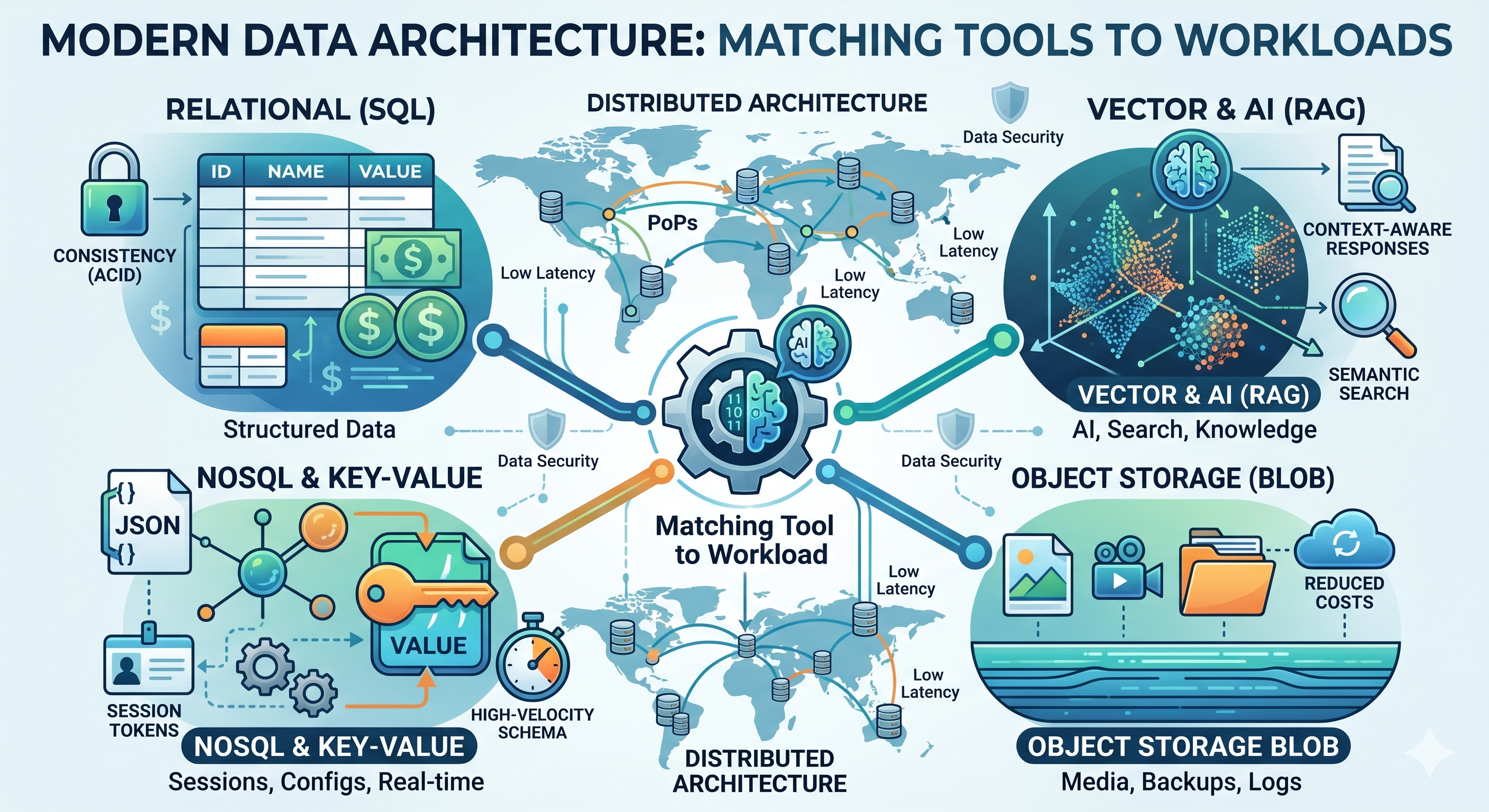
Every user request, content delivery, API interaction, and system log requires data persistence or retrieval. The architecture you choose determines whether your application responds in milliseconds or seconds, scales gracefully or fractures under load, and controls costs or bleeds budget on hidden fees.
According to MarketsandMarkets’ 2023 report, the global Cloud Database and DBaaS market is projected to reach USD 57.5 billion by 2028, growing at 22% annually—driven by distributed architectures and serverless database adoption. This shift reflects a fundamental change in how applications handle data.
Traditional databases in centralized datacenters are giving way to distributed architectures that process data close to users. This shift isn’t just about speed—it’s about enabling new patterns for AI applications, reducing infrastructure costs, and maintaining data sovereignty across global deployments.
Databases and storage systems are logical infrastructures designed to organize, save, protect, and retrieve digital information. The difference lies in what they optimize for: databases excel at structured queries and transactions, while storage systems handle raw files and binary data at scale.
Database vs. File Storage: What’s the Difference?
Databases read, write, and index highly structured or semi-structured data with refined search logic. They understand relationships between data elements, enforce constraints, and return specific records based on complex queries.
File Storage saves entire raw files—photos, videos, backups, logs—without processing their internal structure. It treats each file as a complete unit, identified by name or path, retrieved as a whole.
Think of it this way: a database is like a spreadsheet where you can find all rows matching specific criteria. File storage is like a warehouse where you store and retrieve complete boxes without opening them.
How Distributed Architecture Optimizes This Flow
Keeping data geographically close to users on a distributed architecture reduces round-trip time (RTT). When a user in São Paulo requests data, retrieving it from a local Point of Presence (PoP) takes milliseconds. Fetching the same data from a centralized server in Virginia adds hundreds of milliseconds—sometimes seconds—to each request.
This latency compounds across application layers. A single page load might trigger dozens of database queries and file retrievals. Each round-trip to a distant datacenter degrades user experience and increases bandwidth costs.
Distributed storage and databases solve this by replicating data across global PoPs, ensuring users access information from nearby locations rather than crossing continents.
The Relational Ecosystem: SQL and Data Consistency
What Is a Relational Database?
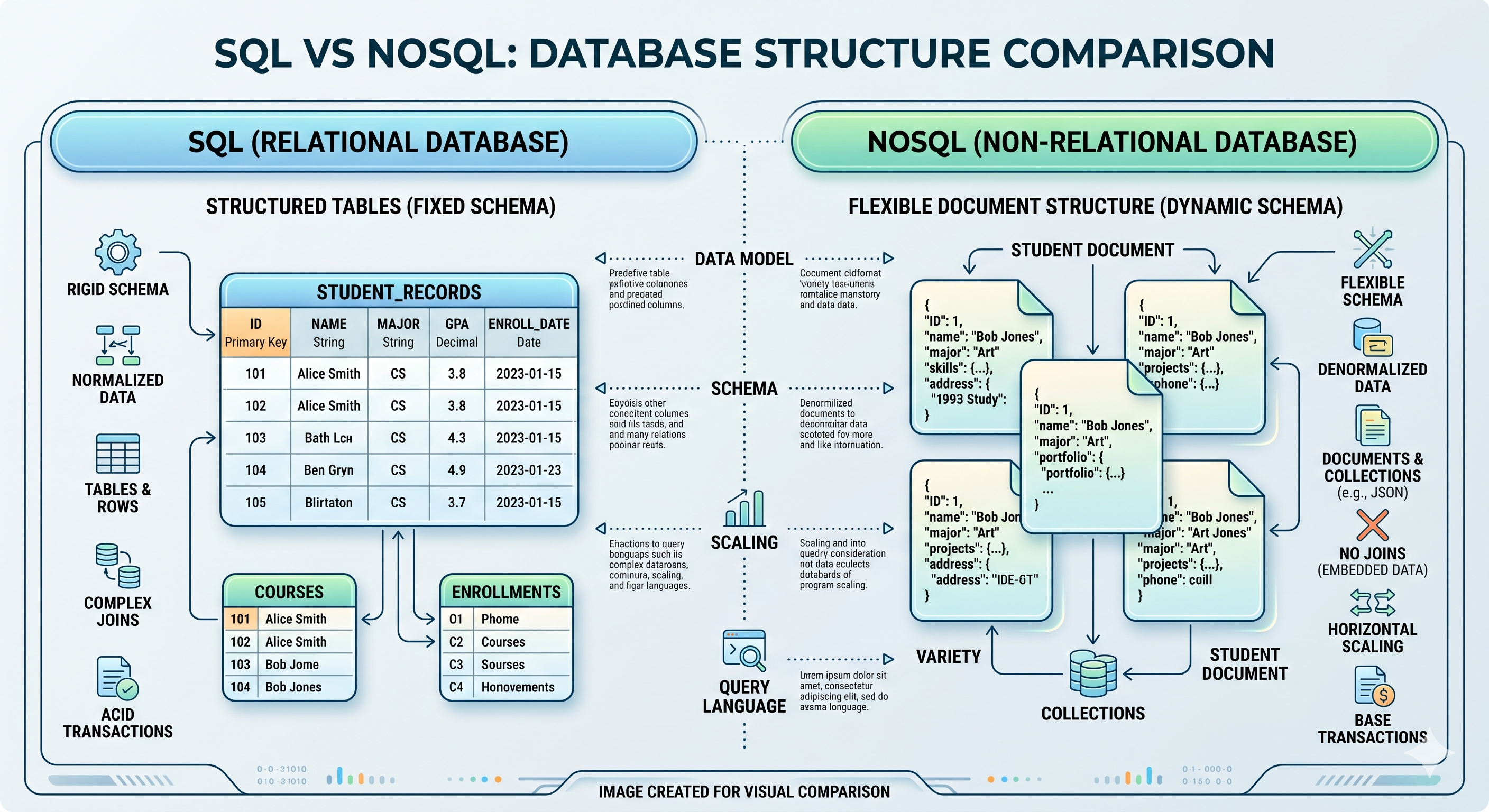
SQL databases (Structured Query Language) organize data into rigid tables composed of rows and columns, interconnected by logical relationships—primary keys and foreign keys. Relational databases enforce ACID properties:
- Atomicity: Transactions complete entirely or roll back
- Consistency: Data remains valid according to defined rules
- Isolation: Concurrent transactions don’t interfere
- Durability: Committed data persists through failures
This makes SQL ideal for systems requiring absolute transactional consistency—financial records, inventory management, user authentication, and order processing. A bank transfer either completes fully or doesn’t happen at all. There’s no middle ground.
Example SQL transaction:
-- Transfer funds between accounts (ACID transaction)BEGIN TRANSACTION;
-- Debit source accountUPDATE accountsSET balance = balance - 500.00WHERE account_id = 'src_12345';
-- Credit destination accountUPDATE accountsSET balance = balance + 500.00WHERE account_id = 'dest_67890';
-- Log the transferINSERT INTO transfers (from_account, to_account, amount, timestamp)VALUES ('src_12345', 'dest_67890', 500.00, NOW());
-- If any step fails, entire transaction rolls backCOMMIT;
SQLite: Lightweight, Self-Contained Persistence
SQLite takes a different approach. Instead of running as a separate server process, it operates as a library embedded directly into applications. The entire database lives in a single file on disk.
This architecture makes SQLite perfect for:
- Client-side applications that need local data persistence
- Serverless functions with memory constraints
- Development and testing environments
- Embedded systems and IoT devices
SQLite limitations to consider: As a single-file database, SQLite excels at read-heavy workloads but has constraints for concurrent writes. Write operations require exclusive locks on the database file, meaning only one writer at a time. In distributed architectures, SQLite implementations typically use read replicas globally with a single write coordinator—ideal for read-mostly applications like content delivery, user preferences, or configuration management, but unsuitable for high-volume transactional systems.
Modern distributed architectures leverage SQLite’s portability. Applications can run database logic close to users, synchronizing changes back to central systems when connectivity allows.
Distributed SQL: Relationships Without Borders
Global applications face a tension: SQL databases excel at consistency, but centralized instances create latency. Distributed SQL resolves this by replicating relational databases across multiple regions while maintaining ACID guarantees.
Read replicas handle queries locally, reducing latency for common operations. Write operations coordinate across nodes to preserve consistency. The result: users experience local-speed responses while the system maintains data integrity globally.
NoSQL Flexibility and Key-Value Store Speed
The Origin of NoSQL
NoSQL databases (“Not Only SQL”) emerged to handle data without rigid schemas—JSON documents, unstructured logs, social graphs, and real-time analytics. They prioritize:
- Horizontal scalability: Add capacity by adding nodes, not upgrading hardware
- Flexible schemas: Change data structure without migrations
- High throughput: Optimize for speed over strict consistency
- Developer agility: Iterate quickly without database administration overhead
The CAP Theorem: The Physics of Distributed Data
When designing global systems, engineers face a fundamental constraint: the CAP Theorem. This principle states that a distributed system can only guarantee two of three properties simultaneously:
- Consistency (C): All nodes see the same data at the same time
- Availability (A): Every request receives a response (success or failure)
- Partition tolerance (P): The system continues operating despite network failures
NoSQL databases designed for distributed architectures typically prioritize Availability and Partition tolerance, accepting Eventual Consistency as a trade-off. This means data written to a local node becomes immediately available locally, but updates propagate asynchronously to other global nodes—synchronizing completely within seconds or minutes, depending on network conditions.
For applications like social media feeds, shopping carts, or real-time analytics, eventual consistency provides acceptable user experience with superior latency. For financial transactions or inventory management, strong consistency (SQL) remains essential.
The Four Fundamental Models
Document databases store data as JSON or BSON documents. Each document contains its own structure, allowing heterogeneous records in the same collection. Use cases: content management, user profiles, product catalogs.
Key-Value stores function as distributed dictionaries. Each item has a unique key (identifier) and an associated value (any data). No joins, no complex queries—just fast lookups. Use cases: session storage, caching, feature flags, API tokens.
Column-family stores organize data by column rather than row, optimizing for analytical queries that aggregate specific fields across millions of records. Use cases: time-series data, analytics, IoT telemetry.
Graph databases map relationships between entities as nodes and edges. They excel at traversing connections—finding friends of friends, detecting fraud rings, recommending products. Use cases: social networks, recommendation engines, knowledge graphs.
Key-Value Store: The Speed Champion for Distributed Systems
The simplicity of key-value architecture makes it the fastest database model for specific workloads. No table joins. No schema validation. No complex query parsing. Just: give me the value for this key.
Example key-value operations:
// Store a user sessionawait kv.set('session:user_12345', {  userId: 'user_12345',  lastAccess: Date.now(),  preferences: { theme: 'dark', lang: 'en' }}, { ttl: 3600 }); // Expires in 1 hour
// Retrieve the sessionconst session = await kv.get('session:user_12345');
// Increment a rate limit counter atomicallyconst requests = await kv.incr('rate_limit:api:user_12345');if (requests > 100) {  throw new Error('Rate limit exceeded');}
This simplicity enables:
- Session storage: User session data retrieved in microseconds
- Instant redirects: URL shorteners and routing tables
- Configuration management: Feature flags and application settings distributed globally
- Rate limiting: Counters for API throttling and quota enforcement
On a distributed architecture, key-value stores deliver consistent low latency because the data model aligns with the infrastructure. Simple operations complete quickly, even when data replicates across continents. Industry benchmarks show key-value lookups averaging 0.5-2ms on distributed platforms, compared to 50-200ms for complex SQL queries across regions.
Object Storage and Blob Storage: Storing the World’s Media and Logs
What Is Object Storage?
Unlike file systems that organize data into hierarchical folders, Object Storage flattens everything into a single logical space—a data lake. Each object has:
- Data: The file content itself
- Metadata: Custom key-value pairs describing the object
- Identifier: A unique ID for retrieval
This flat structure eliminates the complexity of directory hierarchies and enables unlimited scale. Object storage systems handle petabytes of data without the performance degradation that plagues traditional file systems at scale.
Blob Storage: Raw Binary Data
BLOB stands for Binary Large Object. Blobs are raw byte sequences—images, videos, container images, database backups, log archives. They require no formatting, no structure, no parsing.
Blob storage optimizes for:
- Media assets: Images, videos, audio files for web applications
- Container images: Docker layers and Kubernetes artifacts
- Backup archives: Database dumps, configuration snapshots
- Log storage: Historical logs for compliance and analysis
The Financial Trap of Egress Fees
Traditional cloud providers charge for data egress—every time your application reads stored files, you pay for the bandwidth. This creates a hidden cost structure that scales with usage.
Consider a media application serving 10 million images daily. Each 2MB image generates egress charges. The math compounds quickly: 10 million × 2MB = 20TB daily traffic. Over a 30-day month, that’s 600TB of data transfer. At typical cloud egress rates of $0.09 per GB, monthly charges reach approximately $54,000—just for retrieving your own data.
Distributed architectures with global PoPs reduce egress by caching content close to users. This has motivated the emergence of data portability-focused storage providers that eliminate egress fees entirely, allowing companies to move their files freely between clouds without financial surprises.
Vector Databases: The New Era of AI and RAG
What Is a Vector Database?
Vector databases store and search embeddings—numerical arrays generated by machine learning models that represent semantic meaning. Instead of matching exact keywords, vector search finds conceptually similar content.
An embedding transforms text, images, or audio into a point in multi-dimensional space. These embeddings are generated by deep learning models trained to capture semantic relationships. Similar concepts cluster together. “Car” and “automobile” occupy nearby coordinates, even though they share no letters.
Embeddings and Semantic Similarity
Imagine a three-dimensional map of concepts. The AI positions related ideas close together:
- “Coffee” sits near “espresso” and “caffeine”
- “Python” (the language) clusters with “JavaScript” and “programming”
- “Python” (the snake) occupies a different region entirely
This spatial representation enables semantic search. A query for “fast cars” retrieves documents about “sports vehicles” and “high-performance automobiles”—even if those exact words never appear.
Vector Search and RAG on Distributed Architecture
Retrieval-Augmented Generation (RAG) combines vector databases with large language models (LLMs). Instead of relying solely on training data, the AI retrieves relevant documents from a vector database, grounds its response in factual context, and generates accurate answers.
Running RAG on distributed architecture delivers:
- Lower latency: Vector search completes near the user
- Data privacy: Sensitive documents stay within regional boundaries
- Reduced bandwidth: No round-trips to centralized AI services
- Offline capability: Local embeddings enable partial functionality without connectivity
This architecture prevents hallucinations by anchoring AI responses to retrieved evidence, while distributed execution keeps interactions fast and private. For a broader perspective on AI infrastructure, see Generative AI and the Computing Continuum.
Data Security: Hardening Infrastructure End-to-End
Speed means nothing if data pathways remain exposed. Moving databases and AI logic to distributed architectures expands the attack surface—both physical and logical—requiring protection paradigms that extend beyond traditional network firewalls.
Injection Attacks: From SQL to NoSQL
SQL injection exploits applications that concatenate user input directly into database queries. An attacker enters malicious code into form fields or URLs, tricking the database into executing unauthorized commands.
Example vulnerability:
-- Vulnerable query constructionSELECT * FROM users WHERE username = '[user_input]'-- Attacker enters: ' OR '1'='1' ---- Result: SELECT * FROM users WHERE username = '' OR '1'='1' --'The injected condition '1'='1' always evaluates true, bypassing authentication.
NoSQL injection varies by technology. In document databases with internal interpreters, attackers inject logical expressions or query operators specific to that system. In simple key-value stores, attacks typically target authentication token manipulation or TTL (time-to-live) policy exploitation rather than query injection itself.
Prevention requires:
- Parameterized queries: Separate data from code in database commands
- Input sanitization: Validate and escape all user-provided data
- Least privilege: Database accounts with minimal necessary permissions
- ORM frameworks: Use libraries that handle escaping automatically
Preventing Breaches with Zero Trust Architecture
Data breaches expose sensitive information—personal data, credentials, financial records. Zero Trust means the system never blindly trusts any connection—human or automated. In distributed architectures, this requires:
- Encryption at rest and in transit: Data encrypted on disk (AES-256) and protected by TLS 1.3 during network transfer
- Zone transfer restrictions: Limit DNS AXFR operations to strictly authorized IPs, preventing internal topology leakage
- Service authentication: Rigorous authentication for all microservice and API communication, not just user-facing endpoints
- Access controls: Role-based permissions limit who reads what
- Audit logging: Track all data access for forensic analysis
For AI systems, additional guardrails prevent data leakage:
- Prompt injection defenses: Sanitize inputs to AI models
- Output filtering: Block sensitive data in generated responses
- Context boundaries: Limit what documents AI systems can retrieve
Learn more about security for AI agents and mTLS for comprehensive AI system protection.
Quick Reference FAQ
What is a relational database?
A relational database is a structured data storage system that organizes information into tables with rows and columns, using SQL for queries. Key characteristics include: ACID compliance for transactional consistency, primary and foreign keys for relationships, and structured schemas for data integrity. Use relational databases for financial systems, user authentication, and inventory management where data accuracy is critical.
What’s the difference between blob storage and object storage?
In practice, these terms are often used interchangeably by cloud providers. Structurally, they differ: Blob (Binary Large Object) storage specifically refers to storing raw byte sequences—images, videos, executables—without format restrictions or required metadata. Object storage is the broader architecture that encapsulates blob data with an intelligent indexing layer: unique identifiers and rich custom metadata that enable semantic search and cataloging. Think of blob storage as the raw file; object storage as that file plus searchable tags and a universal address.
When should I use SQLite vs PostgreSQL in distributed systems?
Use SQLite when you need lightweight, self-contained persistence: serverless functions, client-side applications, IoT devices, or development environments. It requires zero configuration and runs as a library within your application.
Use PostgreSQL (or similar server-based SQL) when you need concurrent connections, complex transactions across multiple clients, or advanced features like stored procedures. Server-based databases handle higher write volumes and multi-user scenarios better.
How does distributed database replication work?
Distributed databases replicate data across multiple geographic locations using two primary patterns:
- Read replicas: Primary node handles writes; replicas serve read queries locally, reducing latency for common operations
- Multi-primary: Any node accepts writes; changes synchronize across all nodes, enabling local writes but requiring conflict resolution
Replication typically operates asynchronously (eventual consistency) or synchronously (strong consistency), with trade-offs between latency and data freshness.
What are the security best practices for distributed databases?
- Encrypt data at rest and in transit: Use AES-256 for stored data, TLS 1.3 for network communication
- Use parameterized queries: Prevent SQL injection by separating data from code
- Apply least privilege: Database accounts should have minimum necessary permissions
- Enable audit logging: Track all access for forensic analysis
- Implement connection pooling: Reduce attack surface by limiting direct database connections
- Regular backups with encryption: Ensure recovery capability without exposing backup data
What are data egress fees and why do they impact my budget?
Egress fees charge for data leaving a provider’s network. Every time your application reads from storage, you pay. The math compounds: 10 million 2MB images daily = 20TB daily = 600TB monthly. At $0.09/GB, that’s approximately $54,000/month in egress charges. Choose providers that eliminate or minimize these fees, especially for media-heavy workloads.
How does vector search differ from traditional keyword search?
Keyword search matches exact terms. Vector search matches semantic meaning. A query for “budget smartphone” retrieves documents about “affordable mobile devices” even without word overlap. Vector search reduces search abandonment by 30-40% compared to keyword-only systems, according to industry benchmarks, because users find relevant results even when their terminology differs from the stored content.
Why are SQLite databases popular in distributed architectures?
SQLite requires no server process, stores everything in a single file, and runs anywhere. This portability makes it ideal for serverless functions, distributed deployments, and applications that need local data persistence without infrastructure overhead. SQLite databases can be copied, moved, and versioned like any other file—simplifying deployment and reducing operational complexity.
What’s the difference between a key-value store and a cache?
A key-value store persists data durably—written data survives restarts and failures. A cache stores data temporarily for performance, often with TTL (time-to-live) expiration. Caches improve read speed but don’t guarantee persistence. Use key-value stores for permanent data like user sessions and feature flags; use caches for frequently-accessed computed results.
When should I choose NoSQL over SQL?
Choose NoSQL when:
- Your data schema evolves frequently
- You need horizontal scaling across many nodes
- Read/write velocity matters more than complex queries
- Your data is semi-structured (JSON, logs, documents)
Choose SQL when:
- Data relationships and integrity are critical
- You need ACID transactions
- Your schema is stable and well-defined
- Complex queries with joins are required
Check out our comparative framework when to choose each model.
Database Type Comparison
| Type | Best For | Latency | Scalability | Use Case Examples |
|---|---|---|---|---|
| SQL | Transactions, structured data | Medium | Vertical | Financial systems, user accounts, inventory |
| Key-Value | Sessions, caching, configs | Ultra-low | Horizontal | User sessions, feature flags, rate limiting |
| Document | Flexible schemas, content | Low | Horizontal | Product catalogs, user profiles, CMS |
| Object Storage | Media, backups, logs | Low | Unlimited | Images, videos, archives, static assets |
| Vector | AI/ML, semantic search | Medium | Horizontal | RAG systems, recommendation engines, similarity search |
Performance note: Key-value stores deliver sub-millisecond lookups when deployed on distributed architecture with data close to users. Vector search typically adds 10-50ms depending on embedding dimensions and index size.
Conclusion
Modern data strategy isn’t about choosing one database. It’s about distributing the right storage and database technologies across a continuum that matches each workload.
SQL databases guarantee consistency for transactions. NoSQL systems handle velocity and flexibility. Object storage manages scale economically. Vector databases enable AI applications with semantic understanding.
The distributed architecture brings these technologies close to users—reducing latency, controlling costs, and maintaining data sovereignty. As AI reshapes application requirements, the ability to run vector search, RAG pipelines, and real-time data processing at global Points of Presence becomes not just an optimization, but a competitive necessity.
The future belongs to architectures that unite microsecond latency with robust security, transforming how we store, filter, and query information globally.
Related Topics
Continue exploring the Storage and Database cluster:
- What is a Relational Database? — SQL, ACID properties, and structured data
- What is NoSQL and Key-Value Store? — Non-relational databases explained
- What is Object Storage and Blob Storage? — Unstructured data storage at scale
- What is a Vector Database? — The brain of AI applications
- What is Database Security? — SQL injection and breach prevention