A 504 Gateway Timeout error occurs when a server acting as a gateway or proxy doesn’t receive a timely response from an upstream server. Unlike 502 (invalid response) or 503 (server unavailable), 504 specifically indicates the upstream server was too slow to respond. Understanding how it fits within the broader HTTP status codes helps teams triage faster—504 always means a timeout at the proxy layer, not a crash.
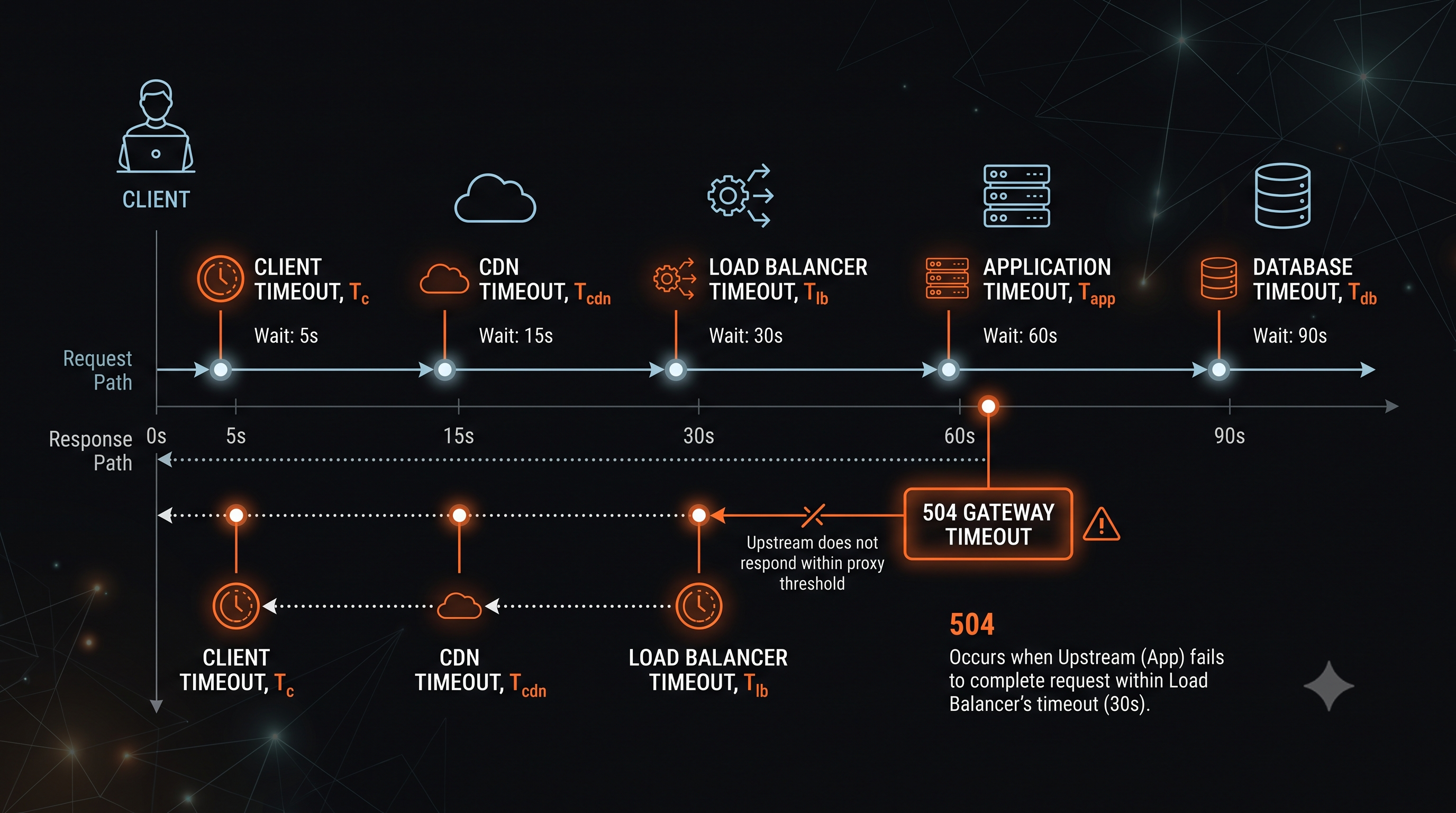
What 504 Gateway Timeout Means
The HTTP Definition
Per RFC 9110, 504 indicates “the server, while acting as a gateway or proxy, did not receive a timely response from an upstream server it needed to access in order to complete the request.”
Key characteristics:
- The proxy/gateway successfully connected to upstream
- The upstream didn’t respond within the timeout period
- The connection was established but no data arrived
- This is a timeout at the proxy level, not the client level
504 vs 502 vs 503
| Code | Meaning | Difference |
|---|---|---|
| 504 Gateway Timeout | No response from upstream | Connection established, waited too long |
| 502 Bad Gateway | Invalid response from upstream | Got a response, but it was malformed |
| 503 Service Unavailable | Server can’t handle request | Server explicitly refused or overloaded |
Common Causes of 504 Gateway Timeout
1. Slow Database Queries
The application waits for a slow query:
-- Query taking longer than proxy timeoutSELECT * FROM large_table WHERE complex_conditions;-- Execution time: 120 seconds-- Proxy timeout: 60 seconds2. External API Calls
Waiting for slow third-party services:
// External API taking too longconst response = await fetch('https://slow-api.example.com/data');// Response time: 90 seconds// Proxy timeout: 30 seconds3. Heavy Computation
CPU-intensive processing blocking the event loop:
// Synchronous heavy computationconst result = calculateLargeDataset(data);// Takes 45 seconds4. Proxy Timeout Too Short
The timeout configuration doesn’t match workload requirements:
# Default timeout may be too shortproxy_read_timeout 60s; # Default in many configurations5. Network Issues
Packet loss or high latency between proxy and upstream:
- Congested network links
- Cross-region calls
- VPN or tunnel overhead
6. Resource Starvation
The upstream server is overwhelmed:
- CPU at 100% for extended periods
- Memory pressure causing swapping
- Disk I/O saturation
Troubleshooting 504 Errors
Step 1: Identify the Timeout Layer
Client → [CDN](/en/learning/cdn/what-is-a-cdn/) → [Load Balancer](/en/learning/performance/what-is-load-balancing/) → App Server → Database ↑ ↑ ↑ ↑ timeout timeout timeout slow queryEach layer has its own timeout. The error comes from whichever times out first.
Step 2: Check Application Logs
# Check for slow operationsgrep -E "(timeout|slow|duration)" /var/log/app/app.log
# Look for database query timesgrep "query.*took.*ms" /var/log/app/database.log
Step 3: Check Proxy/Gateway Logs
Nginx:
tail -f /var/log/nginx/error.log# Look for: "upstream timed out"# Look for: "read timed out"HAProxy:
tail -f /var/log/haproxy.log# Look for: "sH" or "cH" flags for timeoutsAWS ALB/ELB:
Check CloudWatch metrics for TargetResponseTime and HTTPCode_Target_5XX.
Azion:
Real-Time Events → filter by status 504# Check upstream_response_time to confirm which upstream is timing out# Cross-reference with Real-Time Metrics → Edge Application → Request TimeStep 4: Check Database Performance
-- PostgreSQL: Find slow queriesSELECT query, calls, total_time, mean_timeFROM pg_stat_statementsORDER BY mean_time DESCLIMIT 10;
-- MySQL: Check process listSHOW FULL PROCESSLIST;
Step 5: Profile Application Performance
# Use APM tools to identify slow transactions# Node.js: --prof flag# Python: cProfile# Java: JProfiler, YourKitTimeout Configuration Guide
Nginx Timeouts
location /api/ {    proxy_pass http://backend;
    # Time to establish connection    proxy_connect_timeout 10s;
    # Time to send request to upstream    proxy_send_timeout 60s;
    # Time to read response from upstream    proxy_read_timeout 60s;}
Application Server Timeouts
Node.js:
server.setTimeout(120000); // 2 minutesserver.keepAliveTimeout = 65000;Database Timeouts
PostgreSQL:
SET statement_timeout = '60s';MySQL:
SET SESSION max_execution_time = 60000;Client Timeouts
The client timeout should be longer than all upstream timeouts combined:
Client timeout > CDN timeout > LB timeout > App timeoutHow to Fix 504 Errors
1. Increase Timeouts (When Appropriate)
# Only increase if the operation legitimately takes longerproxy_read_timeout 120s;Warning: Don’t mask underlying problems with longer timeouts. Investigate slow operations first.
2. Optimize Slow Operations
Database queries:
-- Add indexesCREATE INDEX idx_user_email ON users(email);
-- Use query hintsEXPLAIN ANALYZE SELECT ...;
Application code:
// Use [caching](/en/learning/cdn/what-is-http-caching/)const cached = await cache.get(key);if (cached) return cached;
// Paginate large resultsconst results = await Model.findAll({ limit: 100, offset: page * 100 });
3. Implement Async Processing
Move long operations to background jobs:
app.post('/api/process', async (req, res) => {  // Start job and return immediately  const job = await queue.add('process', req.body);
  // Return 202 Accepted with job ID  res.status(202).json({    jobId: job.id,    status: 'processing',    statusUrl: `/api/jobs/${job.id}`  });});
app.get('/api/jobs/:id', async (req, res) => {  const job = await queue.getJob(req.params.id);  res.json({    status: job.state,    result: job.returnvalue  });});
4. Use Streaming Responses
For long-running data generation:
app.get('/api/export', (req, res) => {  res.setHeader('Content-Type', 'text/csv');  res.setHeader('Transfer-Encoding', 'chunked');
  // Stream data as it's generated  stream.pipe(res);});
5. Add Circuit Breakers
Fail fast when upstream is consistently slow:
const breaker = new CircuitBreaker(callUpstream, {  timeout: 5000,  errorThresholdPercentage: 50,  resetTimeout: 30000});
breaker.fire()  .catch(() => res.status(503).json({ error: 'Service temporarily unavailable' }));
Timeout Hierarchy Best Practices
Configure timeouts from inside out:
Database: 30s ↓Application: 45s (DB timeout + buffer) ↓Load Balancer: 60s (App timeout + buffer) ↓CDN: 75s (LB timeout + buffer) ↓Client: 90s (CDN timeout + buffer)Rule of thumb: Each layer should timeout slightly before the layer above it.
Monitoring 504 Errors
Track these metrics:
- 504 rate: Percentage of requests timing out
- Upstream response time: P50, P95, P99 latencies
- Connection timeout rate: Failed connection attempts
- Queue depth: Requests waiting for available workers
Alert thresholds:
- 504 rate > 0.01%: Investigate
- P99 response time > timeout threshold * 0.8: Warning
- Any sudden increase in timeouts: Immediate investigation
Frequently Asked Questions
What’s the difference between 504 and 502? 504 means the upstream didn’t respond in time. 502 means the upstream responded but the response was invalid.
What’s the difference between client timeout and 504? Client timeout is the browser giving up. 504 is the proxy/gateway giving up before the client.
Should I retry on 504? Yes, but only for idempotent methods (GET, PUT, DELETE). Use exponential backoff.
How do I set timeouts in Kubernetes? Use timeoutSeconds in probes and configure readinessProbe appropriately.
What’s a reasonable timeout value? Depends on your workload. API calls: 30-60s. Database queries: 5-30s. File uploads: longer.
Why do I see 504 only under load? Resource exhaustion causes slow responses. Check CPU, memory, and connection pool limits.