HTTP status codes are three-digit numbers returned by servers in response to client requests. They indicate whether a request succeeded, failed due to a client error, failed due to a server error, or requires additional action like a redirect. Every HTTP response includes exactly one status code, making them the first piece of information a client or intermediary uses to determine what to do next.
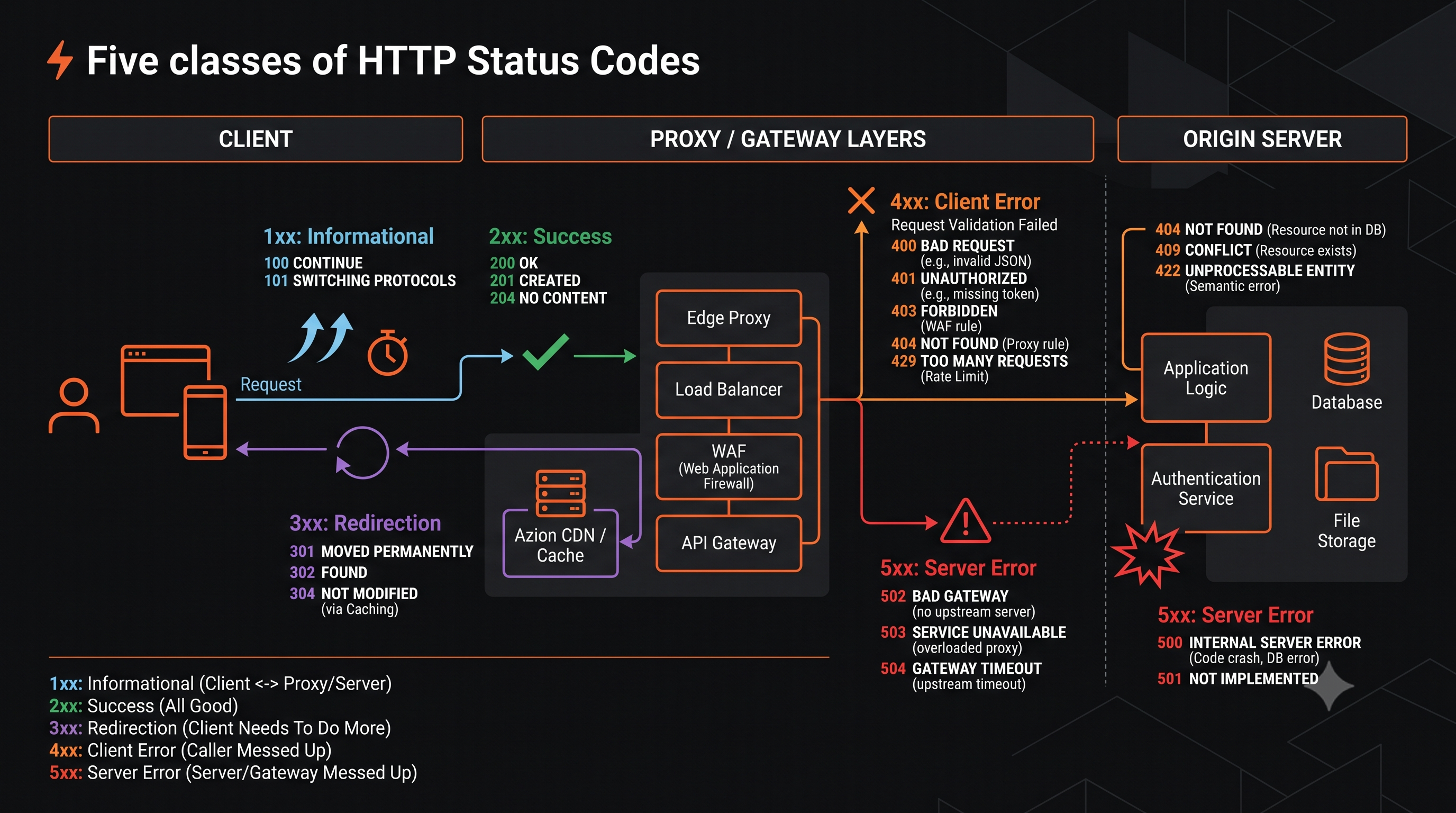
How HTTP Status Codes Work
The Five Status Code Classes
Status codes are grouped into five classes by their first digit:
| Class | Range | Meaning | Example |
|---|---|---|---|
| 1xx | 100-199 | Informational | 100 Continue |
| 2xx | 200-299 | Success | 200 OK, 201 Created |
| 3xx | 300-399 | Redirection | 301 Moved Permanently, 304 Not Modified |
| 4xx | 400-499 | Client Error | 400 Bad Request, 404 Not Found |
| 5xx | 500-599 | Server Error | 500 Internal Server Error, 502 Bad Gateway |
The reason phrase after the code (“OK”, “Not Found”) is informational only. Clients must use the numeric code for decision-making (RFC 9110).
Status Codes and Caching
Not all status codes should be cached. RFC 9111 defines default cacheability:
| Status Code | Cacheable by Default |
|---|---|
| 200, 203, 204, 206, 300, 301, 404, 410 | Yes (unless Cache-Control forbids) |
| 302, 307, 308 | Varies by implementation |
| 304 | Yes (validates cached content) |
| Other 4xx (400, 401, 403, etc.) | No |
| 5xx | No |
Status Codes and Retry Behavior
Clients and proxies use status codes to decide whether to retry:
| Code | Retry Safe? | Retry Behavior |
|---|---|---|
| 408 Request Timeout | Yes | Retry immediately |
| 429 Too Many Requests | Yes | Retry after Retry-After delay |
| 502 Bad Gateway | Idempotent methods only | Retry with backoff |
| 503 Service Unavailable | Yes | Retry after Retry-After delay |
| 504 Gateway Timeout | Idempotent methods only | Retry with backoff |
| 400, 401, 403, 404, 405 | No | Do not retry (client error) |
Common 2xx Success Codes
200 OK
The request succeeded. The meaning depends on the method:
GET: Resource returned in response bodyPOST: Resource created or action completedPUT: Resource updatedDELETE: Resource deleted
201 Created
A new resource was created. Used primarily with POST requests. The response should include a Location header pointing to the new resource.
204 No Content
The request succeeded but there’s no content to return. Common for DELETE requests or PUT updates where the client already has the data.
206 Partial Content
The server is delivering part of a resource. Used with range requests for large files or video streaming.
Common 3xx Redirect Codes
301 Moved Permanently
The resource has permanently moved to a new URL. Clients and search engines should update their records. The Location header contains the new URL.
302 Found (Temporary Redirect)
The resource is temporarily at a different URL. Future requests should continue using the original URL.
304 Not Modified
The resource hasn’t changed since the client’s last request. Used with conditional headers like If-None-Match or If-Modified-Since. Saves bandwidth by not re-sending unchanged content.
307 Temporary Redirect / 308 Permanent Redirect
Like 302 and 301, but preserve the HTTP method. Use 307/308 instead of 302/301 for POST or PUT requests to avoid converting the method to GET.
Common 4xx Client Error Codes
400 Bad Request
The server cannot process the request due to client error. Common causes:
- Malformed JSON or XML in request body
- Missing required parameters
- Invalid parameter values
- Syntax errors in the request
401 Unauthorized
Authentication is required. The client must authenticate before accessing the resource. The response should include a WWW-Authenticate header indicating how to authenticate.
403 Forbidden
The client is authenticated but lacks permission to access the resource. Unlike 401, re-authenticating won’t help—the client simply isn’t allowed.
404 Not Found
The requested resource doesn’t exist. May also be returned instead of 403 for security (to avoid confirming a resource exists).
405 Method Not Allowed
The request method isn’t supported for this resource. The response should include an Allow header listing valid methods.
408 Request Timeout
The server closed an idle connection. The client should retry on a new connection.
429 Too Many Requests
The client has exceeded rate limits. Check the Retry-After header for when to retry.
413 Content Too Large
The request body exceeds the server’s configured limit. The client must reduce the payload size or use chunked upload.
Common 5xx Server Error Codes
500 Internal Server Error
An unexpected error occurred on the server. This is a catch-all for unhandled exceptions and configuration errors. The client cannot fix this issue.
502 Bad Gateway
A proxy or gateway received an invalid response from an upstream server. Common in distributed architectures with load balancers, CDNs, or API gateways.
503 Service Unavailable
The server is temporarily unable to handle requests. Common causes:
- Server is overloaded
- Maintenance in progress
- Resource exhaustion (memory, connections, threads)
The response should include a Retry-After header.
504 Gateway Timeout
A proxy or gateway didn’t receive a response from an upstream server within the timeout period. Unlike 502 (invalid response), 504 means no response arrived at all.
Troubleshooting HTTP Errors
Identify Where the Error Originated
In distributed systems, errors can occur at multiple layers:
Client → [CDN](/en/learning/cdn/what-is-a-cdn/)/Edge → [Load Balancer](/en/learning/performance/what-is-load-balancing/) → API Gateway → Application → Database ↑ ↑ ↑ ↑ ↑ 403/502 502/503 502/504 4xx/5xx 502/504To find the root cause, check logs at each layer. The status code a client sees is the LAST code generated along the path.
Check Headers for Clues
Server: Identifies which software generated the responseX-Cache-Status: CDN cache hit/miss statusX-Request-ID: Correlation ID for tracing across servicesRetry-After: When to retry (429, 503)WWW-Authenticate: Authentication requirements (401)
Distinguish 4xx from 5xx
| Error Type | Who Can Fix | Examples |
|---|---|---|
| 4xx Client Error | Client | Wrong URL, missing auth, bad request body |
| 5xx Server Error | Server administrator | Backend crash, overload, timeout, misconfiguration |
When to Use Each Status Code in Your API
Successful Operations
200 OK: Standard success forGET,PATCH201 Created: Resource created viaPOST202 Accepted: Request accepted for async processing204 No Content: Success with no body (DELETE, somePUT)
Client Errors
400 Bad Request: Invalid input, malformed syntax401 Unauthorized: Missing or invalid authentication403 Forbidden: Authenticated but not authorized404 Not Found: Resource doesn’t exist409 Conflict: State conflict (duplicate, version mismatch)422 Unprocessable Entity: Valid syntax but semantic errors429 Too Many Requests: Rate limit exceeded
Server Errors
500 Internal Server Error: Unexpected server failure502 Bad Gateway: Upstream returned invalid response503 Service Unavailable: Temporary overload or maintenance504 Gateway Timeout: Upstream didn’t respond in time
Metrics and Measurement
Track these metrics to monitor HTTP error patterns:
- 5xx error rate: Target < 0.1% for production services
- 4xx error rate: Monitor for spikes indicating broken clients
- Status code distribution: Sudden changes indicate problems
- Error budget: Percentage of failed requests allowed per SLO
Industry benchmarks:
- 99.9% availability = 8.76 hours downtime/year
- 99.99% availability = 52.56 minutes downtime/year
- Top 5xx causes: deployment bugs (40%), dependency failures (30%), config changes (20%), capacity (10%) (Google SRE)
Common Mistakes and Fixes
Mistake: Returning 200 OK for errors and putting error details in the body
Fix: Always return the correct status code. Intermediaries, monitoring, and clients rely on the numeric code.
Mistake: Using 403 when the user needs to authenticate
Fix: Return 401 for missing authentication, 403 for insufficient permissions.
Mistake: Returning 500 for validation errors
Fix: Use 400 or 422 for client-side validation failures.
Mistake: Not including Retry-After for 429 and 503
Fix: Always include retry guidance to prevent retry storms.
Frequently Asked Questions
What’s the difference between 401 and 403? 401 means “you need to authenticate.” 403 means “you’re authenticated but not allowed.”
Should I return 404 or 403 for resources the user can’t access? Return 404 if you want to hide the resource’s existence. Return 403 if the user knows it exists but lacks permission.
Can I create custom status codes? Yes, but they must follow class semantics (2xx for success, 4xx for client errors, 5xx for server errors). Register custom codes with IANA for public APIs.
How do CDNs handle status codes? CDNs cache based on status code and Cache-Control. Most 4xx and 5xx responses are not cached by default.
What status code should webhooks return? Return 200 OK to acknowledge receipt. Return 202 Accepted for async processing. Any non-2xx will trigger retries from the sending system.
How do HTTP/2 and HTTP/3 change status codes? They don’t. Status codes remain the same across HTTP versions.
Should my API return 500 for business logic errors? No. Use 4xx codes for expected error conditions. Reserve 500 for unexpected technical failures.
What’s the correct code for rate limiting? 429 Too Many Requests, with Retry-After header.