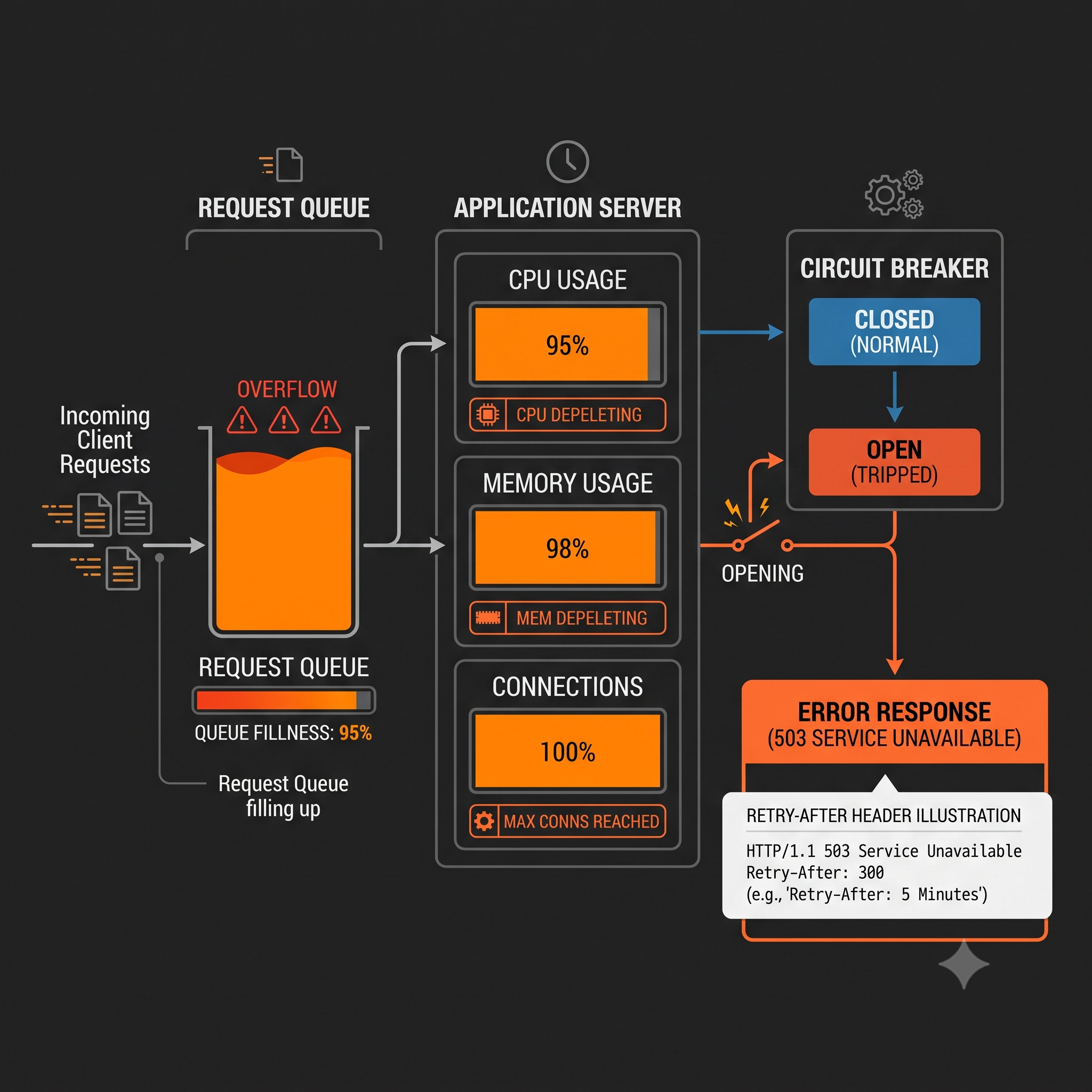
A 503 Service Unavailable error indicates that the server is temporarily unable to handle the request. Unlike 500 (unexpected error) or 502 (bad gateway), 503 specifically signals a temporary condition that may resolve itself—typically overload, maintenance, or resource exhaustion. Within the HTTP status codes 5xx class, 503 is unique because it explicitly tells clients to retry later.
What 503 Service Unavailable Means
The HTTP Definition
Per RFC 9110, 503 indicates “the server is currently unable to handle the request due to a temporary overload or scheduled maintenance, which is likely to be alleviated after some delay.”
Key characteristics:
- The condition is temporary
- Clients should retry after a delay
- The response should include
Retry-Afterheader - The error is server-side, not client fault
503 vs 502 vs 504
| Code | Meaning | Implication |
|---|---|---|
| 503 Service Unavailable | Server can’t handle request now | Temporary, retry later |
| 502 Bad Gateway | Invalid upstream response | Upstream crashed or misconfigured |
| 504 Gateway Timeout | Upstream didn’t respond | Upstream too slow |
Common Causes of 503 Service Unavailable
1. Server Overload
The server has more requests than it can handle:
- CPU at 100%
- Memory exhausted
- Connection pool full
- Thread pool exhausted
2. Scheduled Maintenance
The service is intentionally taken offline:
- Deployments and updates
- Database migrations
- Infrastructure upgrades
- Configuration changes
3. Resource Exhaustion
External dependencies are unavailable:
- Database connection pool exhausted
- Third-party API rate limits hit
- Storage quota exceeded
- File descriptor limits reached
4. Application Not Ready
The application hasn’t finished starting:
- Health check fails during startup
- Warm-up period incomplete
- Dependencies not initialized
5. Circuit Breaker Open
A resilience pattern blocking requests:
// Circuit breaker opened due to upstream failuresif (circuitBreaker.open) { return res.status(503).json({ error: 'Service temporarily unavailable' });}The Retry-After Header
The 503 response should include a Retry-After header:
HTTP/1.1 503 Service UnavailableRetry-After: 120Content-Type: application/json
{  "error": "Service temporarily unavailable",  "retryAfter": 120}
Retry-After Formats
| Format | Example | Meaning |
|---|---|---|
| Seconds | Retry-After: 120 | Retry after 120 seconds |
| HTTP Date | Retry-After: Fri, 26 Jun 2026 12:00:00 GMT | Retry at specific time |
Client Retry Strategy
Clients should:
- Check
Retry-Afterheader first - Use exponential backoff if no header
- Apply jitter to prevent thundering herd
- Give up after max retries
async function fetchWithRetry(url, maxRetries = 3) {  for (let i = 0; i < maxRetries; i++) {    const response = await fetch(url);
    if (response.ok) return response;
    if (response.status === 503) {      const retryAfter = response.headers.get('Retry-After');      const delay = retryAfter        ? parseInt(retryAfter) * 1000        : Math.pow(2, i) * 1000 + Math.random() * 1000;
      await sleep(delay);      continue;    }
    throw new Error(`HTTP ${response.status}`);  }
  throw new Error('Max retries exceeded');}
Troubleshooting 503 Errors
Step 1: Check Server Metrics
# CPU usagetop -bn1 | head -20
# Memory usagefree -m
# Process countps aux | wc -l
# Connection countss -s
Step 2: Check Application Logs
# Look for error patternsgrep -E "(503|overload|capacity|limit)" /var/log/app/error.log
# Check for out-of-memory errorsdmesg | grep -i "out of memory"
Step 3: Check Dependencies
# Database connectionsnetstat -an | grep :5432 | wc -l
# Redis connectionsredis-cli INFO clients
# External API statuscurl -I https://api.example.com/status
Step 4: Check Load Balancer Health
# HAProxy statscurl http://localhost:8404/stats
# Nginx statuscurl http://localhost/nginx_status
# AWS ALB target healthaws elbv2 describe-target-health --target-group-arn arn:...
# Azion: check origin health in Real-Time Metrics → Edge Application → Status Codes# Filter by 503 and correlate with upstream_status field in Real-Time Events
Step 5: Check Rate Limiting
# Nginx rate limit status# Check limit_req logs
# Redis rate limit countersredis-cli GET rate_limit:client_ip
How to Fix 503 Errors
Scale Resources
Add more capacity:
# Kubernetes horizontal scalingkubectl scale deployment app --replicas=10
# Add more servers to pool# Increase instance size# Add read replicas for database
Implement Rate Limiting
Protect server from overload:
# Nginx rate limitinglimit_req_zone $binary_remote_addr zone=api:10m rate=10r/s;
location /api/ {    limit_req zone=api burst=20 nodelay;}
Add Circuit Breakers
Prevent cascading failures:
const CircuitBreaker = require('opossum');
const breaker = new CircuitBreaker(callExternalService, {  timeout: 5000,  errorThresholdPercentage: 50,  resetTimeout: 30000});
breaker.fire()  .catch(() => {    // Return fallback or 503    res.status(503).json({ error: 'Service temporarily unavailable' });  });
Implement Queueing
Queue requests instead of rejecting:
// Use a queue for expensive operationsconst queue = new Queue('processing');
app.post('/api/process', async (req, res) => {  const job = await queue.add(req.body);  res.status(202).json({ jobId: job.id });});
Graceful Degradation
Return cached or simplified responses:
app.get('/api/products', async (req, res) => { try { const products = await getProducts(); res.json(products); } catch (error) { // Return cached products if available const cached = await cache.get('products:fallback'); if (cached) { return res.json(cached); } res.status(503).json({ error: 'Service temporarily unavailable' }); }});Prevention Strategies
1. Auto-Scaling
Scale based on metrics:
- CPU utilization > 70%
- Memory utilization > 80%
- Request queue depth > threshold
- Response time > threshold
2. Health Endpoints
Implement proper health checks:
app.get('/health', async (req, res) => {  const checks = {    database: await checkDatabase(),    cache: await checkRedis(),    memory: process.memoryUsage().heapUsed < 500 * 1024 * 1024  };
  const healthy = Object.values(checks).every(v => v);  res.status(healthy ? 200 : 503).json({ checks, healthy });});
3. Resource Limits
Set appropriate limits:
# Kubernetes resource limitsresources: requests: memory: "256Mi" cpu: "250m" limits: memory: "512Mi" cpu: "500m"4. Connection Pooling
Prevent connection exhaustion:
const pool = new Pool({ max: 20, min: 5, idleTimeoutMillis: 30000, connectionTimeoutMillis: 2000});Monitoring 503 Errors
Track these metrics:
- 503 rate: Percentage of requests returning 503
- Active connections: Current vs maximum connections
- Queue depth: Requests waiting to be processed
- Resource utilization: CPU, memory, I/O
Alert thresholds:
- 503 rate > 0.1%: Warning
- 503 rate > 1%: Critical
- Any 503 during normal traffic: Investigate immediately
Frequently Asked Questions
What’s the difference between 503 and 502? 503 means the server is temporarily overloaded or in maintenance. 502 means the proxy received an invalid response from upstream.
Should I retry on 503? Yes, 503 is explicitly retryable. Check the Retry-After header for guidance.
How long should Retry-After be? Depends on cause: maintenance (known end time), overload (30-120 seconds typical), circuit breaker (configured reset time).
Can I use 503 for rate limiting? 429 Too Many Requests is more appropriate for rate limiting. Use 503 for server-side capacity issues.
How do I test 503 handling? Intentionally return 503 in a test environment, or use chaos engineering tools to simulate overload.
What happens if Retry-After is missing? Use exponential backoff with jitter: 1s, 2s, 4s, 8s, etc., with random jitter added.