A 502 Bad Gateway error occurs when a server acting as a gateway or proxy receives an invalid response from an upstream server. This typically happens in distributed architectures where a load balancer, CDN, or API gateway sits between clients and application servers. Among all HTTP status codes, 502 is one of the most disruptive because it points to a failure between layers—not at the client or the final origin alone.
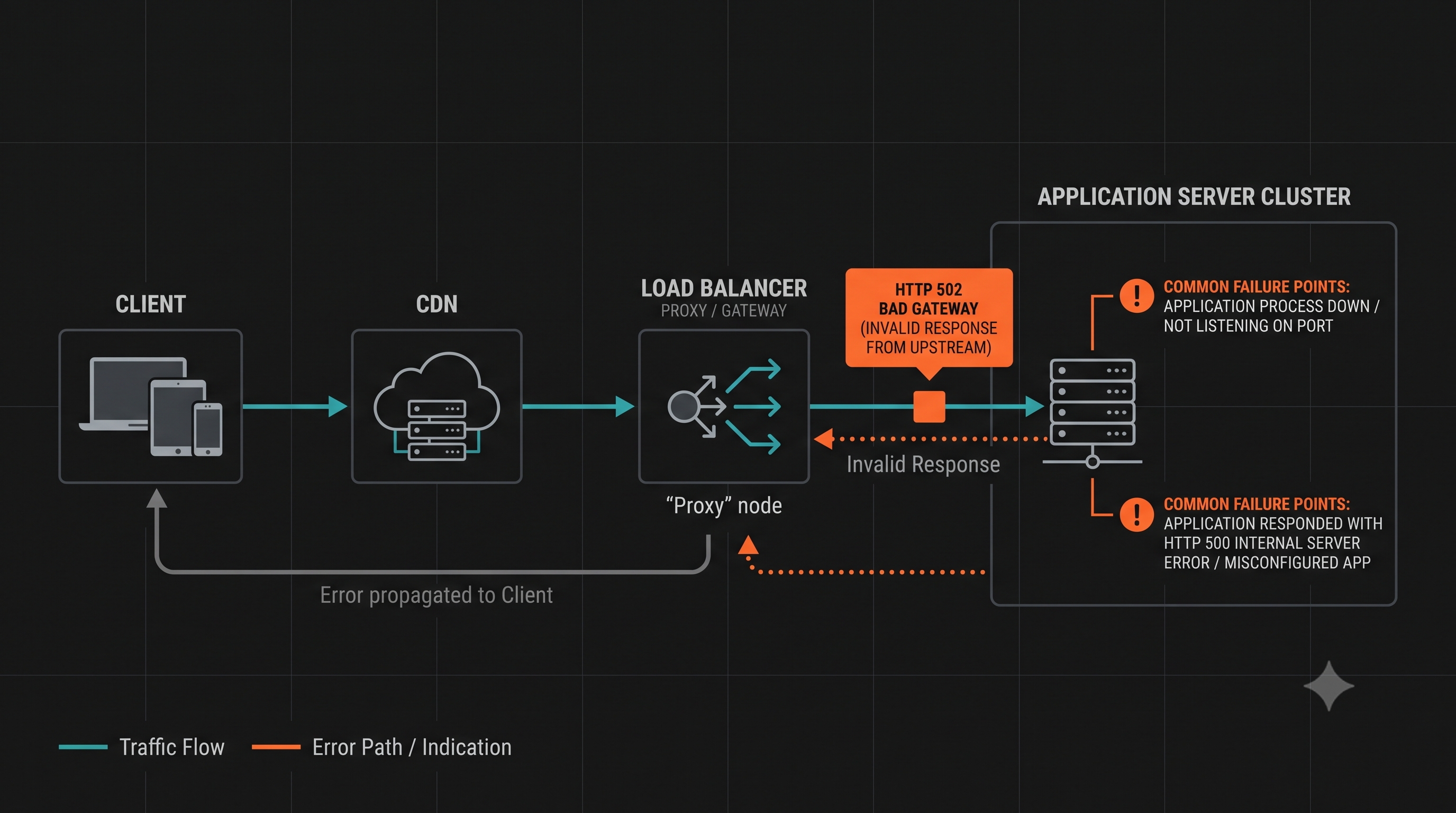
What 502 Bad Gateway Means
The HTTP Definition
Per RFC 9110, 502 indicates “the server, while acting as a gateway or proxy, received an invalid response from an upstream server it accessed while attempting to fulfill the request.”
Key characteristics:
- The server you reached is a proxy, not the origin
- The proxy tried to reach upstream but got a bad response
- “Invalid response” includes malformed HTTP, empty response, or connection reset
502 vs 503 vs 504
| Code | Meaning | Root Cause |
|---|---|---|
| 502 Bad Gateway | Invalid response from upstream | Application crash, malformed response, protocol mismatch |
| 503 Service Unavailable | Server cannot handle request | Overload, maintenance, resource exhaustion |
| 504 Gateway Timeout | No response from upstream | Upstream too slow, timeout exceeded |
Common Causes of 502 Bad Gateway
1. Application Server Not Running
The upstream server isn’t accepting connections:
# Check if application is runningsystemctl status your-appnetstat -tlnp | grep :30002. Application Server Crashed
The process crashed while handling the request:
# Check application logsjournalctl -u your-app -f# Or application-specific logstail -f /var/log/app/error.log3. Protocol Mismatch
The proxy expects HTTP but the upstream sends something else:
- HTTP/1.1 vs HTTP/2 mismatch
- SSL/TLS configuration mismatch
- WebSocket upgrade failures
4. Response Too Large
The upstream response exceeds buffer limits:
Nginx:
# Fix: Increase buffer sizesproxy_buffer_size 128k;proxy_buffers 4 256k;proxy_busy_buffers_size 256k;5. Connection Reset
The upstream closed the connection unexpectedly:
- Application timeout before proxy timeout
- Memory exhaustion causing process kill
- Network issues between proxy and upstream
6. Wrong Port or Address
The proxy connects to the wrong upstream:
# Verify upstream configurationupstream backend { server 127.0.0.1:3000; # Correct address?}Troubleshooting 502 Errors
Step 1: Identify Which Layer Generated the 502
Client → [CDN](/en/learning/cdn/what-is-a-cdn/) → [Load Balancer](/en/learning/performance/what-is-load-balancing/) → API Gateway → Application ↑ ↑ ↑ ↑ 502 502 502 (origin of problem)Check response headers:
Server: Identifies which server respondedX-Cache-Status: CDN informationVia: Proxy chain information
Step 2: Check Upstream Server Health
# Test direct connection to upstreamcurl http://localhost:3000/health
# Check if port is listeningnetstat -tlnp | grep :3000
# Check process statusps aux | grep nodesystemctl status your-app
Step 3: Check Proxy/Gateway Logs
Nginx:
tail -f /var/log/nginx/error.log# Look for: "upstream sent an invalid response"# Look for: "connect() failed"# Look for: "Connection refused"HAProxy:
tail -f /var/log/haproxy.log# Look for: "sH" (502 status)Azion:
Real-Time Events → filter by status 502# Check upstream_cache_status and upstream_response_time fieldsCloud Load Balancer: Check the cloud provider’s logs and metrics dashboards.
Step 4: Check Network Connectivity
# Test from proxy server to upstreamcurl -v http://upstream-server:port/
# Check firewall rulesiptables -L -n
# Check DNS resolutionnslookup upstream-server
Step 5: Compare Timeout Settings
The proxy timeout should be longer than the upstream application timeout:
# Nginx proxy timeoutsproxy_connect_timeout 60s;proxy_send_timeout 60s;proxy_read_timeout 60s;How to Fix 502 Errors
Fix Application Server Issues
# Restart the applicationsystemctl restart your-app
# Check for crashesjournalctl -u your-app -n 100
# Monitor resourcestop -p $(pgrep -f "node.*app")
Fix Nginx Configuration
upstream backend {    server 127.0.0.1:3000 max_fails=3 fail_timeout=30s;    keepalive 32;}
server {    location / {        proxy_pass http://backend;        proxy_http_version 1.1;        proxy_set_header Connection "";
        # Increase timeouts        proxy_connect_timeout 60s;        proxy_send_timeout 60s;        proxy_read_timeout 60s;
        # Increase buffers for large responses        proxy_buffer_size 128k;        proxy_buffers 4 256k;    }}
Fix Health Checks
Ensure the proxy has accurate health checks:
# Nginx passive health checksupstream backend {    server 127.0.0.1:3000 max_fails=3 fail_timeout=30s;}
# Nginx active health checks (requires Plus or third-party module)# HAProxybackend app_servers    balance roundrobin    option httpchk GET /health    server app1 127.0.0.1:3000 check inter 5s fall 3 rise 2
# Azion: configure health checks via Origins settings in the Console# Set health check path, interval, and failure threshold per origin
Implement Circuit Breakers
Prevent cascading failures:
const circuitBreaker = new CircuitBreaker(fetchFromUpstream, {  timeout: 5000,  errorThresholdPercentage: 50,  resetTimeout: 30000});
circuitBreaker.fire()  .catch(err => {    // Return fallback or 503  });
Prevention Strategies
1. Proper Resource Sizing
Monitor and size for peak load:
- Memory per process
- CPU limits
- Connection pool size
- File descriptor limits
2. Graceful Restarts
Use graceful restart to avoid dropped connections:
# Nginxnginx -s reload
# Node.js with PM2pm2 reload app --update-env
3. Health Endpoints
Implement proper health checks:
app.get('/health', (req, res) => { const healthy = checkDatabase() && checkMemory(); res.status(healthy ? 200 : 503).json({ status: healthy ? 'ok' : 'unhealthy' });});4. Rate Limiting
Prevent overload from traffic spikes:
limit_req_zone $binary_remote_addr zone=api:10m rate=10r/s;
location /api/ {    limit_req zone=api burst=20 nodelay;}
Monitoring 502 Errors
Track these metrics:
- 502 rate: Percentage of requests returning 502
- Upstream response time: Time to get response from backend
- Connection errors: Failed connections to upstream
- Process health: Application server availability
Alert thresholds:
- 502 rate > 0.1%: Investigate
- 502 rate > 1%: Critical incident
- Any 502 spike after deployment: Rollback and investigate
Frequently Asked Questions
What’s the difference between 502 and 504? 502 means the upstream sent an invalid response. 504 means the upstream didn’t respond at all (timeout).
Why does 502 happen after deployment? Common causes: application not starting, wrong port, missing environment variables, database migration issues.
How do I fix 502 in Kubernetes? Check pod status, logs, readiness probes, and service selectors.
Can a CDN cause 502 errors? Yes. If the origin returns an invalid response, the CDN will return 502 to the client.
Should clients retry on 502? Only for idempotent methods (GET, PUT, DELETE). Use exponential backoff.
What does Nginx “upstream prematurely closed connection” mean? The application closed the connection before sending a complete response. Check application logs for crashes or timeouts.