A 403 Forbidden error indicates that the server understood the request but refuses to authorize it. The client’s identity is known to the server, but access is explicitly denied. This is different from 401 Unauthorized, which means the client needs to authenticate first. As one of the HTTP status codes in the 4xx client error class, 403 signals an authorization problem—not an authentication one.
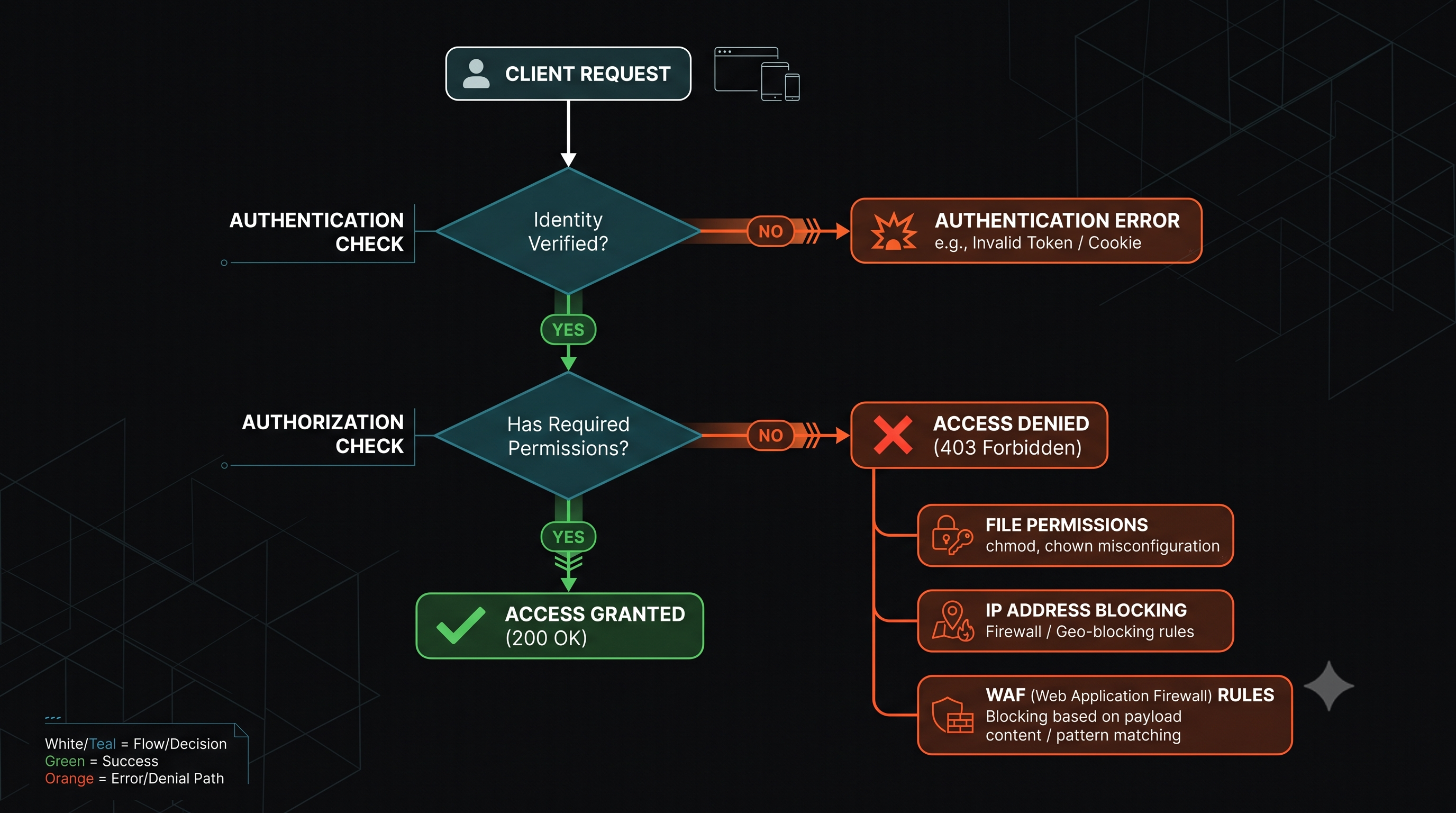
What 403 Forbidden Means
The HTTP Definition
Per RFC 9110, 403 means “the server understood the request but refuses to authorize it.” The key points:
- The server processed the request enough to determine access should be denied
- Authentication is not the issue (that would be 401)
- Authorization is the issue—the user lacks permission
- Repeating the request with the same credentials will not help
403 vs 401 vs 404
| Code | Meaning | When to Use |
|---|---|---|
| 401 Unauthorized | Client must authenticate | No or invalid credentials provided |
| 403 Forbidden | Client lacks permission | Authenticated but not authorized |
| 404 Not Found | Resource doesn’t exist | Resource missing, or hide existence |
For security-sensitive resources, return 404 instead of 403 to avoid confirming the resource exists.
Common Causes of 403 Forbidden
1. File System Permissions
On Unix/Linux systems, the web server process needs read permission on files and execute permission on directories:
# Correct permissions for web contentchmod 644 file.html # -rw-r--r--chmod 755 directory/ # -drwxr-xr-xCommon mistakes:
- Files owned by root with no read permission for web server user
- Directory without execute permission (can’t list contents)
- SELinux or AppArmor blocking access
2. Web Server Configuration
Apache uses .htaccess and main config for access control:
# Deny access to a directory<Directory /var/www/private>    Require all denied</Directory>
# Allow only specific IPs<Directory /var/www/admin>    Require ip 192.168.1.0/24</Directory>
Nginx uses deny and allow directives:
location /private {    deny all;}
location /admin {    allow 192.168.1.0/24;    deny all;}
3. Index Files Missing
When a directory is requested without a filename (e.g., /docs/), the server looks for an index file. If missing and directory listing is disabled:
- Apache:
Options -Indexescauses 403 - Nginx:
autoindex off;(default) causes 403
Fix by adding an index file or enabling directory listing:
DirectoryIndex index.html index.php4. Application-Level Authorization
Modern applications implement authorization in code:
app.get('/admin/users', authenticate, authorize('admin'), (req, res) => { // If authorize middleware fails, returns 403});Common patterns:
- Role-based access control (RBAC)
- Permission-based access control
- Resource ownership checks
- IP allowlisting
5. CDN and WAF Rules
CDNs and Web Application Firewalls can return 403 for:
- Blocked countries or IP ranges
- Rate limiting violations
- WAF rule matches (SQLi, XSS attempts)
- Bot detection rules
- Geographic restrictions
6. CORS Restrictions
Cross-Origin Resource Sharing can trigger 403-like behavior in browsers, though the actual status may be different. CORS preflight failures show as network errors in the browser console.
Troubleshooting 403 Errors
Step 1: Check Server Logs
Apache:
tail -f /var/log/apache2/error.log# Look for: "client denied by server configuration"Nginx:
tail -f /var/log/nginx/error.log# Look for: "forbidden" or "access forbidden by rule"Step 2: Verify File Permissions
ls -la /var/www/html/# Check owner and permissionsnamei -l /var/www/html/file.html# Trace full path permissionsStep 3: Check SELinux/AppArmor
SELinux:
ls -Z /var/www/html/# Check security contextausearch -m avc -ts recent# Search for recent denialsAppArmor:
aa-status# Check profiles and denialsStep 4: Test with curl
curl -v https://example.com/protected/# Check response headers and body for cluescurl -H "Authorization: Bearer token" https://example.com/api/# Test with authenticationStep 5: Check CDN/WAF Logs
If behind a CDN or WAF, check their dashboards for blocked requests. The server may never receive blocked requests.
How to Fix 403 Errors
Fix File Permissions
# Set correct ownershipchown -R www-data:www-data /var/www/html
# Set correct permissionsfind /var/www/html -type d -exec chmod 755 {} \;find /var/www/html -type f -exec chmod 644 {} \;
Fix Apache Configuration
<Directory /var/www/html> Options Indexes FollowSymLinks AllowOverride All Require all granted</Directory>Fix Nginx Configuration
server {    location / {        try_files $uri $uri/ =404;    }
    location /allowed/ {        allow all;    }}
Fix Application Authorization
Ensure your authorization logic returns proper status codes:
function authorize(role) { return (req, res, next) => { if (!req.user) { return res.status(401).json({ error: 'Authentication required' }); } if (!req.user.roles.includes(role)) { return res.status(403).json({ error: 'Insufficient permissions' }); } next(); };}Fix CDN/WAF Rules
Review and adjust:
- IP allowlist/blocklist rules
- Geographic restrictions
- Rate limiting thresholds
- WAF rule sensitivity
When to Use 403 in Your API
Return 403 When
- User is authenticated but lacks required role
- User tries to access another user’s private resource
- Operation is not permitted for this account type
- Resource exists but user has no access
Return 401 When
- No authentication credentials provided
- Invalid or expired token
- Authentication failed
Return 404 When
- Resource doesn’t exist
- You want to hide resource existence (security)
Security Considerations
Information Disclosure
A 403 response confirms the resource exists. For sensitive resources:
- Return 404 instead of 403 for user enumeration protection
- Don’t leak information in error messages
- Log 403s for security monitoring
Proper Error Messages
// Good: Generic message{  "error": "Access denied",  "code": "FORBIDDEN"}
// Bad: Leaks information{  "error": "User 'admin' exists but you don't have permission"}
Metrics and Monitoring
Track 403 rates to detect:
- Authorization misconfigurations (spikes after deployment)
- Attack attempts (brute force, enumeration)
- Legitimate access being blocked (user complaints)
Benchmark: 403 rates should remain stable. Sudden increases indicate issues.
Frequently Asked Questions
Why am I getting 403 but I’m logged in? You may be authenticated but lack the specific permission for this resource. Check your role and permissions.
How do I fix 403 on WordPress? Common causes: file permissions, .htaccess rules, security plugins, or wp-config.php restrictions.
What’s the difference between 403 and 401? 401 means you need to authenticate. 403 means you’re authenticated but not allowed.
Can CDNs cause 403 errors? Yes. CDNs and WAFs can block requests and return 403 for security rules, rate limits, or geographic restrictions.
Should I return 403 or 404 for unauthorized access? Return 404 if you want to hide the resource’s existence. Return 403 if the user should know it exists but can’t access it.
How do I debug 403 in production? Check server logs, verify file permissions, test with different users, and review any WAF/CDN configurations.