The agent that writes your code also suggests your security policy
See how the open-source Azion MCP Server lets coding agents like Claude Code and Codex query Azion docs and propose security policies (WAF, Firewall, rate limiting) via Terraform, for team review before deploy.
OCT 5, 2026 • 9 min read

Marilia Bafutto Costa
Using AI agents in development helps teams write code and add application features faster. To keep pace, security configuration can also be part of the development workflow. Every new page, API endpoint, or integration needs protection that follows the organization’s policies, and the agent that helps create the code can contribute to this step as well.
With access to the platform’s documentation and examples, the agent can prepare configuration proposals for the responsible teams to evaluate before deployment. When the team uses infrastructure as code, these configurations can live in the same repository as the application. The open-sourceAzion MCP Server makes it possible to integrate this step into the development workflow.
What a coding agent can already do today
The coding agent helps the engineering team build applications and suggest security configurations. Used in tools such as Claude Code or Codex, it can consult Azion’s documentation and examples through the Azion MCP Server.
The agent in production, meanwhile, is part of the application: it receives user requests and calls models, APIs, and other services to carry out tasks. The endpoints it exposes can be protected by Azion Firewall, using rules that the coding agent helps prepare and the responsible teams evaluate before applying them.
The tools available in the Azion MCP Server include:
Tool | Purpose |
search_azion_docs_and_site | Searches Azion products, documentation, and website content |
search_azion_code_samples | Searches Azion's collection of code samples |
search_azion_cli_commands | Looks up Azion CLI commands |
search_azion_api_v3_commands / search_azion_api_v4_commands | Looks up API endpoints |
search_azion_terraform | Searches Terraform Provider documentation |
create_rules_engine | Generates Rules Engine configurations |
create_graphql_query | Generates GraphQL queries for analytics |
deploy_azion_static_site | Guides static site deployment |
These tools let the coding agent consult documentation, find examples, and get guidance on working with the Azion Platform. With this context, it can suggest security configurations for the team to evaluate and adjust, without having to start from scratch.
For example, when a configuration is managed through Terraform, the agent can consult the provider documentation to prepare a proposed change. That proposal follows the organization’s review process before it is applied.
A reusable policy for applications and APIs
On Azion, a Firewall brings together security rules, such as WAF enforcement and request limits (rate limiting). Its configuration is created independently of the applications and can be shared across them. An update to the rules can therefore apply to all applications using that Firewall, without having to repeat the change for each one.
Below is an example of a security policy configuration using the Azion Terraform Provider:
resource "azion_waf" "production" {  result = {    name   = "Production WAF"    active = true
    engine_settings = {      engine_version = "2021-Q3"      type           = "score"
      attributes = {        thresholds = [          {            threshold = {              threat      = "sql_injection"              sensitivity = "high"            }          },          {            threshold = {              threat      = "cross_site_scripting"              sensitivity = "highest"            }          }        ]      }    }  }}
resource "azion_firewall_main_setting" "production" {  data = {    name   = "Production Firewall"    active = true
    modules = {      waf                 = { enabled = true }      network_protection  = { enabled = true }    }  }}
resource "azion_firewall_rule_engine" "apply_waf" {  firewall_id = azion_firewall_main_setting.production.data.id  results = {    name        = "Apply Production WAF"    description = "Route all traffic through the WAF policy"    active      = true
    behaviors = [      {        behavior = {          type = "set_waf"          attributes = {            waf_id = azion_waf.production.result.id            mode   = "blocking"          }        }      }    ]
    criteria = [      {        entries = [          {            criterion = {              variable    = "$${uri}"              operator    = "matches"              conditional = "if"              argument    = ".*"            }          }        ]      }    ]  }}
Protection for applications across different environments
Applications and AI agents in production can run in another cloud, on your own infrastructure, or directly on Azion. When traffic passes through Azion Firewall, security rules are applied before the request reaches the application, regardless of where it is hosted.
The Azion MCP Server helps the team explore the platform’s capabilities and prepare configuration proposals for that environment. Real-Time Events, in turn, lets the team investigate traffic and security rule actions on a per-request basis.
Protecting AI agent endpoints
Agents in production expose endpoints and access APIs. Applications developed with coding assistants can also introduce new routes and dependencies. These additions expand the surface the team needs to manage and protect under its existing security policies.
When an agent’s endpoints receive HTTP requests, they can use the same security controls applied to a traditional API, such as WAF, rate limiting, and Bot Manager. Rules are defined according to each endpoint’s needs, taking into account its exposure, traffic volume, and the tasks it allows.
The Terraform example below configures per-IP request limits for endpoints whose paths start with /agent/:
resource "azion_firewall_rule_engine" "rate_limit_agent_endpoints" {  firewall_id = azion_firewall_main_setting.production.data.id  results = {    name        = "Rate Limit Agent-Facing Endpoints"    description = "Limit request rate per client on /agent/* routes"    active      = true
    behaviors = [      {        behavior = {          type = "set_rate_limit"          attributes = {            type               = "second"            limit_by           = "client_ip"            average_rate_limit = 100            maximum_burst_size = 200          }        }      }    ]
    criteria = [      {        entries = [          {            criterion = {              variable    = "$${request_uri}"              operator    = "starts_with"              conditional = "if"              argument    = "/agent/"            }          }        ]      }    ]  }}
Visibility into traffic and blocked requests
Azion brings security controls and observability features together on the same platform. To investigate a request blocked by the WAF, you can query Real-Time Events through the interface or API, using a filter such as host=‘domain.com’ AND waf_block=‘$BLOCK’.
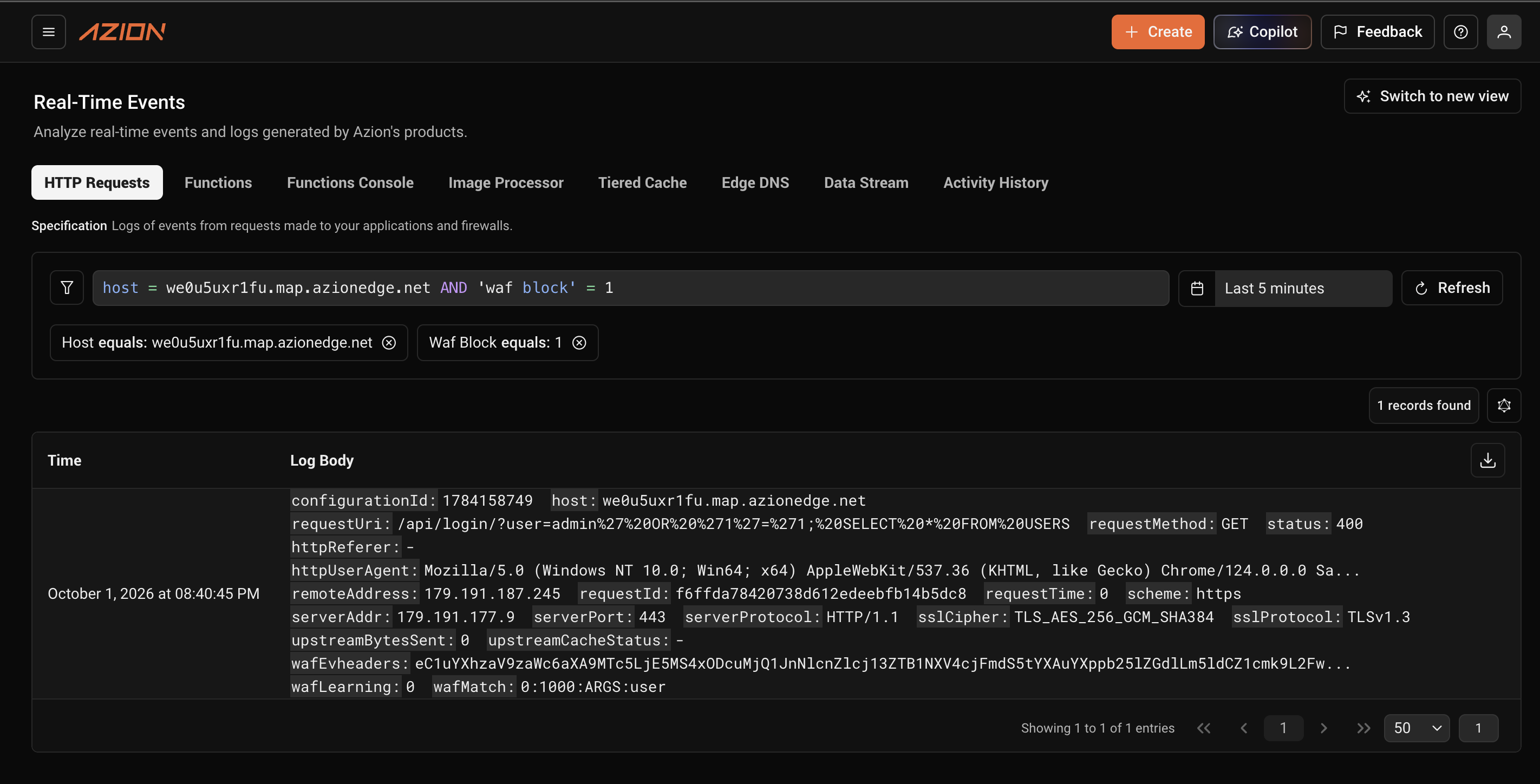
In the event details, the waf_match field helps identify what triggered the rule. In addition to this field,waf_score provides the request’s threat score: the higher the number, the more indicators of an attack were found. This information helps the team investigate the block and evaluate possible configuration adjustments.
The Terraform example below creates a Network List containing Brazil, the United States, and Portugal. This list can be referenced in rules for one or more Firewalls, allowing it to be reused across different security policies.
resource "azion_network_list" "allowed_countries" { results = { name = "Production Allowlist" type = "countries" items = ["BR", "US", "PT"] }}Network Lists simplify the management of lists used in blocking or allow rules. When IPs, ASNs, CIDR blocks, or countries are added to or removed from a Network List, the update automatically propagates to every rule that uses the list, without having to edit each rule separately.
Where mitigation happens
Azion’s proprietary routing technology allows traffic to be redirected within the network without depending on BGP announcement propagation times. Inspection and blocking take place on Azion’s infrastructure: when a Firewall rule blocks a request, it does not reach the origin.
DDoS Protection is always on. It is not sold as a separate product; it is a Firewall module enabled by default, with no configuration required. Bot Manager classifies automated abuse using behavior, fingerprints, and device, browser, and network signals, with thresholds that can be adjusted by the team managing the policy.
Versioned, reusable configurations
For teams that manage configurations as code, the security policy can live in the same repository as the application. In the Azion CLI workflow, the azion.config.ts file declares the configurations that the CLI applies to the platform. This approach is known as infrastructure as code (IaC) and can also be adopted with Terraform. Teams using the Console configure resources through the graphical interface. Your security team evaluates the proposed configuration and, depending on the organization’s process, can approve it during code review.
Configurations can be managed through the Console, API, CLI, or Terraform, depending on the team’s workflow. The coding agent can use the MCP Server to consult documentation and examples that support the preparation of changes.
Traffic and security logs and events become available in Real-Time Events in approximately 30 seconds, with a retention period of 7 days. Data Stream can export these records to tools such as Splunk, Datadog, and other compatible destinations. This data helps teams investigate blocked requests, monitor rule enforcement, and provide evidence for audits.
Security integrated into development
The application and the endpoints exposed by the agent can be protected by the same Firewall, since they receive requests through the HTTP interface. The coding agent that created these endpoints can also suggest security rules, which are evaluated by the responsible teams and, in an infrastructure-as-code workflow, versioned and applied during deployment.
See how the Azion Platform protects applications, APIs, and agents under a single control plane.Start free ortalk to an expert.
Application security at the speed of AI.
Try it out:
- MCP Server repository:github.com/aziontech/mcp-server
- Terraform Provider documentation:azion.com/en/documentation/products/terraform-provider
Frequently asked questions
What is the Azion MCP Server? An open-source (MIT) Model Context Protocol server that gives coding agents, such as Claude Code or Codex, programmatic access to the Azion Platform. It offers tools for consulting documentation and code examples, as well as support for preparing configurations and queries for the platform.
Can a coding agent apply a security policy without human review? This depends on the permissions granted to the agent and the workflow defined by the organization. The agent can help prepare and apply configurations through the CLI, API, or Terraform. Your security team should review the proposed changes before they are applied, following internal review and approval processes.
Does the security policy need to be adjusted for AI agent traffic? Not necessarily. The policy can remain unchanged or include specific rules for agent access, depending on business needs and the sensitivity of each endpoint. An e-commerce business, for example, may allow agents to browse its product catalog while restricting access to the shopping cart or pages containing personal data. On Azion, rules can be configured to handle these types of access differently.

Azion Cells and the Future of Serverless Computing
Explore Azion Cells for ultra-low latency, edge-native applications, built with open standards for secure, high-performance serverless computing.
OCT 14, 2020 • 7 min read

How Azion started using JAMStack
Explore how Azion adopted JAMStack for seamless content scaling, reducing dependency on developers and enhancing web development with SSGs.
MAY 3, 2021 • 4 min read


How JAMStack improved Azion's LCP performance
Discover how Azion's JAMStack integration enhances site performance, reduces resource use, and improves LCP for optimal loading times.
JUN 1, 2021 • 5 min read
Subscribe to our Newsletter
Get the latest product updates, event highlights, and tech industry insights delivered to your inbox.