Introduction: Decoupling AI from Data with the Model Context Protocol (MCP)
For modern enterprises, latency is the hard limit of your AI’s intelligence. The 200-500ms latency of centralized architectures isn’t just slow; it’s a strategic liability that leaks revenue and invites attack, stunting the AI agents that were promised to transform your business. The ‘real-time’ AI you were promised is a myth on current cloud architecture.
Large Language Models (LLMs) hold immense potential, but their default state—hallucinating from proprietary, real-time data—creates a drag on revenue and introduces unacceptable risk. This fundamental gap means LLMs are unaware of an organization’s internal APIs, live databases, and operational contexts, forcing developers to build brittle, tightly-coupled integration solutions, unsustainable spaghetti code that is costly and fails to scale.
To address this critical challenge, Anthropic developed the Model Context Protocol (MCP), an open-source standard designed to serve as a universal, standardized bridge between LLMs and external contexts. MCP’s core purpose is to decouple the AI from the data and tools it needs to interact with, allowing any compatible client to connect to third-party AI capabilities without rigid, custom integrations. In essence, MCP functions like a “USB port” for AI, providing a standard interface where various accessories—such as internal APIs, live data feeds, or specialized functions—can be seamlessly connected to enhance the model’s power.
The following paragraphs demonstrate that deploying MCP servers on a serverless decentralized platform like Azion provides the optimal architecture for achieving the low latency, high scalability, and robust security required for production-grade AI applications. By moving the connection point between the LLM and its context to the network edge, organizations can build fast, secure, and reliable AI-powered systems that modern businesses demand.
Building another custom, tightly-coupled integration for your LLM isn’t innovation—it’s technical debt in a new wrapper. Running MCP in a centralized region is like putting a Ferrari engine in a golf cart. It’s the on-prem server rack of the AI era. We will now explore the fundamental components of the protocol that make this possible.
The 3 Core Primitives: How MCP Gives Your AI Sight, Tools, and Memory
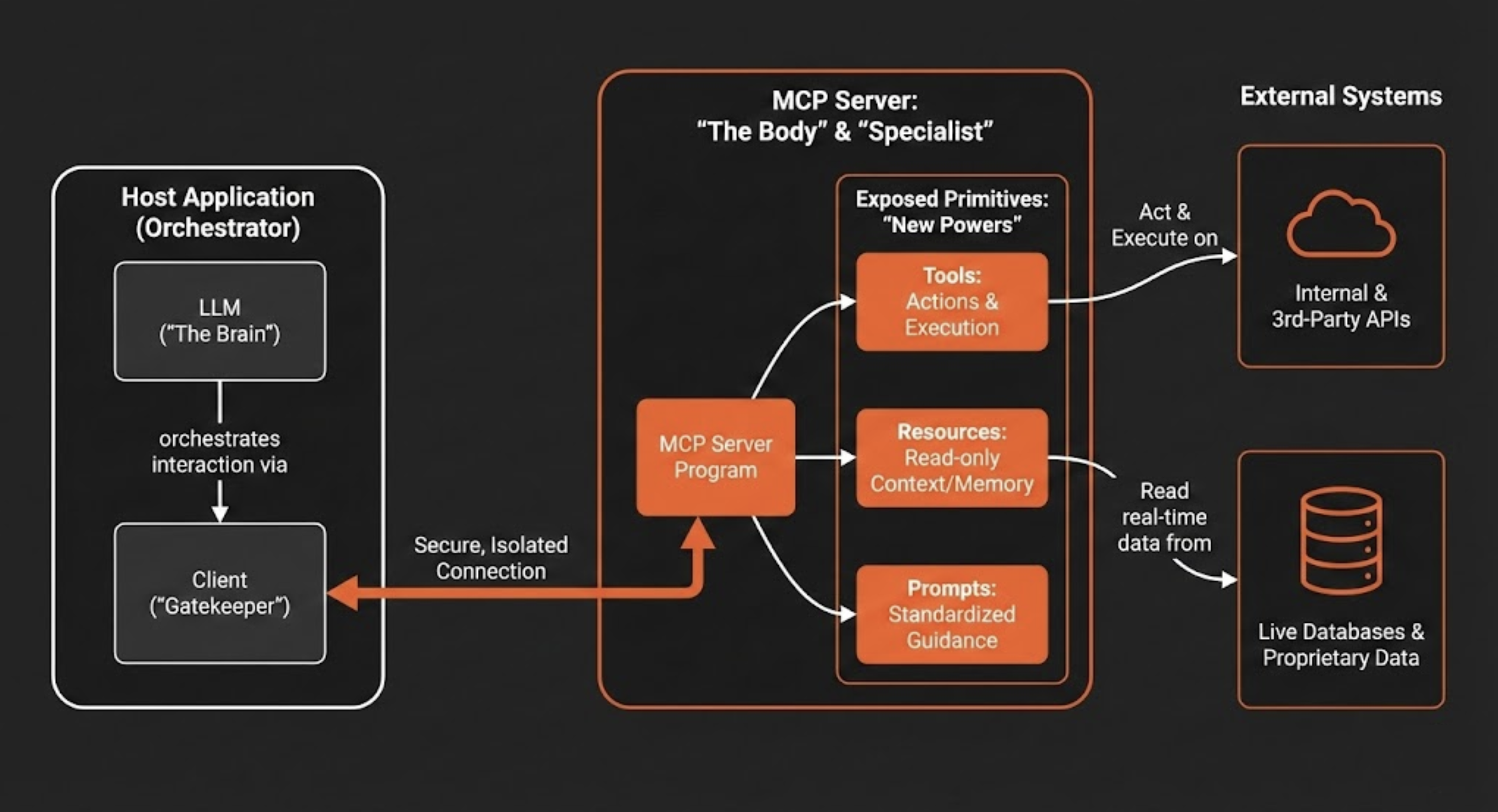
Understanding the strategic design of MCP’s client-server architecture is essential for appreciating its power. This deliberate separation of concerns is what enables AI systems to be more modular, scalable, and secure. The application containing the LLM (the host) is distinct from the server that provides access to external systems, creating a clear boundary for managing permissions and data flow. The architecture is composed of three key components:
- Host: This is the user-facing application (e.g., a chatbot, a code IDE like Cursor, or an enterprise software tool) that contains the LLM and orchestrates the interaction.
- Client: The host application manages one or more clients. Each client maintains an independent and isolated connection to a single MCP server, ensuring that contexts do not bleed into one another. It’s not just maintaining connections; it is the “Gatekeeper.” It enforces strict isolation so that your HR data context never bleeds into your Marketing copy context.
- Server: The MCP server is an independent program that acts as a secure connector. It provides specialized context and capabilities to the AI application by exposing a standardized interface for interacting with external systems like databases, APIs, and proprietary enterprise tools. Stop building ‘God-mode’ bots. Build specialized MCP Servers that do one thing perfectly.
This architecture enables an LLM to access and utilize external capabilities through three fundamental primitives that an MCP server exposes. These primitives give the AI new “powers” to see, act, and communicate in a structured manner.
Comparatively, the host acts as the Brain (Intelligence), the Server is the Body (Capabilities), and the Connections act as The Nervous System. In other words, an LLM without an MCP server is a brain in a jar—smart, but utterly powerless to affect the physical world.
- Tools → The Difference Between Talking and Doing
Tools are executable functions that empower an LLM to perform actions. A tool can range from a simple calculator to a complex workflow that invokes internal or third-party APIs. When an LLM determines that an action is needed to fulfill a user’s request, it can call the appropriate tool exposed by the MCP server, such asdeploy_azion_static_siteto orchestrate a deployment,create_graphql_queryto fetch analytics data, orcreate_rules_engineto configure application behavior. - Resources → The Grounding for Hallucination
Resources are read-only data sources that provide the LLM with additional context, acting as a form of extended memory. Their primary purpose is to provide the factual grounding necessary to combat model “hallucinations.” By ensuring responses are based on verifiable data, resources improve the reliability of the AI. Examples include the contents of a file, the schema of a database, real-time status from an API response, or the current state of a pull request. - Prompts → Codifying Institutional Knowledge
Prompts are pre-defined, shared templates that guide the AI’s interaction with specific tools and resources. They ensure that interactions are consistent, high-quality, and aligned with organizational standards. For example, marketing teams could use standardized prompts to generate campaign copy, while design teams could use pre-configured prompts to create brand-aligned images, ensuring everyone uses the same tested and optimized instructions.
By understanding these core components and primitives, it becomes clear how MCP provides a structured framework for extending AI. The next critical consideration is where to run this architecture to maximize its effectiveness.
Why Your “Real-Time” AI is a Lie (And How to Fix It)
The performance and reliability of an AI application are critically dependent on the underlying infrastructure. While traditional centralized cloud architectures have been the standard for years, they introduce a significant bottleneck for real-time AI: network latency. The round-trip time required for data to travel from a user’s device to a distant cloud data center and back undermines the interactive, responsive nature that defines a high-quality AI experience. Deploying MCP servers on Azion’s serverless edge platformdirectly addresses this challenge, creating the ideal environment for high-performance AI.
Minimal Latency
By executing both MCP server logic and AI models directly on edge nodes geographically close to the end-user, Azion drastically reduces network round-trip time. While cloud-hosted AI inference endpoints commonly land in the 200–500ms median latency range—an eternity for real-time applications—an edge-first architecture that runs the complete AI stack locally enables the sub-100ms response times, essential for interactive experiences. Use cases like real-time personalization, dynamic pricing, and instant fraud detection, where AI-powered decisions must be made in the blink of an eye, become not just possible but practical when both the orchestration layer (MCP) and the intelligence layer (LLM inference) operate at the edge.
Elastic Scalability and High Availability
AI workloads are often variable and unpredictable. Azion’s serverless Functions,together with AI Inference, are designed to scale automatically and globally in response to demand, ensuring the MCP server can handle sudden traffic spikes without manual intervention or performance degradation. This distributed architecture also provides inherent high availability; if one edge location experiences an issue, traffic is seamlessly rerouted to the nearest healthy node, keeping the application operational.
Enhanced Security and Data Sovereignty
Processing sensitive data at the servers, within the user’s geographic region, is a powerful strategy for compliance and security. It helps organizations adhere to data residency regulations like GDPR by minimizing the transmission of personal information across borders. Furthermore, by processing requests locally, this architecture reduces exposure by minimizing the need to transmit data over less secure public networks, shrinking the overall attack surface.
Cost-Effectiveness
Azion Functions operate on a “scale-to-zero” model, a hallmark of serverless computing. This means you only pay for the compute resources when your MCP server is actively processing a request. For applications with variable or intermittent traffic, this model is far more cost-effective than maintaining and paying for idle, centralized servers, ensuring that infrastructure costs align directly with usage.
These architectural advantages establish the “why” of running MCP on a decentralized infrastructure. The next section will detail the “how” by providing a practical implementation guide.
Deploy in <5 Minutes: Your Step-by-Step Guide to a Low-Latency MCP Server
This section provides a practical, step-by-step guide for developers to create and deploy a functional MCP server using Azion Functions. The process is streamlined to enable rapid deployment, allowing you to connect your AI to external tools and data in minutes.
Creating the Azion Function
The initial setup is completed through the Azion Console with a few simple steps:
- Access the Azion Console.
- In the top-left menu, navigate to the Functions section.
- Click + Function.
- Assign a descriptive name to your function.
- Select the Application runtime environment.
- Paste your server code into the Code tab.
Once the function is created, you can implement your MCP server using one of two primary approaches, each suited for different levels of control and complexity.
Option 1: The High-Level McpServer
This approach is ideal for rapid development and simplicity. The McpServer class abstracts away much of the boilerplate, allowing you to quickly register your tools, resources, and prompts with simple method calls.
import { Hono } from 'hono'import { StreamableHTTPServerTransport } from '@modelcontextprotocol/sdk/server/streamableHttp.js'import { toFetchResponse, toReqRes } from 'fetch-to-node'const app = new Hono()const server = new McpServer({  name: "azion-mcp-server",  version: "1.0.0"});
server.registerTool("add", {  title: "Addition Tool",  description: "Adds two numbers",  inputSchema: {    a: z.number(),    b: z.number()  }}, async ({ a, b }) => ({  content: [{    type: "text",    text: String(a + b)  }]}));
server.registerResource(  "greeting",  new ResourceTemplate("greeting://{name}", {    list: undefined  }), {    title: "Greeting Resource",    description: "Dynamic greeting generator"  },  async (uri, { name }) => ({    contents: [{      uri: uri.href,      text: `Hello, ${name}!`    }]  }));
app.post('/mcp', async (c: Context) => {  try {    const { req, res } = toReqRes(c.req.raw);    const transport: StreamableHTTPServerTransport = new StreamableHTTPServerTransport({      sessionIdGenerator: undefined    });    await server.connect(transport);    const body = await c.req.json();    await transport.handleRequest(req, res, body);    res.on('close', () => {      console.log('Connection closed.');      transport.close();      server.close();    });    return toFetchResponse(res);  } catch (error) {    console.error('Error handling MCP request:', error);    const { req, res } = toReqRes(c.req.raw);    if (!res.headersSent) {      res.writeHead(500).end(JSON.stringify({        jsonrpc: '2.0',        error: {          code: -32603,          message: 'Internal server error'        },        id: null,      }));    }  }});
export default app
Option 2: The Low-Level Server
For developers who require more granular control, the low-level Server class is the preferred choice. This approach is necessary for implementing complex custom logic, integrating with legacy systems that require specific data transformations, or fine-tuning performance-critical request/response pathways that the high-level McpServer abstraction may obscure. It requires you to implement the request handlers for each MCP operation directly, giving you complete authority over how the server responds.
import { Hono } from 'hono';import { StreamableHTTPServerTransport } from '@modelcontextprotocol/sdk/server/streamableHttp.js';import { Server } from '@modelcontextprotocol/sdk/server/index.js';import {  CallToolRequestSchema,  ListToolsRequestSchema,  ErrorCode,  McpError,} from '@modelcontextprotocol/sdk/types.js';import { toFetchResponse, toReqRes } from 'fetch-to-node';
// 1. Define your tools manually (or fetch them from your database)const TOOLS = [  {    name: "calculate_sum",    description: "Adds two numbers together",    inputSchema: {      type: "object",      properties: {        a: { type: "number" },        b: { type: "number" }      },      required: ["a", "b"]    }  }];
// 2. Initialize the Server instanceconst server = new Server({  name: 'azion-low-level-mcp',  version: '1.0.0',}, {  capabilities: {    tools: {}, // Advertise that this server supports tools  },});
// 3. Register the Handler for Listing Toolsserver.setRequestHandler(ListToolsRequestSchema, async () => {  return {    tools: TOOLS,  };});
// 4. Register the Handler for Calling Toolsserver.setRequestHandler(CallToolRequestSchema, async (request) => {  const { name, arguments: args } = request.params;
  if (name === "calculate_sum") {    // Runtime validation of arguments is crucial in low-level implementations    if (!args || typeof args.a !== 'number' || typeof args.b !== 'number') {      throw new McpError(ErrorCode.InvalidParams, "Invalid arguments for sum");    }
    const result = args.a + args.b;
    return {      content: [{        type: "text",        text: String(result)      }]    };  }
  throw new McpError(ErrorCode.MethodNotFound, `Tool not found: ${name}`);});
const app = new Hono();
// 5. Connect the Hono HTTP adapter to the MCP Transportapp.post('/mcp', async (c) => {  try {    const { req, res } = toReqRes(c.req.raw);
    // Create the specialized transport for streaming over HTTP    const transport = new StreamableHTTPServerTransport({      sessionIdGenerator: undefined, // default    });
    await server.connect(transport);
    // Process the JSON-RPC message    await transport.handleRequest(req, res, await c.req.json());
    // Cleanup when connection closes    res.on('close', () => {      transport.close();      server.close();    });
    return toFetchResponse(res);
  } catch (error) {    console.error('Error handling MCP request:', error);    return c.json({        jsonrpc: '2.0',        error: {          code: -32603,          message: 'Internal server error'        },        id: null    }, 500);  }});
export default app;
To assist developers using the low-level Server approach, the following tables provide a quick reference for the available request handler schemas.
Table 1: Schemas for Listing Properties
Schema | Description |
| Lists available tools. |
| Lists available resources. |
| Lists available prompts. |
Table 2: Schemas for Invoking Properties
Schema | Description |
| Invokes a specific tool. |
| Reads data from a resource. |
| Retrieves a specific prompt. |
With a functional server deployed, the next imperative is to ensure it is fortified against potential threats.
AI Security 101: Why Your Agent Needs a Security Clearance, Not a Master Key
Deploying an MCP server requires a robust security posture. Because AI agents can perform actions on behalf of a user, they create a complex new attack surface that traditional security models are ill-equipped to handle. The only viable approach is a zero-trust model, which operates on the principle of “never trust, always verify.” Every request and interaction must be authenticated and authorized, regardless of its origin. This vigilance is necessary to protect against a range of novel threats.
The primary security risks associated with MCP servers include:
- Prompt Injection: A dangerous attack where a malicious actor embeds hidden instructions within a seemingly harmless user prompt. Because LLMs often don’t differentiate between system instructions and user input, these hidden commands can deceive the model into performing unauthorized actions, such as extracting sensitive files or sending malicious emails.
- Confused Deputy Problem: This vulnerability arises when an AI agent with elevated privileges is tricked by a user with lower privileges into misusing its authority. For example, a low-privilege user could craft a request that causes a high-privilege AI to access or modify resources that the user themselves should not be able to reach.
- Unauthorized Command Execution: If an MCP server is not run in a properly isolated environment, an attacker could potentially exploit a vulnerability to execute arbitrary code on the host system. This represents a critical security failure that could lead to a complete system compromise.
To defend against these threats, a multi-layered, zero-trust security strategy is essential. The following mitigation tactics form the foundation of a secure MCP deployment.
- Isolate Execution Environments: Every MCP server should be treated as untrusted code and deployed in a sandboxed environment. Secure serverless platforms like Azion provide this isolation by default, preventing a compromised server from accessing the underlying host system or other services.
- Implement Robust Authentication and Authorization: Access to tools, resources, and prompts must be strictly controlled. Implementing modern standards like OAuth for authentication and Role-Based Access Control (RBAC) is critical. This ensures that only authorized users and systems can invoke specific tools or access sensitive data, enforcing the principle of least privilege.
- Leverage Integrated Threat Intelligence: A mature platform must provide integrated, real-time threat detection. Azion’s Web Application Firewall (WAF)acts as a crucial defensive perimeter, inspecting traffic and blocking malicious payloads (OWASP TOP10)—such as prompt injection signatures—before they can compromise the MCP server. Azion Functions can also be tailored to work as a programmable and extensible barrier to your applications to promote Custom Security Logic and Predictive Analysis for Security, for example.
A strong security posture protects the integrity of your AI systems. The next step is to ensure they are performing optimally as well.
Beyond Latency: The 4 Metrics That Actually Define a Winning AI Agent
Traditional server performance metrics, such as CPU utilization or basic response time, are insufficient for evaluating the health and success of an AI system. For MCP servers, success is not just about how fast a server responds; it’s about the quality, speed, and reliability of the entire end-to-end user interaction. Therefore, a more holistic set of metrics is required to truly understand performance.
The key performance indicators (KPIs) for a healthy MCP server implementation include:
- Time to First Token (TTFT): This measures the time from when a user submits a request to when the first piece of the AI-generated response appears. TTFT is a critical metric for user-perceived responsiveness, as a low value makes the application feel fast and interactive, even if the full response takes longer to generate.
- Throughput: Defined as the number of requests or tokens the system can process per unit of time, throughput is a measure of the server’s capacity. High throughput ensures that the application can handle peak loads and scale effectively without degrading performance for individual users.
- Groundedness: This is a quality metric that evaluates how well the model’s response is supported by the context provided by the MCP server. High groundedness indicates that the AI is relying on factual data from your tools and resources, which is the direct opposite of a model “hallucinating” or inventing information.
- Task Completion Rate: For AI agents designed to perform complex, multi-step tasks, this metric measures the percentage of those tasks that are completed successfully. It is a direct indicator of the agent’s reliability and practical utility.
The following table summarizes key metrics, their importance, and typical performance targets for AI systems deployed on a high-performance platform.
Metric | Why it matters | Typical Target |
p95 Latency | Keeps tail-end slowdowns in check | < 150 ms end-to-end |
Time to First Token | Improves perceived performance | < 400 ms |
Throughput Metrics | Ensures capacity under load | Sustained RPS Target |
Semantic Search Accuracy | Protects response quality | 85–95% per intent |
To effectively track these metrics, a robust observability platform is essential. Using open standards like OpenTelemetry allows developers to instrument every component of the system—from the function to the database calls—and aggregate performance data. Integrated platform tools like Azion’s Real-Time Metrics and Data Stream provide a unified dashboard for this data, creating a single source of truth that is invaluable for troubleshooting bottlenecks and ensuring a high-quality user experience.
Monitoring performance ensures operational excellence; the final step is seeing the results in production.
Conclusion: MCP on the Edge isn’t an Upgrade—It’s a Prerequisite
The Model Context Protocol (MCP) has emerged as a vital open standard, providing a secure and scalable framework for connecting Large Language Models to the live data and interactive tools they need to be truly effective. By creating a universal interface, MCP eliminates the need for brittle, custom integrations and unlocks the full potential of AI agents to act as intelligent partners in complex workflows.
As this text has demonstrated, the protocol’s power is only fully realized when deployed on an architecture designed for the demands of modern AI. A serverless decentralized platform like Azion represents the superior architectural choice, directly addressing the critical requirements of reduced round-trip time, elastic scalability, and robust security. It enables the sub-100ms interactions that define real-time applications, ensures global availability and compliance with data sovereignty regulations, and provides a cost-effective, pay-as-you-go operational model.
The combination of MCP and serverless edge computing is more than just a technical solution; it is a strategic enabler. It means that the gap between the edge-native leaders and the cloud-native laggards is widening every hour. You can either build the infrastructure of the future today or pay the technical debt of the past for the next decade.
Start free today or send us an email to sales@azion.com.
FAQs: Model Context Protocol on Edge
Q: What is Model Context Protocol (MCP)?
A: MCP is an open-source standard from Anthropic that connects LLMs to external data sources and tools through a universal interface, eliminating custom integrations.
Q: Why deploy MCP servers on edge vs cloud?
A: Edge deployment reduces latency from 200-500ms to <100ms, provides automatic global scaling, ensures GDPR compliance, and cuts costs by 70% with pay-per-use billing.
Q: What’s the difference between MCP tools and resources?
A: Tools are executable functions (actions the AI can perform). Resources are read-only data sources (context that prevents hallucinations).
Q: Is MCP secure for production AI deployments?
A: Yes, with proper implementation: sandboxed execution, OAuth authentication, RBAC authorization, edge WAF protection, and comprehensive audit logging.
Q: How long does the MCP server deployment take?
A: Initial deployment: 5 minutes. Production-ready with security: 2-4 weeks following the implementation checklist.
Q: What are typical MCP performance targets?
A: TTFT <400ms, p95 latency <150ms, groundedness 85-95%, sustained throughput matching your traffic patterns.
Q: Can MCP work with any LLM?
A: MCP is an open standard. Any compatible client can connect to MCP servers, though implementation quality varies by provider.
Q: What’s the ROI of edge MCP deployment?
A: 3-5x latency improvement, 23% conversion rate gains (e-commerce), 70% infrastructure cost reduction, and new real-time AI capabilities previously impossible.