

Among Black Friday bots, the one that costs a store the most is rarely the one trying to take the site down. It is the one that buys the deal inventory before customers can, tests leaked passwords on the login page and stolen cards at checkout, and collects prices for a competitor, while the real customer finds the product sold out or a checkout slower than it should be.
Protecting e-commerce from bots like these comes down to three decisions: scoring automation on the paths where it causes losses, giving anyone who was misclassified a way through, and calibrating protection before the peak with the store’s own traffic, instead of adjusting it in the middle of the event. Below, see how to build this protection on Azion, from login to the app’s APIs, and how to measure whether it worked. The same plan applies to any sales peak, such as Cyber Monday, the holidays, and product launches.
What changes in bot traffic on Black Friday?
On sale days, contested inventory, accounts with stored balances, and promotional prices are worth more to bot operators, and that is where automation turns its attention.
This traffic concentrates in three types of attack, each at a different point in the store:
- Scalping and hoarding, in which bots buy or hold in the cart the inventory of the most contested deals, either to resell it or simply to take it out of circulation.
- Credential stuffing and card testing, in which bots try lists of passwords leaked from other services on the login page and stolen card numbers at checkout, to find out which ones still work.
- Price and inventory scraping, in which competitors and resellers collect the store’s pages and APIs to track prices and availability.
The damage does not always come with volume, since a script that tests cards can go unnoticed in traffic charts and still generate chargebacks, which is why protection starts with the paths where each request is worth the most.
Why do login, sign-up, and checkout need different treatment?
Not every page in the store deserves the same rigor. A search engine bot on the storefront is welcome, while an automated login attempt can end in a compromised account, and that is why the use case Block account takeover on login and checkout flows applies Bot Manager only to login, sign-up, and checkout, with a different response for each.
On login and sign-up, anyone who reaches the score limit defined by the team, the threshold, is redirected to a challenge, ALTCHA, an open source alternative to CAPTCHA that runs as a function in the firewall, and a person who solves it continues without being challenged again. At checkout, the response is a block with 403, because a card-testing script does not solve challenges and a customer with a payment in progress should not be interrupted by one.
The WAF (Web Application Firewall) covers the same three paths, looking for attack payloads such as injection in a form field, which Bot Manager does not inspect.
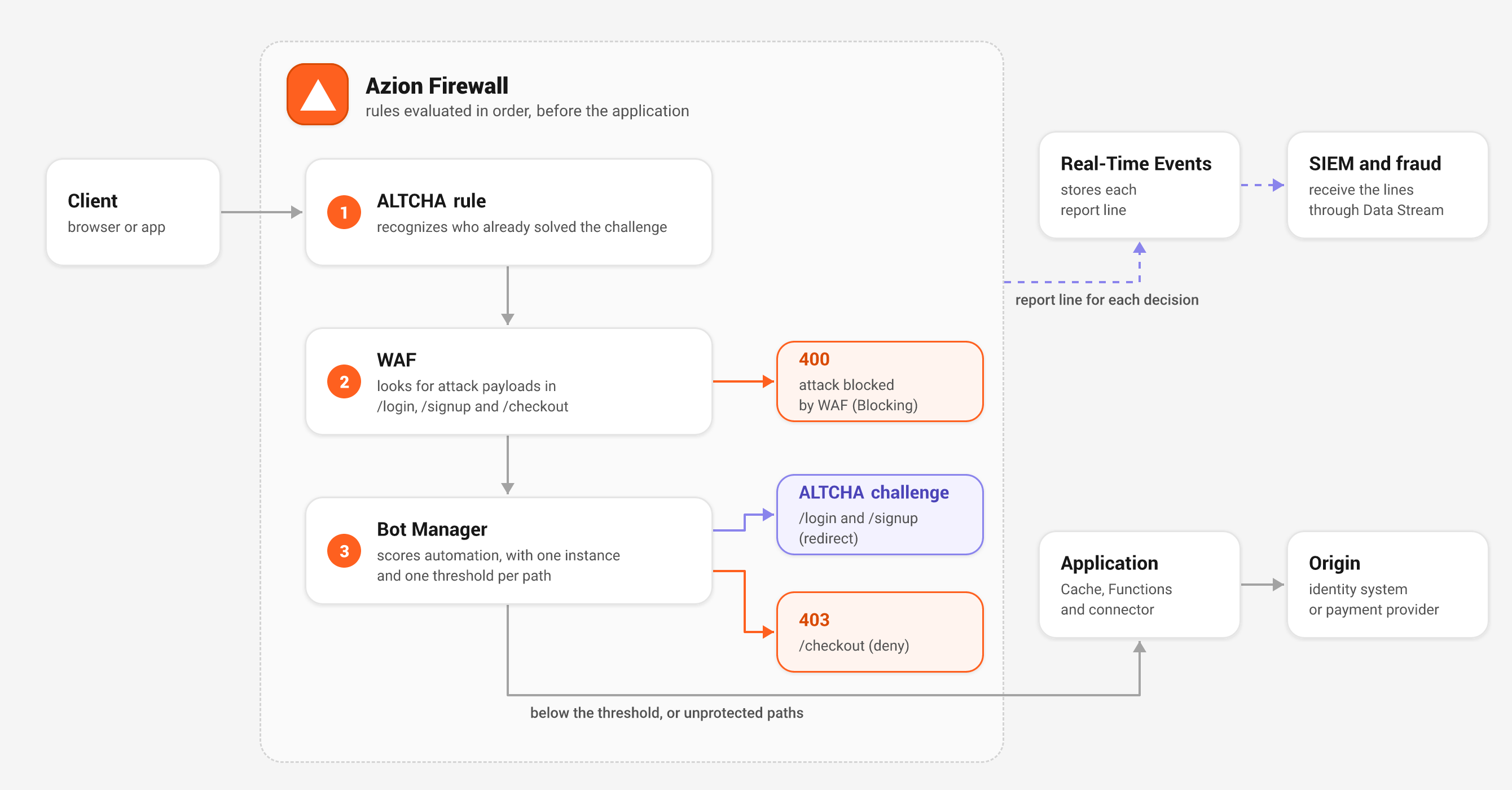
In the online fraud prevention architecture, the request passes through the firewall in this order: first the ALTCHA rule, which recognizes anyone who has already solved the challenge, then the WAF, and finally one Bot Manager instance per path type.
Only what stays below the threshold reaches the application and, from there, the identity system or payment provider, and each decision becomes a report line that goes to Real-Time Events and, through Data Stream, to the fraud team’s tools.
How bot management works in Bot Manager
Bot Manager, Azion’s bot management solution, does not make a yes-or-no decision. Each rule the request triggers adds points to a score, and the rules fall into six classes, which are malicious bot signatures, scripted bots, malicious browser behavior, malicious intent, reputation intelligence, and cloud providers, as explained on the bot scoring page. The action only fires when the score reaches the threshold your team defined, and whatever stays below it continues to the application.
Each request also receives a verdict, which can be legitimate traffic, good bot, malicious bot, or under evaluation, and a client seen for the first time stays under evaluation for up to 15 minutes instead of being refused for being new, which matters on a day when many people visit the store for the first time.
When the score reaches or exceeds the threshold, Bot Manager executes one of seven actions, listed on the arguments page:
| Action | What it does |
|---|---|
allow | Lets the request through, whatever the score |
deny | Responds with 403 |
drop | Ends the request without a response |
redirect | Redirects to a URL, such as the ALTCHA challenge |
custom_html | Responds with an HTML page and a status you define |
random_delay | Waits 1 to 10 seconds, chosen at random, and lets the request through |
hold_connection | Keeps the connection open for 1 minute and then drops it |
The last two are the most useful against scalping. A bot competing for inventory depends on speed, and random_delay takes that advantage away without refusing the request, so a misclassified customer still completes the purchase, only a few seconds slower.
hold_connection goes further and holds the connection for a minute before dropping it, which makes each attempt more expensive for anyone firing thousands of them, but it also drops the request of anyone who was misclassified, so reserve this action for the highest scores.
Scalping happens before checkout, when the bot adds the product to the cart, so it calls for a dedicated Bot Manager instance on the add-to-cart path, with random_delay, separate from the checkout instance, which keeps deny. Storefront and product page scraping is not the focus of this guide, but an instance on those paths with the allow action helps measure how much of it exists before deciding how to respond.
How do you prepare protection for any sales peak?
A threshold that works for one store does not necessarily work for another, because the score of legitimate traffic depends on each operation’s audience, browsers, and integrators. That is why preparation happens in four phases, with the store’s real traffic, and each phase ends when it meets a criterion, not when a date arrives on the calendar. Before you start, check that the firewall is associated with the store’s workload, with the WAF and Functions modules enabled, and that ALTCHA has been installed from Marketplace. It also pays to bring security, fraud, and e-commerce together to define the critical paths and how many challenges to real customers the business accepts, since the e-commerce team is the one that feels false positives in conversion.
Phase 1: observe
Put Bot Manager in observation mode on the critical paths, with the allow action, which scores and logs each request without refusing any, and with an explicit initial threshold, since in the full edition of Bot Manager the default is infinite and, without a defined value, no request ever reaches it. Also apply the WAF to the same paths in Logging mode, which shows what would be blocked without blocking it, with one exception, since even in Logging mode the WAF refuses POST requests with an invalid format.
Observation needs to cover at least one real traffic peak, such as a smaller campaign or a presale, and it also serves to identify legitimate traffic that is not a customer, such as monitoring, partners, integrators, payment provider callbacks, and search engine bots. Keep the threshold fixed for the whole phase, because the verdict depends on the threshold in force and changing it midway reclassifies the traffic you are observing. The phase ends when that traffic is mapped and you know where your customers’ scores sit.
Phase 2: calibrate
Read the Bot Manager report and the WAF Tuning tab, separate the scores of traffic you recognize from the scores of traffic you do not recognize, and choose the threshold in the gap between the two. Rules that keep scoring legitimate traffic can be disabled in the instance, which applies to all clients on that path, and when a rule only affects customers on a specific path, narrowing the instance’s paths is usually the better fix.
In the WAF, false positive records become exceptions. Since Tuning reads at most the last 3 days, the review needs to be weekly, and the phase ends when two reviews in a row bring no new false positive.
Phase 3: enforce gradually
Turn on blocking path by path, starting with login. The WAF mode is defined in the firewall rule that calls it, and each Bot Manager instance has its own action, so you can block on /login and keep /checkout logging only until its data is clean as well.
A path is ready when the share of solved challenges stays stable, a sign that the threshold has not moved into your customers’ score range. In this phase, also create the rule that blocks the addresses in a temporary block network list, still empty, and agree on who can add addresses to it during the peak.
Phase 4: operate and review
During the peak, monitor instead of reconfiguring. Bot Manager reports and WAF events reach the SIEM (Security Information and Event Management) through Data Stream, where the security and fraud teams cross-reference decisions with their own signals, and Bot Manager report lines are sent through the Functions data source, which requires a Functions subscription. If an abusive address shows up, the person agreed on in the previous phase uses the temporary block and adds the IP to the list with an expiration date in UTC, in the format 198.51.100.7 --LTYYYY-MM-DDTHH:MM:SSZ #login abuse.
Because the rule already exists, the action only touches the list, not the firewall policy, but expiration does not remove the entry on its own, because Azion only discards expired entries the next time the list is saved. After the peak, review the scores, the solved challenges, and the blocked addresses, and use that data as the starting point for observing the next event.
For Black Friday, start at least three weeks before, because each phase needs at least one weekly review. If the event is closer than that, the plan still applies, just compressed, and the step you cannot skip is observation, because it is what shows where your customers’ scores sit.
What about the mobile app and APIs?
The app and the inventory and pricing APIs are targets of scraping and hoarding, and they do not carry the session cookie that Bot Manager uses to evaluate browsers. That is why the use case Protect public APIs from abuse sets up a perimeter with four rules in the firewall, in this order:
- WAF on the API path, which, in blocking mode, refuses attack patterns, oversized bodies, and JSON that cannot be parsed.
- JWT validation (JSON Web Token), a Marketplace integration that runs on Functions and refuses with
400or401anyone who arrives without a valid token. - Bot Manager in
apimode, which skips the session cookie checks designed for browsers. On this path, configure thedenyaction instead ofredirect, because an API client does not solve challenges. - Rate limiting by IP, in the last rule, which responds with
429to concurrent requests above the limit.
The rate limit should start from the heaviest legitimate IP that appears in the logs, so you do not block your own app, since on mobile networks many clients can share the same carrier IP. The 429 response also does not say when to retry, so agree with the app team on how to handle it. The api mode is documented for the full edition of Bot Manager, and the Lite edition ignores it.
How do you know whether the protection worked?
The account takeover use case proposes three measures, and all of them should be read with the threshold noted alongside, because the verdict changes with it:
| What to measure | Where to read it | Sign that it is working |
|---|---|---|
| Automated attempts blocked | Top Bot Action on the Bot Manager dashboard, in Real-Time Metrics | deny and redirect concentrate the automated traffic on the three paths |
| False positives on real customers | Solved challenges on the same dashboard and the challenge_solved field in the report | A stable share of solved challenges, since each one is a person Bot Manager flagged |
| Attacks that still reach the origin | Report lines with the allow action, read together with the score | No group of automated clients sitting just below the threshold |
The same data can be queried through the Real-Time Metrics GraphQL API. The botManagerMetrics dataset, available to accounts with Bot Manager, keeps requests grouped by action, verdict, and challenge result for two years, which lets you track each measure throughout the event.
For false positives, track the share of solved challenges and be suspicious when it rises from one day to the next, a sign that the threshold has moved into your customers’ score range. The botManagerBreakdownMetrics dataset, in turn, shows the URLs and IPs that bots accessed most and helps find a path that was left out of the protection.
Checklist by phase
| Phase | What to do | Where |
|---|---|---|
| Observe | Bot Manager with allow, an explicit threshold, and internal_logs: 2 on login, sign-up, cart, checkout, and API | Firewall, function instances |
| Observe | WAF in Logging mode on the same paths | Firewall, rule with Set WAF |
| Observe | Data Stream sending reports to the SIEM | Data Stream |
| Observe | Legitimate non-customer traffic mapped, such as monitoring, partners, payment provider, and search engine bots | Bot Manager report |
| Calibrate | Threshold set from customer scores and noisy rules disabled | Bot Manager report |
| Calibrate, every week | WAF false positives turned into exceptions | WAF Tuning tab |
| Enforce gradually | Blocking enabled path by path, starting with login | Firewall |
| Enforce gradually | random_delay on the add-to-cart path, in a dedicated instance | Bot Manager instances |
| Enforce gradually | Blocking rule for the temporary network list created, with the list empty and an owner defined | Firewall, network lists |
| Operate and review | Monitor metrics and use the temporary block for abusive IPs | Real-Time Metrics, network lists |
| Operate and review | Peak data reviewed as the starting point for the next event | Bot Manager report, SIEM |
Because Bot Manager runs in the same firewall and the same rules as the WAF, this protection does not require a second bot vendor, with another console and another contract, and every decision reaches the same tools the security team already uses.
HeroSpark, a digital education platform, uses this combination, and the company’s CTO sums up the result in the success case: “When we faced attacks, the WAF, Bot Manager, and DDoS Protection allowed us to mitigate threats without interruption.”
To reach Black Friday with calibrated protection, talk to an Azion expert and see how to put Bot Manager in observation mode on your store’s login and checkout, so you can set the threshold from your customers’ real traffic. If you prefer to start on your own, install Bot Manager Lite from Marketplace, available on any Azion plan, and move to the full edition of Bot Manager when you need api mode and dynamic scoring.
For other areas of preparation, see also how fast your store responds to threats, API security beyond the WAF, and the difference between AI search, agent, and training bots, which should not be treated the same way as a scalping bot.
Frequently asked questions
How do I know if my e-commerce store is being attacked by bots?
The most common signs are spikes in failed logins, typical of credential stuffing, many purchases declined by the acquirer in a row, deals selling out in seconds, and high-volume access to the pricing and inventory APIs. To confirm, put Bot Manager in observation mode on those paths and read the score of each request.
What is scalping?
Scalping is the use of bots to buy or hold the inventory of contested products before customers can, usually to resell it at a higher price. On Black Friday, it hits deals with limited inventory. random_delay reduces the bot’s speed advantage without refusing the request, and hold_connection holds the connection for a minute before dropping it.
Can blocking bots stop real customers?
It can, if the threshold is set without looking at the store’s traffic. That is why protection starts in observation mode, the threshold is chosen from the scores of real customers, and login uses a redirect to a challenge instead of a block, which gives anyone who was misclassified a way to continue.
How long before Black Friday should I set up bot protection?
For Black Friday, start at least three weeks before, so there is time to observe, calibrate, and turn on blocking path by path, with one review per week. Since WAF Tuning only reads the last 3 days, the false positive review needs to be repeated every week until the event, and the same plan applies to any other sales peak.
How do I protect a mobile app from bots?
Since the app does not carry the session cookie used for browsers, use Bot Manager in api mode, with the deny action, together with JWT validation, rate limiting by IP on the API path, and the WAF.