Migrate from Cloudflare to Azion
Move a Cloudflare project to Azion: deploy it, recreate Workers, rules, and cache, move KV, R2, and D1 data, then switch DNS.
A project on Cloudflare spreads across Pages builds, Workers, routing files, KV namespaces, R2 buckets, D1 databases, security rules, and DNS. Moving it means recreating each of these on Azion and confirming that the project answers correctly before DNS changes.
On Azion, an application and its rules take over delivery, routing, and cache. Functions runs the Worker code. KV Store, Object Storage, and SQL Database hold the data. Firewall filters traffic, a workload serves the domain, and Edge DNS answers for the zone. Real-Time Metrics, Real-Time Events, and Data Stream show what happens to each request.
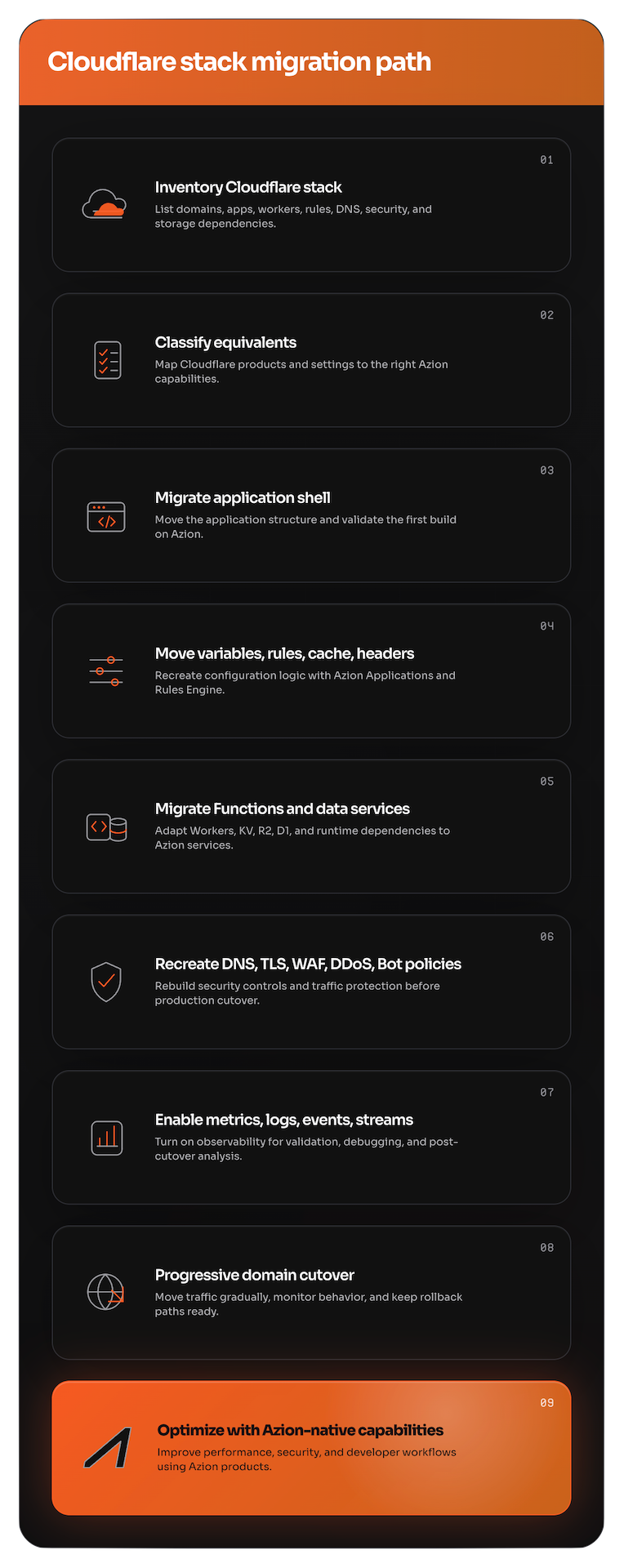
Each stage of this guide moves one layer, in the order a migration runs: inventory, deployment, code and rules, data, security, monitoring, and DNS. Most code moves with focused changes: how a function reads variables, how it opens storage, and how it calls a model. When near-zero downtime is not a requirement, migrate in phases with maintenance windows. Writes stop during each step, so the data needs no parallel synchronization.
The prerequisites and the procedures on this page switch with the interface you select:
Prerequisites
- An Azion account. To open one, sign up in Azion Console. For more information, refer to Create an account.
- The Cloudflare account, with access to its projects, Workers, data stores, and DNS zones.
- Access to the DNS records or the registrar of each domain you move.
curlanddig, to check responses and DNS answers.
- Access to Azion Console. To sign in, refer to Access Azion Console.
Inventory the Cloudflare account
Move one project first. Choose one that tests the whole path and still moves quickly. A good first project has a build, a few redirects, some environment variables, one Worker, and a manageable amount of data. Use it to document the process, then move the next projects in the same order. Keep the first deployment small, and prove that it builds and runs on Azion before you move domains, storage, or databases.
Before you create anything on Azion, list what the project uses:
- Pages projects, their build commands, output directories, and framework presets.
wrangler.tomland the CI/CD settings that deploy the project.- Environment variables and secrets, from the Pages settings,
wrangler.toml, the CLI-managed secrets, and the CI/CD settings. - Workers, their routes, and the bindings each one reads.
_redirectsand_headersfiles, and rules for redirects, origins, transforms, and cache.- Load Balancing pools and their origins.
- Image transformations and Workers AI calls.
- Workers KV namespaces, R2 buckets, and D1 databases.
- Custom domains, DNS zones and records, DNSSEC, and certificates.
- WAF rules, bot settings, rate limiting rules, and DDoS settings.
- Analytics dashboards and log exports.
Each item in the list maps to a stage of this guide. The table in Map each Cloudflare product to Azion names the destination of each one.
Map each Cloudflare product to Azion
Every Cloudflare product in the inventory has a destination on Azion. Find the product in the first column, then move it with the stage that names its destination. A dash (-) in the last column means that Azion has no direct equivalent.
| Cloudflare product | What it covers | Destination on Azion |
|---|---|---|
| Agents | AI-powered agents on the developer platform | AI Inference and Functions |
| AI Crawl Control | Access control for AI crawlers | Firewall, Network Shield, and Functions |
| AI Gateway | Observing, caching, rate limiting, and controlling AI traffic | Functions, Cache, Real-Time Events, and Data Stream |
| AI Search | Managed retrieval and search pipelines | SQL Database, with vector search, and AI Inference |
| Analytics | Analytics across Cloudflare services | Real-Time Metrics, Real-Time Events, Data Stream, and Edge Pulse |
| API Shield | API discovery, schema validation, mTLS, and controls | Firewall, Web Application Firewall, Network Shield, and Certificate Manager |
| Bots | Detection and mitigation of automated traffic | Bot Manager and Bot Manager Lite |
| Cache | CDN cache behavior | Cache, including Tiered Cache |
| Cloudflare for Platforms | Platforms built on Cloudflare services | Azion API and Marketplace |
| Cloudflare Images | Storing, resizing, optimizing, and delivering images | Image Processor, with the images stored in Object Storage |
| Cloudflare Network Firewall | Firewall as a service for network traffic | Firewall and Network Shield |
| D1 | Serverless SQL database built on SQLite | SQL Database |
| DDoS Protection | Protection against DDoS attacks | DDoS Protection |
| Digital Experience Monitoring | User, device, network, and application experience | Edge Pulse and Real-Time Metrics |
| DNS | Authoritative DNS and DNS security | Edge DNS |
| Dynamic Workers | Isolated Workers created on demand | Functions |
| KV | Global key-value storage | KV Store |
| Load Balancing | Traffic distribution across origins | Load Balancer, a module of Connectors |
| Logs | Exporting, querying, and managing logs | Real-Time Events and Data Stream |
| Origin Rules | Origin settings and request routing to origins | Applications and Connectors |
| Pages | Frontend and full-stack deployments | Applications, served by a workload, and the Azion CLI |
| R2 | S3-compatible object storage | Object Storage |
| Rate limiting | Limits on request rates | Firewall and Functions |
| Rules | Request, routing, cache, transform, and security logic | Applications, Firewall, and Functions. Functions can also run inside a firewall |
| Secrets Store | Secrets for developer workloads | Environment variables, stored as secrets |
| Smart Shield | Shielding and optimizing origin access | Cache with Tiered Cache, Application Accelerator, and Origin Shield, a module of Connectors |
| SSL/TLS | Certificates, encryption modes, and TLS settings | Certificate Manager and Edge DNS |
| Terraform | Resource management with Terraform | Terraform Provider |
| Transform Rules | Request and response changes | Applications, through Rules Engine, and Functions |
| Vectorize | Vector database for embeddings and semantic search | SQL Database, with vector search |
| WAF | Web application firewall rules | Web Application Firewall |
| Workers | Serverless compute | Functions |
| Workers AI | AI inference on hosted models | AI Inference |
Azion holds a SOC 2 Type 2 report and a SOC 3 report, and is a PCI DSS 4.0.1 Level 1 Service Provider. For the attestations, refer to SOC 2 and SOC 3 and PCI DSS certification.
Deploy the project on Azion
On Azion, a Pages project becomes an application, and a workload serves that application on a domain. Cloudflare keeps the build configuration in wrangler.toml. Azion keeps it in azion.config.js, which can also be azion.config.mjs or azion.config.cjs, depending on the preset.
| Task | Cloudflare | Azion CLI |
|---|---|---|
| Install | npm i -D wrangler@latest | curl -fsSL https://cli.azion.app/install.sh | bash, or brew install azion |
| Sign in | npx wrangler login | azion login |
| Run locally | npx wrangler pages dev ./dist | azion dev |
| Deploy | npx wrangler pages deploy ./dist | azion link, then azion deploy |
Azion supports 19 frameworks and 5 generic presets. Azion Console imports a repository with one of six presets, and the Azion CLI asks for the preset in a picker.
The API creates the application, its rules, and the workload one resource at a time. To build that chain, refer to Applications quickstart.
The deployment answers on a workload domain that Azion assigns under map.azionedge.net. Before you move any production domain, send a request to the root path, with that domain in place of <your-workload-domain>:
The response carries the status, the headers, and the body the project returns for /. Send the same request to each critical route.
If the build fails on Azion, compare the preset with the framework of the project, and check build.preset, build.entry, and build.bundler in azion.config.js. The build block has no command field.
Move environment variables
Environment variables hold API keys, database credentials, authentication secrets, service endpoints, feature flags, and per-environment settings. A variable that does not reach Azion breaks the project at run time, even when the deployment succeeds.
On Cloudflare, a Worker reads a variable from the env parameter. On Azion, variables belong to the account, up to 100 of them, and a function reads them with Azion.env.get(). Each variable has a key, a value, and a flag that marks it as a secret.
To create the variables in Azion Console, open the Variables page of the Account menu, and create each variable with its key and its value. Turn a variable that holds a credential into a secret.
Then change the code that reads the variables:
A deployed function also reads a variable as process.env.API_KEY. Under azion dev, a function reads the project .env file instead of the account variables, or the whole shell environment when there is no .env file. If a function reports a variable as not found, confirm that the variable exists on the account and that the code reads it with Azion.env.get().
Move Workers to Functions
Workers often carry the most critical logic of a project: authentication, personalization, API orchestration, and integrations with third-party services. On Azion, this code runs in Functions. A function holds the code, a function instance runs it on an application, and a rule decides which requests reach it.
| Aspect | Cloudflare Workers | Azion Functions |
|---|---|---|
| Handler | fetch(request, env, ctx) | fetch(request, env, ctx) |
| Variables | env.VARIABLE | Azion.env.get('VARIABLE') |
| Memory | 128 MB on every plan | 512 MB per isolate, on every plan |
| Cold start | Possible | None |
The handler keeps its signature, but env is an empty object on a deployed function, and ctx carries args and waitUntil. Any value a Worker reads from a binding in env moves to a variable, or to the runtime API of its store:
Geolocation moves from request.cf to request.metadata:
Under azion dev, request.metadata is undefined. Test code that reads it on a deployed function.
Code that reads Workers KV, D1, or Workers AI also changes its calls. The stages Move Workers KV data to KV Store, Move D1 databases to SQL Database, and Move Workers AI to AI Inference show the new calls. For the runtime APIs, refer to Web APIs.
Recreate redirects and rewrites
Redirects protect search rankings, campaign links, backlinks, and bookmarks. When a redirect breaks, the result is lost traffic and broken user journeys. Cloudflare keeps them in a _redirects file. Azion keeps them in the rules of the application, which you write in Azion Console, the API, or azion.config.js.
| Aspect | Cloudflare | Azion |
|---|---|---|
| Configuration | _redirects file | Rules Engine for Applications |
| Pattern matching | Glob patterns (/*) | Regular expressions with the matches operator, such as ^/.*$, plus starts_with and is_equal |
| Captured values | :splat, :placeholder | %{name[index]}, such as %{capture[1]} and %{capture[2]}, from a Capture Match Groups behavior in the same rule |
Convert each pattern to a regular expression:
| Cloudflare pattern | Azion regular expression |
|---|---|
/old-page | ^/old-page$ |
/blog/* | ^/blog/(.*)$ |
:splat | %{capture[1]}, with capture as the array name |
The criteria of a rule select the requests, but they capture nothing. To reuse part of the path in the target, add a Capture Match Groups behavior before the redirect, in the same rule. Capture Match Groups requires Application Accelerator on the application. The array is local, so only the rule that captures it can read it.
To create the redirect with the Azion CLI, add the rule to the rules of the application in azion.config.js. Give it the behaviors capture_match_groups and redirect_to_301, then run azion deploy. For the fields of a rule, refer to azion.config.js.
To check the redirect, request an old path:
The response carries 301 Moved Permanently and a location header that ends in /blog/post. A new rule can take a few minutes to propagate. On an unexpected response, wait and retry before diagnosing.
To serve content from another path without a redirect, use Rewrite Request with the same captures. For SEO-sensitive moves, prefer permanent redirects, avoid redirect chains, keep canonical paths consistent, and test the paths with and without a trailing slash.
Recreate custom headers
Headers control caching, security, and browser behavior. Cloudflare keeps them in a _headers file, for responses only. Azion adds them with rules in either phase: Add Request Header changes the request sent to the origin, and the same behavior in a Response Phase rule changes the response sent to the user.
| Aspect | Cloudflare | Azion |
|---|---|---|
| Configuration | _headers file | Rules Engine for Applications, in Azion Console, the API, or azion.config.js |
| Phases | Response only | Request and response |
| Dynamic values | Not supported | Rule variables, such as ${uri}, ${host}, or ${geoip_city_country_code} |
This azion.config.js adds two security headers to every response of the application:
The value takes the form Name: value, and the Console refuses any other shape with Header must follow the header-name: value format. A workload must serve the application for the headers to reach a domain. Run azion deploy, then check a response:
The response carries x-frame-options: SAMEORIGIN and x-content-type-options: nosniff.
Recreate cache settings
On Azion, a cache setting holds how long a response stays in cache and what makes two requests share one cached copy. A rule with Set Cache Policy applies the setting to the requests it matches. The rule selects a setting, and the setting holds the TTL and the cache key.
| Aspect | Cloudflare | Azion |
|---|---|---|
| Cache levels | Regional Tiered Cache, Smart Tiered Cache, edge, and browser | Cache, Tiered Cache, and browser cache |
| Cache key | Customizable | Customizable in the cache setting, with Cache vary by controls that require Application Accelerator |
| TTL | Per page rule | Max Age of each cache setting, from 0 to 31,536,000 seconds |
| Purge | URL, tag, host, and prefix | URL, cache key, and wildcard |
| Stale content | stale-while-revalidate | Stale cache, which serves an expired copy when revalidation fails |
Max Age defaults to 60 seconds. A value below 60 requires Application Accelerator, and a cache setting with Tiered Cache on needs at least 3 seconds and Override cache behavior. Stale cache honors the stale-while-revalidate the origin sends, or keeps a 300-second window under Override cache behavior. It is on by default in Azion Console and off in the API and the CLI.
The CLI flags cannot set the cache TTL, the cache behavior, or Tiered Cache. Send the full cache setting body from a file with --file, as the Cache quickstart shows.
To vary the cache by query string, cookie, or device, use the Cache vary by controls of the cache setting: Cache vary by Query String, Cache vary by Cookies, and Cache vary by Devices. They require Application Accelerator on the application. Cache vary by Devices with the Allowlist behavior keeps one copy for each device group you select, from the groups in the Device Groups tab of the application. For the controls, refer to Cache variation.
To purge cached content, send a POST request to the purge endpoint of its type:
Purge is a top-level endpoint, not nested under applications. A URL purge takes up to 50 items, and a wildcard purge takes one expression. Only a cache key purge, at /v4/workspace/purge/cachekey, reaches Tiered Cache with "layer": "tiered_cache". A URL or wildcard purge with that layer fails with 30001. For the purge types, refer to Real-Time Purge.
Balance traffic across origins
On Azion, Load Balancer is a module of a connector, not a separate resource. One connector of type http holds every origin as an address, up to 15 addresses with Load Balancer on, and one address without it. A rule with Set Connector sends the requests of the application to the connector.
| Aspect | Cloudflare Load Balancing | Azion Load Balancer |
|---|---|---|
| Balancing methods | Round-robin, least connections, random, and geo steering | Round Robin, Least Connections, and IP Hash, which are round_robin, least_conn, and ip_hash in the API. No method steers by location |
| Health checks | HTTP, HTTPS, and TCP monitors | None. Failover is passive: Max Retries and the timeouts handle a failed connection |
| Failover | Active-passive and active-active | Several Primary addresses with weights, and Backup addresses that receive traffic only when every primary fails |
| Session affinity | Cookie and IP hash | IP Hash only, which maps each client IP address to one address |
| Origins | Pools of origins | Addresses of one connector |
Each address has a Weight from 1 to 100, which sets its share of the traffic. IP Hash refuses Backup addresses, with 28005 in the API. Max Retries takes 0 to 20, Connection Timeout 1 to 300 seconds, and Read/Write Timeout 1 to 600 seconds. These fields exist only with Load Balancer on. When you turn it on in Azion Console, the form fills in Round Robin, 3, 30, and 60. The API defaults are 0, 60, and 120.
The update command needs the full connector body. Put it in a JSON file and send it with --file, as the Load Balancer quickstart shows.
For the connector fields, refer to Connector settings.
Serve optimized images
Image Processor resizes, crops, converts, and filters images on request. It stores nothing: it reads the source image from the origin of the application, which can be an Object Storage bucket behind a connector.
| Aspect | Cloudflare Images | Azion Image Processor |
|---|---|---|
| Storage | Built-in storage | The origin of the application, such as Object Storage |
| Transformations | Resize, format, and quality | Resize, format, quality, crop, rotate, fill, and watermark |
| URL format | /cdn-cgi/image/<OPTIONS>/<SOURCE-IMAGE> | /image.png?ims=<OPTIONS> |
| Formats | WebP and AVIF | WebP, AVIF, JPEG, GIF, and PNG |
| Signed URLs | Supported | Through the Secure Token integration on a firewall |
Image Processor works in two steps: turn on the module on the application, then create a rule with the Optimize Images behavior. A request that no such rule matches is delivered unprocessed.
To turn on Image Processor with the Azion CLI, follow the CLI panel of the Image Processor quickstart.
Image Processor reads the transformation from the ims query parameter:
| Syntax | Result | Example |
|---|---|---|
?ims=WxH | Resizes to the width and height, cropping to fit when both are set | ?ims=400x300 |
?ims=Wx | Resizes to the width, with the height in proportion | ?ims=400x |
?ims=xH | Resizes to the height, with the width in proportion | ?ims=x300 |
?ims=fit-in/WxH | Fits the image inside the dimensions, never enlarging it | ?ims=fit-in/400x300 |
?ims=fit-in/WxH/filters:fill(Color) | Fits the image and fills the rest of the canvas with a color | ?ims=fit-in/400x300/filters:fill(white) |
Image Processor converts to WebP when the Accept header of the client allows it. AVIF needs ?ims=filters:format(avif) and a client that accepts image/avif. To cache one copy for each ims value, turn on Application Accelerator and vary the cache by query string. For every parameter, refer to URL parameters.
Move Workers AI to AI Inference
AI Inference runs a catalog of open-source models: large language models, vision language models, an embedding model, and a reranker. A model is not an object you create, and Azion hosts no inference endpoint for it. A function calls a model by its ID with Azion.AI.run(), and needs no credential:
| Aspect | Cloudflare Workers AI | Azion AI Inference |
|---|---|---|
| Models | Cloudflare-hosted models | A catalog of open-source models. To adapt a model, use LoRA fine-tuning |
| Interface | REST API | Azion.AI.run() inside a function |
| Model types | Text generation, image, and speech | LLMs, vision language models, an embedding model, and a reranker |
Under azion dev, Azion.AI is undefined. Test the call on a deployed function. For the request fields, refer to Model invocation and the AI runtime API.
For an OpenAI-compatible /v1/chat/completions endpoint, deploy the AI Inference Starter Kit template. It creates an application and a function that serve that endpoint. To deploy it, access Azion Console > Create, select the template, and select Deploy. The Azion CLI has no template flag.
Move Workers KV data to KV Store
KV Store holds configuration, feature flags, session state, routing tables, and per-user preferences. A function opens a namespace with Azion.KV.open(), a runtime global that needs no import line:
Azion.KV.open() is the only entry point, and it is asynchronous. The namespace must exist first, or open() throws NotFound. get() returns null for a missing key, the same as for an expired one.
KV Store has no bulk import, and no API, CLI command, or Console screen reads or writes keys. To move the data:
- Export the keys from Cloudflare through its API.
- Create the namespace with a
POSTrequest tohttps://api.azion.com/v4/workspace/kv/namespaces. The name takes 3 to 63 characters, is case-sensitive, and is permanent: a namespace cannot be renamed or deleted. - Write the keys from a deployed function with
kv.put().
The function writes a key at most once per second. A value takes up to 25 MB, a key up to 512 bytes, and the metadata up to 1,024 bytes. Map each Cloudflare TTL to the expiration option, in Unix seconds, or to expirationTtl, in seconds with a minimum of 60. A write becomes visible everywhere within 60 seconds, or within the cacheTtl of the read. Before the import, review the key prefixes, the value formats, and the code that handles a missing key. For the client, refer to KV Store runtime API.
Move R2 buckets to Object Storage
Object Storage holds images, documents, static assets, media, uploads, and generated files. It speaks the S3 protocol, so S3 tools and SDKs reach it with a new endpoint, a region, and a key pair.
| Aspect | Cloudflare R2 | Azion Object Storage |
|---|---|---|
| Endpoint | <ACCOUNT_ID>.r2.cloudflarestorage.com | s3.us-east-005.azionstorage.net |
| Region | auto | us-east-005 |
| Data transfer | Free | No data-transfer charge on Object Storage. Delivery to users goes through a workload, billed as Workloads data transfer |
The key pair comes from an Object Storage credential. Create it in Azion Console or with a POST request to https://api.azion.com/v4/workspace/storage/credentials. The secret_key comes back only in the create response. To migrate, the credential needs at least listBuckets, listFiles, and writeFiles, plus listAllBucketNames to list the buckets.
A Node.js migration script reaches Object Storage with the AWS SDK:
To copy the data with s3cmd, create the destination bucket first in Azion Console, the API, or the CLI. s3cmd cannot create or remove a bucket on Azion: s3cmd mb and s3cmd rb are refused with 403 AccessDenied. A bucket name takes 6 to 63 characters, is unique across all accounts, and cannot start with azion.
-
Run
s3cmd --configure -c ~/.s3cfg-azion, and enter these values:- Access Key and Secret Key: the key pair of the credential.
- Default Region:
us-east-005. - S3 Endpoint:
s3.us-east-005.azionstorage.net. - DNS-style bucket+hostname template:
%(bucket).s3.us-east-005.azionstorage.net. - Use HTTPS protocol:
true.
-
Configure a second file,
~/.s3cfg-r2, with the endpoint and the keys of the R2 bucket. One s3cmd configuration holds one endpoint. -
Download the R2 objects:
-
Upload them to Azion:
The objects are in the Azion bucket. To check, list them with s3cmd -c ~/.s3cfg-azion ls s3://azion-bucket/. s3cmd ls with no bucket lists every bucket, which needs listAllBucketNames on the credential. s3cmd sync s3://source-bucket/ s3://dest-bucket/ copies between two buckets of the same provider only. Other commands work the same way: s3cmd put file.png s3://my-bucket/ uploads an object, and s3cmd get s3://my-bucket/file.png downloads one. rclone, the AWS CLI, and other S3 tools also work.
Azion Console refuses a single upload over 300 MB. The API and S3 tools are not bound by that limit. Before the move, map the buckets, the object prefixes, the public and private assets, and the signed URL logic. Bucket access to workloads is read_only, read_write, or restricted, and a credential works independently of it. Public delivery goes through a connector and an application, not through the S3 endpoint. For the S3 operations, refer to S3 compatibility and Use S3-compatible tools. For the buckets and their objects, refer to Create and modify a bucket, Upload and download objects, Use a bucket as origin, and the Storage library.
Move D1 databases to SQL Database
SQL Database uses the SQLite dialect and is fully ACID-compliant. One main instance takes every write, and read replicas answer reads. SQL Database is in Preview on every plan.
| Aspect | Cloudflare D1 | Azion SQL Database |
|---|---|---|
| Connection | env.DB binding | Database.open() from the Azion.Sql global |
| SQL dialect | SQLite | SQLite |
| Writes from code | Through the binding | Through the API. A runtime connection is read-only |
| Vector search | Supported | Supported, with vector columns, libsql_vector_idx, and vector_top_k. Refer to Vector search |
A function reads the database through a read-only replica connection. Azion.Sql is a global, and the azion:sql import fails the build:
rows.next() returns the next row, or null after the last one, and row.getString(i) reads a column by index. An insert or delete through the connection fails with attempt to write a readonly database. Under azion dev, Azion.Sql is undefined, so test the code on a deployed function. For server-side scripts and build tools, the @aziontech/sql package manages databases through the API.
To move the data, export the D1 database to a SQL file:
Create the database on Azion. Then run the statements of the dump through one of these paths:
- The API: send the statements in the
statementsarray of aPOSTrequest tohttps://api.azion.com/v4/workspace/sql/databases/<database-id>/query. A failed statement still returns HTTP200, with anerrorkey in place ofresults. - The EdgeSQL Shell:
.read dump.sqlruns the script. The shell does not start on a clean install, so check EdgeSQL Shell before you rely on it. To install it, refer to Install SQL Shell.
The Azion CLI has no SQL Database command. For the other import formats, refer to Import data into SQL Database. For the runtime API, refer to SQL Database runtime API.
Protect the application with WAF
Web Application Firewall scores requests against eight threat families: cross-site scripting, directory traversal, evading tricks, file upload, identified attack, remote file inclusion, SQL injection, and unwanted access. A WAF rule set holds a sensitivity for each family, and a firewall rule applies it with Set WAF.
| Aspect | Cloudflare WAF | Azion WAF |
|---|---|---|
| Rule language | Expression language | Criteria of Rules Engine for Firewall |
| Managed rules | Cloudflare-managed rulesets | One managed ruleset, scored per threat family |
| Custom rules | Custom rules | Rules Engine for Firewall |
| Modes | Block, challenge, and log | Logging and Blocking |
mode is required on every Set WAF behavior, and it has no default. Start in Logging to check what the rule set would block, then switch to Blocking. In Blocking mode, a request the rule set blocks receives 400. To keep a legitimate request from matching, add a WAF exception or use the Tuning tab.
To bind a firewall with the Azion CLI, pass --firewall-id to the workload deployment. For the rule set and the rule, follow the WAF quickstart.
Convert each Cloudflare custom rule to firewall criteria. Firewall variables differ from application variables: the path is ${request_uri}, and an address range goes in a Network List matched with ${network}.
The ${network} criterion requires Network Shield on the firewall. For the variables and operators, refer to Rules Engine for Firewall.
Rely on DDoS Protection
DDoS Protection is on for every workload, with nothing to create and nothing to configure. It mitigates volumetric, protocol, and application-layer attacks, such as UDP and ICMP floods, SYN floods, packet fragmentation, HTTP floods, and slowloris, on layers 3, 4, 6, and 7.
| Aspect | Cloudflare DDoS Protection | Azion DDoS Protection |
|---|---|---|
| Activation | Automatic | Automatic, and it cannot be turned off |
| Layers | 3, 4, and 7 | 3, 4, 6, and 7 |
| Billing | Unmetered | Unmetered for layers 3 and 4. Layer 7 mitigation can generate chargeable traffic |
| Customization | Managed rules and custom rules | Custom firewall rules |
A firewall shows the DDoS Protection Unmetered switch in Main Settings > Modules, always on. In the API, modules.ddos_protection is read-only. DDoS Protection has no thresholds, no per-rule switches, and no alerts. For targeted mitigation, write custom rules on the firewall bound to the workload. The Security Response Team is an add-on to Enterprise and Mission-Critical support. For the attack types, refer to Attack mitigation.
Network Shield is a different module of the firewall. It matches the client address against a Network List of IP addresses, CIDR ranges, ASNs, or countries, through the ${network} criterion. Use it to block or allow sets of clients, restrict countries, or rate-limit a set of clients.
Recreate bot management
Bot Manager scores each request and acts on the score. Bot Manager Lite is the Marketplace function included on every plan, and the full Bot Manager is available on Enterprise.
| Aspect | Cloudflare Bots | Azion Bot Manager |
|---|---|---|
| Detection | Machine learning, heuristics, fingerprinting, and JavaScript detections | Static rules, a dynamic behavioral method in the full Bot Manager, device fingerprints, and reputation Network Lists |
| Challenge | JavaScript detections, Managed Challenge, and Turnstile | A JavaScript Tag for fingerprinting, and ALTCHA through the redirect action |
| Actions | Allow, Managed Challenge, and Block | allow, custom_html, deny, drop, hold_connection, random_delay, and redirect |
| Lite version | Bot Fight Mode | Bot Manager Lite |
Bot Manager Lite scores a request with 26 static rules, against a threshold that defaults to 30, and takes the deny action by default. It can also check the client against reputation Network Lists. Tolerance levels belong to the dynamic rules of the full Bot Manager, which Bot Manager Lite does not have.
To set up Bot Manager Lite in Azion Console:
Access Azion Console > Marketplace, search for Bot Manager Lite, and select Install. The installation takes effect at once.
Go to Firewalls, and select a firewall with the Functions module on.
In the Functions Instances tab, create an instance of Bot Manager Lite. For more information, refer to Functions instances. In its JSON arguments, set threshold and action.
In the Rules Engine tab, create a rule with the Run Function behavior and the instance.
The firewall scores the requests of the workload. For every argument, refer to Install Bot Manager Lite and Bot Manager Lite. For how a function runs on a firewall, refer to Functions for Firewall. Bot protection from a third party is also available through the Radware Bot Manager integration.
To block a client by its user agent, add a firewall rule:
${header_user_agent} requires the WAF module on the firewall and supports only matches and does not match. The firewall has no allow behavior: to exempt a client, add a does not match criterion to the deny rule, or order the rules. A client can send any user agent, so verify a good bot another way. To check the rule:
The response is 403, with the Forbidden error page. A request with a browser user agent receives the normal response.
Recreate rate limits
Azion limits request rates in two ways, and each covers a different part of what Cloudflare rate limiting rules do. Use the native Set Rate Limit behavior of a firewall rule to cap the requests per second or per minute, per client IP address or across all clients. Use the Upstash Rate Limiting integration, a rate limit with penalty run as a firewall function, for custom keys, custom windows, or a penalty period.
| Capability | Native Set Rate Limit | Upstash Rate Limiting function |
|---|---|---|
| Count key | Client IP address or global | Any combination of request metadata, headers, and the hostname |
| Window | Per second or per minute | Any interval in seconds or minutes, with different limits for different times of day |
| Algorithm | Leaky bucket, counted in each data center | Fixed window, sliding window, or token bucket, counted globally |
| Response | 429, with no rate-limit header | 429 at the limit, and 403 during a penalty |
| Log-only action | None | None |
| Requirements | None | An Upstash account and Global Database |
Use the native rate limit
A Set Rate Limit behavior counts the requests its rule matches. The criteria of the rule scope the limit, such as the path with ${request_uri}. Rate Limit Type is Req/s or Req/min, and Limit By is Client IP address or Global. Average Rate Limit takes at least 1, and Maximum Burst Size takes at least 1 and applies to Req/s only. No behavior can follow Set Rate Limit in a rule. A rule whose criteria join several paths with or shares one count across all of them.
To create the rule with the Azion CLI, save the rule body of the API panel in a file. Then pass the file with --file to the firewall rule command. For the commands, refer to Firewall quickstart.
A request beyond the rate and the burst receives 429, with the error page titled Too Many Requests. For how the rate and the burst admit requests, refer to Set Rate Limit.
Use the rate limit with penalty
The Upstash Rate Limiting function keeps its counters in an Upstash Global Database. It therefore counts every request across the network, not in each data center. A request during a penalty receives 403 Forbidden. A valid request is counted, and the function returns 429 Too Many Requests when the count reaches the limit.
To set it up in Azion Console:
Access Azion Console > Marketplace, search for Upstash Rate Limiting, and select Install.
Go to Firewalls, and open a firewall with Functions turned on in Modules.
In the Functions Instances tab, create an instance. In Function, select the Upstash Rate Limiting function, and edit the JSON Arguments.
In the Rules Engine tab, create a rule with criteria such as Host matches yourdomain.com, and the Run Function behavior with the instance.
Run the CLI command that creates the workload deployment with the firewall:
The function counts the requests the rule matches. These arguments set a sliding window of 2 requests per 20 seconds from midnight to noon UTC, with a 45-second penalty:
| Argument | Description |
|---|---|
upstash_redis_rest_url, upstash_redis_rest_token | The REST URL and the token of the Upstash database that stores the counters and the penalties |
rate_limit_prefix | A prefix for every key, which keeps two instances of the function apart |
rate_limit_key_metadata | The request metadata that forms the key, such as remote_addr |
rate_limit_key_header | The headers that form the key |
rate_limit_key_hostname | When true, the hostname is part of the key |
rate_limit_repenalize | When true, every request during a penalty restarts it |
rate_limits | The windows, at least one. When two windows overlap, the first one in the list applies |
algorithm | fixed_window, sliding_window, or token_bucket |
requests | The requests allowed in the interval |
interval | The window, as a number and s or m. For example: "120 s" |
start, end | The time of day the window covers, in 24-hour UTC. They default to 00:00 and 23:59 |
penalty_in_seconds | How long a client that exceeds the limit receives 403. Without it, the window is a plain rate limit |
max_tokens, refil_rate | The bucket size and the refill per interval of a token_bucket window. refil_rate is the spelling the function reads |
The key joins the prefix and every value the arguments select. In this example, it is my_rate_limit + client IP + x-a-custom-header value + hostname, such as my_rate_limit_127.0.0.1_Value_azion.com. For the full setup, refer to Install the Upstash Rate Limiting integration.
Rebuild monitoring
Azion splits observability across three products. Real-Time Metrics charts aggregates over time, Real-Time Events answers queries about individual requests, and Data Stream sends the logs to external destinations.
Real-Time Metrics
| Aspect | Cloudflare Analytics | Azion Real-Time Metrics |
|---|---|---|
| Data freshness | Near real time | Up to 10 minutes to aggregate |
| Retention | 30 days on free plans, 1 year on paid plans | 2 years, except 90 days for httpBreakdownMetrics and 60 days for botManagerBreakdownMetrics |
| Query method | Dashboard and API | Dashboards, Copy query, Export CSV, and the GraphQL API |
| Metrics | Requests, bandwidth, and errors | Requests, data transferred, status codes, cache offload, and average request time |
| Granularity | Per-minute aggregates | 1 minute under 2.5 days, 1 hour up to 60 days, and 1 day beyond |
The Applications dashboards chart:
- Requests: total requests, requests by method and by scheme, and Average Request Time, the average time in seconds Azion takes to process and answer a request.
- Status Codes: the 2XX, 3XX, 4XX, and 5XX responses, and the Requests by Status and Upstream Status table, which tells errors from Azion and errors from the origin apart.
- Data Transferred: saved and missed data and bandwidth, and Edge Offload.
- Cache: Requests Offloaded, Saved Requests, and Missed Requests.
Real-Time Metrics reports no latency, time to first byte, or origin response time. To read the cache status of the requests, filter a dashboard by Upstream Cache Status, whose values include HIT, MISS, STALE, and EXPIRED. To find origin errors, filter by Upstream Status, which is 0 when the origin did not answer.
To open the dashboards, access Azion Console > Real-Time Metrics. It opens on Build > Applications > Data Transferred, over the Last 5 minutes. To narrow a dashboard to one workload, add the Domain or Workload filter. To export a chart, open its More options menu and select Export CSV.
To query the same data, send a GraphQL query to https://api.azion.com/v4/metrics/graphql:
Replace the dates with a range inside the retention period. A range past it returns an empty array. limit takes up to 10,000 rows and defaults to 10. The httpMetrics dataset of older queries still works, but it is deprecated. For every field, refer to Real-Time Metrics GraphQL fields and Build dashboards. For dashboards in Grafana, refer to Grafana plugin custom dashboards and pre-built dashboards. To read the dashboards, refer to Analyze metrics. For real-user measurements, use Edge Pulse.
Real-Time Events
| Aspect | Cloudflare Logs | Azion Real-Time Events |
|---|---|---|
| Access | Pull API and push to S3 | Queries in Azion Console or the GraphQL API |
| Delay | Minutes | Up to 30 seconds |
| Retention | Configurable | 7 days. For longer retention, use Data Stream |
| Format | JSON | GraphQL responses with the fields you select |
Real-Time Events needs no setup. Its data sources are HTTP Requests, Functions, Functions Console, Image Processor, Tiered Cache, Edge DNS, Data Stream, and Activity History. WAF results are fields of HTTP Requests.
To query the events in Azion Console:
Access Azion Console > Products menu > Observe > Real-Time Events.
Select the data source, such as HTTP Requests.
Set the Time Filter, which opens on the last 15 minutes, and add conditions in Filter by.
The results table lists the events. Select a row to open the whole record.
To query the same data, send a GraphQL query to https://api.azion.com/v4/events/graphql. The workloadEvents dataset holds the HTTP requests:
Replace the dates with a range inside the last 7 days. upstreamResponseTime reads - for a response served from cache. For every field, refer to Real-Time Events GraphQL fields and Investigate requests with the GraphQL API.
Data Stream
| Aspect | Cloudflare Logs | Azion Data Stream |
|---|---|---|
| Access | Pull API and push to S3 | Push to an external destination |
| Delay | Minutes | Batches of 2,000 records or 60 seconds, delivered within 3 minutes |
| Retention | Configurable | Set by the destination |
| Format | JSON | Templates that select the fields |
| Destinations | S3, Azure, and GCS | 11 types, listed below |
A stream sends one data source to one destination:
- Storage: Amazon S3, Azure Blob Storage, and Azion Object Storage, through the S3 type.
- Monitoring: Datadog, Splunk, Elasticsearch, and Azure Monitor.
- Streaming: AWS Kinesis Data Firehose and Apache Kafka.
- Analytics: Google BigQuery.
- Security: IBM QRadar.
- Custom: Standard HTTP/HTTPS POST.
A stream needs exactly one of sampling or a workload filter. Saving an active sampled stream deactivates every other stream on the account. Filtered streams coexist.
To create a stream with the Azion CLI, follow the CLI panel of the Data Stream quickstart.
For an Object Storage destination, the credential needs listAllBucketNames, listBuckets, listFiles, and writeFiles, or every send fails with 503. For the fields, refer to Stream settings and Endpoints. For destination guides, refer to Amazon S3, Azion Object Storage, Datadog, Splunk, Elasticsearch, Kinesis, BigQuery, and Configure sampling.
Prepare the certificate
Certificate Manager holds the certificates that workloads serve. Prepare the certificate before the domain points to Azion, so users reach the project over HTTPS from the first request.
| Area | Cloudflare SSL/TLS | Azion Certificate Manager |
|---|---|---|
| Scope | Edge certificates, origin certificates, encryption modes, mTLS, and TLS settings | TLS certificates for workloads |
| Certificate options | Universal SSL, advanced certificates, and custom certificates | Azion SAN, Let’s Encrypt, custom certificates, and Trusted CA certificates for mTLS |
| Default managed certificate | Universal SSL covers the apex and first-level subdomains | Let’s Encrypt for your own domains. Azion SAN covers the azionedge.net workload domain and the azion.app hostname |
| Advanced managed certificates | More control over the CA, the hostnames, and the validity | No equivalent layer. Use Let’s Encrypt for a managed DV certificate, or a custom certificate for full control |
| Custom certificates | Customer-managed issuance and renewal | Upload of a certificate and its private key, single-domain or SAN, with RSA 2048 or P-256 keys |
| Validation | Domain control validation, automatic with Cloudflare DNS | Let’s Encrypt HTTP-01 or DNS-01 challenges |
| Renewal | Managed for Universal SSL and advanced certificates | Let’s Encrypt certificates renew from 30 days before their 90-day expiry. Custom certificates follow your own lifecycle |
| Origin encryption | SSL/TLS encryption modes, such as Full and Full Strict | Transport Protocol Policy of the connector: Preserve, Force HTTPS, or Force HTTP |
| Origin CA | Origin CA certificates for the Cloudflare-to-origin connection | No Origin CA. Protect the origin with Origin Shield on the connector, through Origin IP ACL and HMAC |
| mTLS | Client certificates, BYOCA, and Authenticated Origin Pulls | Trusted CA certificates. Azion SAN does not support mTLS |
Azion issues a Let’s Encrypt certificate at no additional cost once you choose a Let’s Encrypt preset. Pick the challenge by where DNS answers:
- HTTP-01 needs the hostname, and every alternative name, to already point to Azion.
- DNS-01 works before the move. At an external DNS provider, add a CNAME from
_acme-challenge.<domain>to<domain>.letsencrypt.azion.com. In Edge DNS, the record is automatic.
For a move from Cloudflare, use DNS-01.
To set mTLS or the certificate of a workload with the Azion CLI, run azion update workload --file with the workload body. For the certificate commands, refer to Certificate Manager quickstart.
If the certificate does not become active, read its status and status_detail. For HTTP-01, check that the hostname points to Azion. For DNS-01, check the _acme-challenge CNAME. Retries continue on schedule, so a fixed record issues the certificate later. For the issuance rules, refer to Issuance and renewal.
mTLS needs a Trusted CA certificate, and an Azion-generated certificate cannot be the Trusted CA. Sales activates mTLS on the account. Then set mtls.enabled, mtls.config.certificate, and verification, enforce or permissive, on the workload through the API or azion update workload --file. mTLS works over HTTPS only. For the steps, refer to Configure mTLS on a workload and mTLS.
Move DNS zones to Edge DNS
Moving the zone to Edge DNS gives Azion every record of the domain, including the apex. Every zone uses the same three nameservers, ns1.aziondns.net, ns2.aziondns.com, and ns3.aziondns.org. Skip this stage when you keep the current DNS provider and point only subdomains, as Point the domain to the workload shows.
| Aspect | Cloudflare DNS | Azion Edge DNS |
|---|---|---|
| Nameservers | Assigned per zone | ns1.aziondns.net, ns2.aziondns.com, and ns3.aziondns.org for every zone |
| Record types | A, AAAA, CNAME, MX, TXT, SRV, NS, and others | A, AAAA, ANAME, CAA, CNAME, DS, MX, NS, PTR, SRV, and TXT |
| DNSSEC | Supported | Supported |
| API | REST API | /v4/workspace/dns/zones |
Recreate each Cloudflare record with its type:
| Record | Use on Azion |
|---|---|
| A | IPv4 address |
| AAAA | IPv6 address |
| ANAME | Alias of the apex to an Azion hostname, such as the workload domain. Its TTL must be 20 |
| CNAME | Alias to another name. It holds exactly one value and cannot sit at the apex |
| MX | Mail exchange, with its priority |
| TXT | Text, such as SPF and DKIM |
| SRV | Service records, one per name |
| CAA | Certificate authorities allowed to issue for the domain |
| NS | Delegation of a subdomain |
| DS | Delegation signer of a signed child zone |
| PTR | Reverse lookup |
Edge DNS refuses other types, such as SOA. A, AAAA, ANAME, DS, MX, and NS records hold up to 10 values each.
To create zones and records with the Azion CLI, follow the CLI panel of the Edge DNS quickstart. Boolean flags need =, such as --active=false.
With DNSSEC on, Edge DNS shows four DS values: Key Tag, Algorithm 13, Digest Type 2, and Digest. Reload the page after you save to see them. Add them at the registrar, which can take up to 48 hours to publish them. For the steps, refer to DNSSEC.
To check the move, query the nameservers and the records:
The first command lists the three Azion nameservers once the registrar change propagates. The second shows the answer of Edge DNS before the change reaches every resolver. With DNSSEC on, the third returns two DNSKEY records, with flags 257 and 256 and algorithm 13. Do not query a new name before its record exists: Edge DNS caches the negative answer for one hour. For more commands, refer to Run the dig command and Run the traceroute command.
Point the domain to the workload
The DNS change is the switch: once the domain resolves to the workload, users reach the project through Azion. Treat it as a controlled cutover. Before you switch, confirm that:
- The certificate is active.
- The hostname is in the Domains of the workload.
- The DNS records are ready.
- The critical routes and the redirects answer as expected on the workload domain. To test them under the real hostname before the switch, refer to Test an application through the hosts file.
- Monitoring is ready to watch the traffic after the switch.
Point each name with the record its zone allows:
| Strategy | Use it for | Record |
|---|---|---|
| CNAME | A subdomain, keeping the current DNS provider | www CNAME <your-workload-domain> |
| Nameservers | The apex and every other name, with Edge DNS answering for the zone | An ANAME at the apex to the workload domain |
To check a CNAME:
The answer is the workload domain, such as xxxxxxxxxx.map.azionedge.net. DNS changes take time to propagate. For the Console settings of the custom domain, refer to Point a domain to a workload. To move the nameservers, refer to Migrate the nameservers to Azion.