
The new Azion Platform is now in preview. It changes three parts of your work: how a change reaches traffic, how you create a resource, and how a coding agent operates your account.
Until now, saving a change on Azion published it. You edited an Application, clicked Save, and the new configuration served traffic in every data center. An API call from a script or an agent did the same.
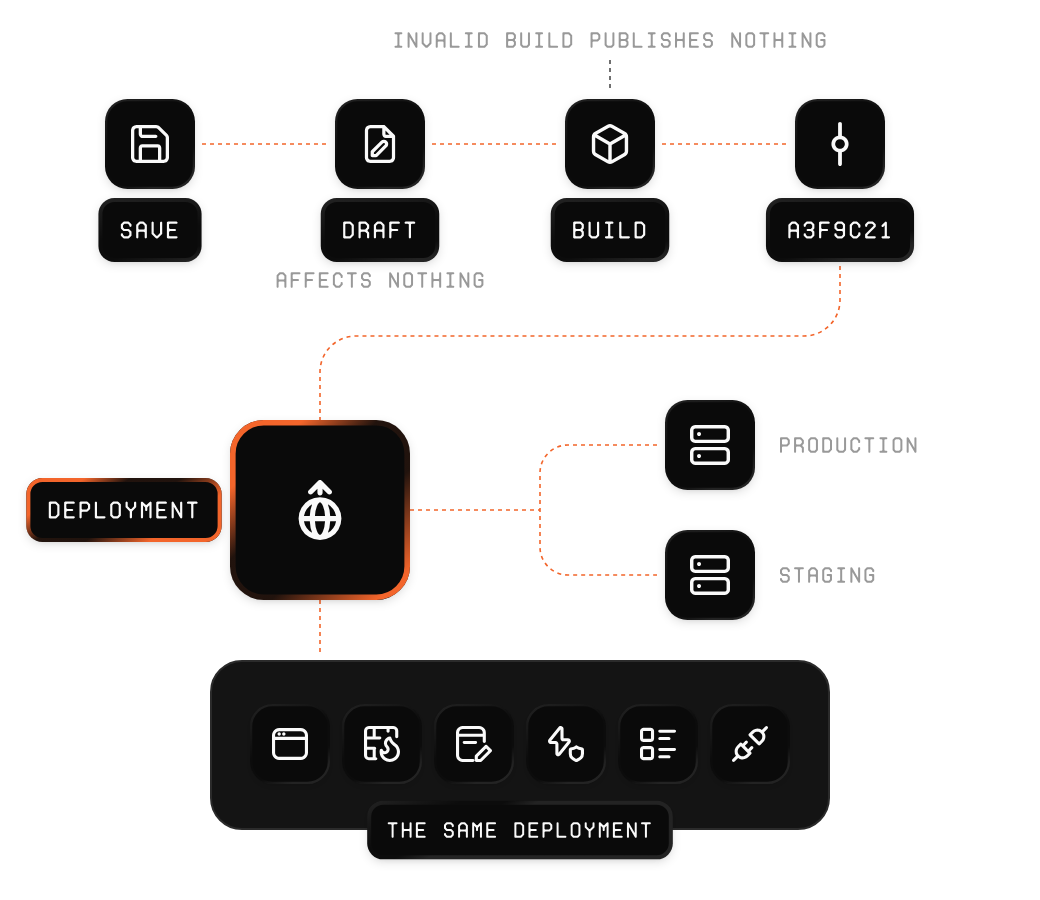
In the preview, saving writes a Draft. A build turns the Draft into an immutable version, and a deploy puts that version into traffic. You trigger each step yourself.
Save, build and deploy are separate steps
A saved change waits as a Draft and affects nothing. The build validates the configuration and produces a version identified by a hash. An invalid build publishes nothing.
A version moves through named states: Draft, Queued, Building and Ready. A version can also end as Canceled, Error, Archived or Deleted. You can deploy only a Ready version.
Versioning covers Applications, Firewall, WAF, Functions, Connectors, Custom Pages, Network Lists and Workloads.
A Deployment is the unit that reaches traffic. It publishes the Application, the Firewall and the Custom Page together, each at its own version, along with the resources they depend on. Delivery rules and security rules go live together, so a rollback brings both back.
Create a resource and reach traffic in one flow
Versioning adds steps between an edit and production. Create Journeys remove steps at the other end, where you first create a resource.
A Create Journey in Azion Console guides the creation of an Application, Workload, Firewall, Function, Connector or Custom Page, from the minimum configuration to the first deploy. Presets fill in common settings. If a step fails, you retry that step and keep the resources the journey already created.
The Application journey also creates the Workload, the Connector, the cache rule and the Deployment Settings that the Application needs to serve traffic.
An Azion Platform that coding agents can operate
Coding agents write configuration faster than a team can review it. On a platform where Save publishes, an agent’s API call is a production change.
The new Azion Platform puts a build and a deploy between the agent and your traffic. The agent edits a Draft. The build checks the result. A person, or a pipeline you trust, decides the deploy.
Teams building agentic infrastructure need those controls in the platform, where a prompt cannot skip them.
| An agent needs | The preview provides |
|---|---|
| A contract it can read | API v6 publishes an OpenAPI specification for resources, versions, Environments and Deployments |
| Configuration as files in the repository | azion.config v6 declares the configuration as code and runs it locally through the Bundler |
| A check before traffic | The build validates each Draft; an invalid build publishes nothing |
| A place to test | An Environment has its own URL and variables, and IP Allowlist restricts who reaches it |
| A record of its work | Version History stores author, date, comment and build origin: Console, API or CLI |
| A way back | Rollback returns traffic to an earlier version and restores exactly what was live |
Version Promotion closes the loop. The version an agent built and you tested in Staging is the same version you promote to Production, with no new build.
What is in the Azion Platform preview
Every feature below is available in preview accounts today.
Versions and publishing
| Feature | What it does |
|---|---|
Resource Versioning | Keeps each change to a resource as an immutable version, identified by a hash |
Build and Deploy Workflow | Separates save, build and deploy; an invalid build publishes nothing |
Deployments | Publishes the Application, the Firewall and the Custom Page as one unit, each at its own version |
Deployment Settings | Groups the Application, Firewall and Custom Page that serve a Workload in each Environment; one group can serve several Workloads |
Rollback | Returns traffic to an earlier version and restores exactly what was live |
Version Promotion | Takes the same Ready version to more than one Environment, with no new build |
Version History | Records author, date, build origin (Console, API or CLI) and comment for each version |
Deployment Impact Preview | Shows how many Workloads, domains and Environments a deploy reaches, before you confirm |
Dependency Detection | Identifies the resources a version depends on and shows them in the deploy |
Environments and release strategies
| Feature | What it does |
|---|---|
Environments | Creates publication stages, each with its own URL, variables and protection |
Version Policy | Sets how many versions receive traffic at once: Single, Versioned or Latest |
Versioned URLs | Keeps several versions live, each on its own URL |
Automatic Deployments | Publishes every new build with no manual deploy |
Binding Policy | Locks the resources of a deploy to each version (Strict) or lets them change between versions (Flexible) |
Skew Protection | Keeps a visitor on the version they loaded after a new one goes live, for a configurable time; up to 10 earlier versions stay reachable |
IP Allowlist | Restricts access to an Environment to IP addresses or CIDR ranges |
Robots Policy | Sets how each Environment answers /robots.txt: follow the origin, allow indexing or block it |
Environment Variables | Applies global variables with a value per Environment, secrets, and import from .env or JSON |
Developer tools, security and observability
| Feature | What it does |
|---|---|
API v6 | Exposes resources, versions, Environments and Deployments, with a published OpenAPI specification |
SDK v6 | Provides clients for API v6 |
azion.config v6 | Declares the configuration as code, with build and local development through the Bundler |
Firewall Bypass Behavior | Ends Firewall evaluation when a rule matches and skips the remaining rules |
Real-Time Metrics and Events | Shows metrics and events for Workloads, Applications, Firewall and Connectors |
What ships with limits in the preview
Four features are in the preview with part of their scope still to come.
| Feature | In the preview | Still to come |
|---|---|---|
Gradual Rollout | Releases a new version to a percentage of traffic, through the API | Console control, and a percentage per rollout at general availability |
Azion CLI | Build and deploy | The remaining commands, at general availability |
Fail-open / Fail-closed | The network already applies the choice between passing and blocking traffic when the Firewall fails | Configuration through the API, at general availability |
Tor Network List | The global Tor list stays up to date with no action from you | Selection in Azion Console |
What arrives at general availability
Three features arrive at general availability. You will not find them in the preview.
Branch Trackingstarts a build when the configured branch receives a push.Terraform Providermanages the versioned resources through Terraform.Log Format and Verbositybrings the new log format and a level of detail per Environment.
What stays the same
The resources keep their names: Applications, Firewall, Custom Pages, Connectors, Functions, WAF, Network Lists and Workloads. Rules Engine and Cache Settings stay inside the Application. Domains and certificates stay on the Workload.
Your rules, cache settings and domains carry over as they are.
What the new model costs
A small change takes more steps. Lowering a cache TTL used to be one Save. Now you edit a Draft, build a version and deploy it.
For a team with a change window or an approval step, that trade is easy to accept. For a team that wants every build live at once, Automatic Deployments publishes each new build. That mode has no manual rollback, and it removes the pause between an agent’s build and your traffic.
Preview accounts use API v6 and do not have access to API v4. Check your automation and your agent tooling before you move an account.
How to get the Azion Platform preview
Azion enables the preview per account. Every other account keeps working on the current model, where Save publishes.
Customer Success and your account executive run the migration with you, one account at a time. Nothing moves until you schedule it with them.
To join the preview, talk to an expert.